OpenClaw Proves Agents Work — But Exposes the Context Gap
OpenClaw proves AI agents can manage your life. But as agents scale from personal assistants to enterprise systems, they hit a wall: the context they need is scattered across systems, stale, or inconsistent. Here's what infrastructure is missing.
TL;DR: OpenClaw proves AI agents can run your digital life — persistent memory, tool use, cross-platform coordination. But its single-user architecture (SQLite, markdown files on disk) breaks when you need multiple agents sharing state, sub-second freshness, transactional consistency, and access control. The gap between personal assistant and production system is a context infrastructure problem: agents need a shared, fresh, consistent memory layer — a Context Lake — not files on one machine.
OpenClaw went from 9,000 to 60,000 GitHub stars in a week. The lobster-themed personal AI assistant — formerly Clawdbot, then Moltbot — has captured the imagination of developers who want a "24/7 Jarvis" running on their own machine. OpenClaw schedules meetings, summarizes documents, sends emails, and automates WhatsApp conversations while you sleep.
This is the consumer breakthrough moment for AI agents. Not a chatbot that answers questions, but an AI agent that does things — autonomously, continuously, across your digital life. OpenClaw runs like cron jobs with a soul: it monitors your platforms, reads incoming messages, and takes action without you typing a single command. OpenClaw agents handle tasks that used to require constant human attention — managing your inbox, writing daily notes, running web search queries, and responding in group chats on your behalf.
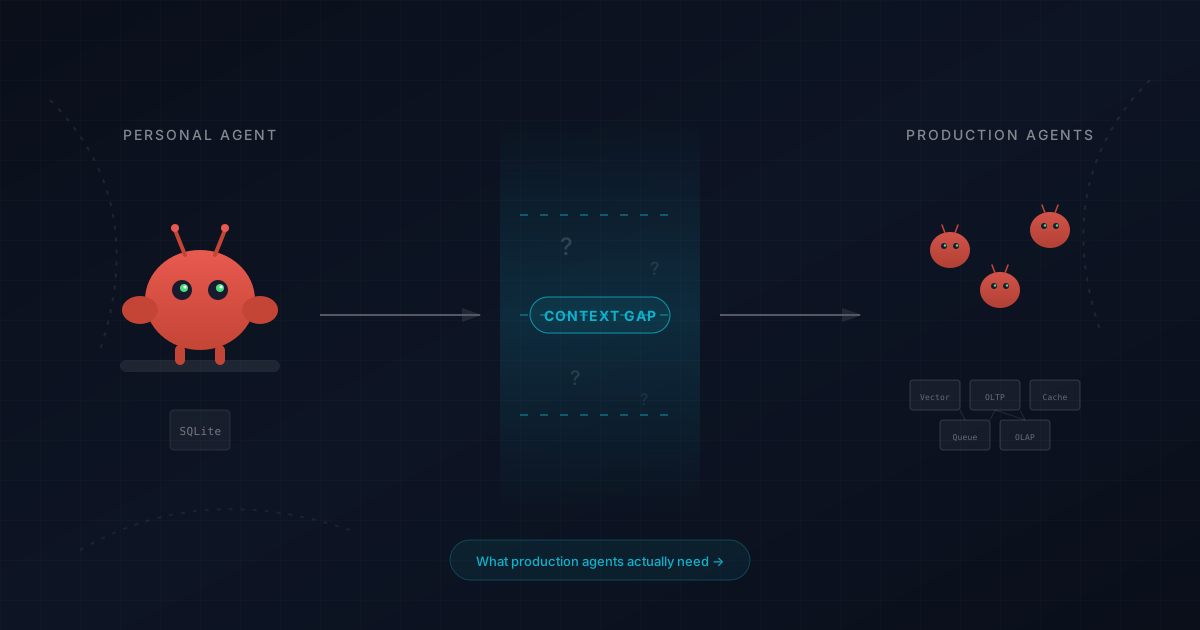
OpenClaw has made the personal AI agent real for thousands of developers. But as agents move from personal tools to production systems, the infrastructure assumptions underlying OpenClaw break down. There is a gap between "personal assistant" and "agents running your business" — and that gap is about context: the data and infrastructure that supports agents at scale.
What OpenClaw Gets Right as a Personal Assistant
The architecture is clever in detail. OpenClaw runs as a daemon on your machine, connects to messaging platforms (WhatsApp, Slack, Discord, Telegram), and routes incoming messages to a model that can take actions on your behalf. OpenClaw has persistent memory, can do web search, handle your calendar, manage files, and execute multi-step tasks across your digital life.
The key insight is persistence. Unlike a chatbot session that resets when you close the tab, OpenClaw maintains state. It remembers what you asked for yesterday, can follow up on tasks, and operates in the background processing messages while you do other things — an AI assistant that remembers context across sessions.
OpenClaw uses markdown files on disk to keep notes, history, and session context between restarts. Memory is just SQLite. Files on your machine hold skills, tool descriptions, and system configuration. This makes sense for one user — your device already has your files, your calendar, your email. The AI agent can access what it needs because everything is nearby.
How OpenClaw Context, Long-Term Memory, and Memory Files Work
Understanding how OpenClaw context works reveals both its strengths and limitations. Context is built from several layers:
Session memory. Each interaction creates a session. It stores the exchange of messages between you and the OpenClaw agent — your commands, the model's reasoning, tool results, and the output from each action. Session history gives continuity within a single window, so OpenClaw does not forget things you said five messages ago.
Persistent memory in memory files. Between sessions, OpenClaw saves notes and detail to memory files on disk. These act as long-term memory — kept nearby, readable by both you and the model. OpenClaw can save a note about your preferences, store a detail from a conversation, or keep a running history of actions taken. This is how the AI assistant remembers your life across sessions. The memory file system is simple but effective: OpenClaw reads from and writes to files in a designated directory, building a persistent record of what it knows about you.
Context window and compaction. Every model has a limited context window — the amount of text it can process at once. As interactions grow long, OpenClaw handles the window through compaction: summarizing older messages and tool results to make room for new ones. Compaction keeps OpenClaw responsive by fitting the most important information into the window, but it means the AI agent can forget things from earlier. Window limits are one of the hard rules of working with any model.
Tool results and output. When OpenClaw invokes a tool — running web search, reading a file, sending a message — the tool results become part of the context. The model reads the output, reasons about it, and decides what to do next. Each tool call adds to the session, which is why compaction matters: too many tool results and the AI agent starts losing earlier history.
For one user on one machine, this context management system works well. OpenClaw has access to your files, your history is on disk, and the window is large enough for most tasks.
OpenClaw Skills: Web Search, Group Chats, and Natural Language Commands
What makes OpenClaw more than a simple chatbot is its skills and tool system. Skills are pre-built capabilities that let the OpenClaw agent handle specific tasks — scheduling, web search, file operations, messaging. Each skill bundles one or more tool definitions with instructions that tell the model when and how to invoke them.
Built-in skills include browsing the web for web search, reading and writing files, managing your calendar, sending emails, and sending messages on WhatsApp and Slack. OpenClaw integrates with Google Workspace to create calendar events, access Google Drive, and manage Gmail. It also supports Apple Reminders, letting you set reminders through natural language commands without opening the app. You can write daily notes, respond to group chats, and run a competitive analysis — all through a single command.
Adding a new skill to OpenClaw is straightforward: create a tool description in a markdown file or code, and OpenClaw picks it up the next time you run OpenClaw. This makes the AI agent highly extensible — any third-party service with an API becomes a potential skill.
The command system lets you talk to OpenClaw with natural language instructions. You can issue a command through any connected platform — Slack, WhatsApp, Telegram, Discord — and OpenClaw processes your input, invokes the right tools, and returns output in the same thread. OpenClaw monitors all connected platforms for mentions or trigger patterns.
Importantly, the tool system gives you detail and control. You can set hard rules about which tools OpenClaw can access, define provider-level restrictions for each group or platform, and craft tool descriptions that constrain behavior. This gives users security without complexity — OpenClaw only touches what you explicitly allow.
What OpenClaw Handles: From Simple Tasks to Complex Workflows
OpenClaw excels at simple tasks — the kind of low-stakes, repetitive work that does not require real-time coordination with other agents or access to shared data. Send a message, search the web for a summary, create a calendar event, set reminders, update a file. For simple tasks, the user experience is genuinely magical: a user can wake up to messages already handled, notes already written, and a schedule already updated — all based on instructions the agents received the day before.
The agents OpenClaw deploys for simple tasks are effectively stateless workers: they receive a message, search for what they need, execute the task, and report back. For this pattern, the user's local machine has everything needed. The agents read from local files, write to local files, and make API calls to external services. No shared infrastructure required.
Where complexity enters is when tasks require agents to coordinate with each other, when the same data must serve multiple agents simultaneously, or when a user's instructions depend on information that is changing in real time. A user managing a single inbox can tolerate a few seconds of latency. Agents managing hundreds of users across a system cannot.
OpenClaw Setup: Code, API Keys, and Data Configuration
To run OpenClaw, users configure a set of options that determine how the agents behave, what skills they can access, and which external services they can reach.
Running OpenClaw. You run OpenClaw by cloning the repository and installing dependencies. OpenClaw reads configuration from a settings file that defines the model provider, API keys, enabled skills, and user preferences. Most users have OpenClaw running within minutes of initial setup.
API keys and environment variables. OpenClaw connects to external services through API keys stored as environment variables. Users configure API keys for each connected service — Google Workspace, Slack, WhatsApp, and other messaging platforms — and OpenClaw reads those API keys from the environment at runtime. Storing API keys in environment variables rather than in skill code or markdown files is the baseline for secure setup.
API costs and model configuration. OpenClaw is model-agnostic: users can configure any OpenAI-compatible provider. API costs vary by model and usage volume. A user running OpenClaw for simple tasks — answering questions, handling occasional web search queries — will see modest API costs. Users running agents continuously across multiple messaging platforms with complex tool calls will see higher API costs. Tracking API costs as you scale up agent activity is important for keeping spend predictable.
Skill code and customization. Each skill is defined as code — a tool description plus handler logic that tells OpenClaw how to interact with a given service. Users write custom skill code to extend OpenClaw's capabilities, connect new APIs, or create specialized agents for specific workflows. The skill code lives in a directory that OpenClaw searches at startup, making it straightforward to add, remove, or update skills without restarting the system.
Data access and file operations. OpenClaw agents have access to your local file system. Users configure which directories agents can read from and write to. This data access is what makes file operations fast — agents read source data directly from disk rather than querying a remote service. For personal use, local data access is sufficient. For multi-user deployments, agents need a shared data layer that every user's agents can reach.
Knowledge graph and structured memory. Some OpenClaw configurations use a knowledge graph to track relationships between entities — people, projects, events, and tasks. A knowledge graph gives agents richer context for reasoning about complex workflows: rather than searching through flat memory files, agents can traverse a structured graph of relationships to find relevant data. The knowledge graph is stored locally like other OpenClaw data, with the same access patterns and the same scale limitations.
OpenClaw Security: A Deep Dive into Prompt Injection, Malicious Skills, and Data Protection
Security is one of the most important topics for any AI agent system, and OpenClaw security deserves a careful deep dive. When agents have access to your accounts, files, and messaging platforms, security is not optional — it is the difference between an agent that works for you and one that can be turned against you.
Prompt injection. OpenClaw reads messages from external platforms — WhatsApp, Slack, Discord — and passes that data to the model. A malicious message can attempt to hijack the AI agent's behavior by embedding instructions in the content. Prompt injection is the primary security threat for any AI assistant that reads from user-controlled input. An attacker who can send a message to OpenClaw agents can potentially instruct them to exfiltrate sensitive data, send emails on your behalf, or take actions the user never authorized. OpenClaw addresses prompt injection through configurable tool restrictions and hard rules that limit what agents can do regardless of what instructions arrive in messages. Security-conscious users should audit these settings carefully.
Malicious skills. The open skill system that makes OpenClaw extensible creates a meaningful security surface. Malicious skills — third-party skill packages that contain harmful code — can instruct OpenClaw agents to exfiltrate sensitive data, make unauthorized API calls, or access user data without authorization. The security practice here is the same as with any third-party code: review skill code before enabling it, restrict skills to the minimum data access they need to function, and monitor session logs for unexpected behavior from recently added skills.
Sensitive data and data security. OpenClaw agents handle sensitive data — personal messages, private calendar events, confidential files, account credentials. Security controls around data access should reflect the sensitivity of the data your agents touch. Define which directories agents can search, which accounts they can write to, and which data they can read and transmit. Users who give agents unrestricted data access are accepting a higher security risk than the security benefits of automation justify for most use cases.
API key security and secrets management. Every external service OpenClaw connects to requires API keys. Security best practices require storing API keys as environment variables — never in skill code or markdown files that might be shared or committed to a repository. Rotate API keys regularly, scope API keys to minimum required permissions for each service, and monitor API calls made by agents through session logs. API key exposure is one of the most common security incidents for agent systems.
Access control and user permissions. Access control in OpenClaw is configured at the skill level. Each skill defines what data it can access, what APIs it can call, and what accounts it can modify. Security-first configurations restrict each skill to the minimum access it needs. When you create a skill for sending emails, that skill should not also have access to your file system or the ability to search calendar data. Principle of least privilege applies to agents as much as to any other system component.
Session logs and security monitoring. OpenClaw maintains session logs — records of every action the AI agent took, every tool it invoked, and every API call it made. Reviewing session logs is the practical security control for catching unexpected agent behavior. Security incidents in agent systems often leave traces in session logs: unusual API calls, unexpected data access, commands the user never issued. Security hygiene for OpenClaw includes reviewing session logs after any significant agent activity and after installing new skills.
For personal use, these security properties are manageable. For production deployments serving many users, they become hard requirements.
Where the Personal Assistant Model Breaks Down for Multiple Agents
Now imagine you want to deploy something like OpenClaw for your team. Or your company. Or a product you are building. Suddenly, the single-user architecture hits walls:
Shared context. When Agent A updates a customer record, Agent B needs to see that update immediately — not eventually, not after a sync, but now. SQLite on a laptop does not give you that. A note kept in a memory file on one machine is invisible to OpenClaw agents running on another server.
Data freshness. A personal AI assistant can tolerate stale data. If your calendar sync is 30 seconds behind, you probably will not notice. But a fraud detection AI agent acting on 30-second-old transaction data? That is millions in losses. The data an agent sees must reflect reality, not a cached snapshot from minutes ago.
Decision coherence. When multiple agents operate on the same data, they need to see consistent state. If two OpenClaw agents both try to book the same meeting slot because they each saw it as available, you have a coordination failure. This is the stateful vs stateless problem at scale.
Security and identity at scale. A personal assistant can be a black box for one user. Enterprise security requires access control, identity management, and audit trails across all agents and all users. The system needs to know which user is issuing commands, what data each agent can access, and what actions are authorized. A security model built around one user's local credentials does not extend to an organization with many users.
Auditability. Production systems need to explain their decisions, maintain history of every action, and prove they acted on correct data. You need to search through what happened, inspect the context each AI agent had, and trace tool results back to the source data.
What Most Teams Build Instead — and Why It Fails
The context gap is not about model capabilities — they are good enough. It is about the layers that OpenClaw agents operate on and the infrastructure that supports them.
Most teams trying to build production systems end up stitching together: a vector database for semantic search, a traditional database for structured data, a cache for low-latency reads, a message queue for coordination, a feature store for ML signals, and a REST API gateway for routing messages. Each piece has its own security model, its own data consistency guarantees, its own latency profile, its own failure modes.
The result is what we call the Composition Impossibility Theorem: you cannot compose separate infrastructure into a coherent layer. The seams between pieces become failure points. Data drifts out of sync. AI agents make decisions based on data that no longer exists — they do not get an error, they just get the wrong answer with confidence.
This is why agents spin their wheels — not because the model is wrong, but because the context it is reasoning over is incomplete, inconsistent, or outdated. OpenClaw solves this for one user by keeping everything on disk. But that approach does not scale to a system where dozens of agents need the same fresh, consistent data.
OpenClaw Agent Data Freshness and the Infrastructure Gap
Data freshness is not a performance optimization for AI agents — it is a correctness requirement. OpenClaw agent data freshness works at personal scale because there is only one consumer of the data: you. Your files, your SQLite data, your calendar — one agent reading and writing to one location. Freshness is guaranteed by construction.
Production systems break this assumption. When multiple agents read and write to shared data, the gap between "when data was written" and "when data is read" becomes a source of errors. An AI agent that approves a transaction based on account data that changed 200 milliseconds ago is not slow — it is wrong. The system needs infrastructure that closes this gap: reads and writes inside a single transactional boundary, with no replication lag between what one agent writes and what other agents see.
Agents need to search across current data, not search through a stale index from five minutes ago. When agents run semantic search over user data, those search results should reflect the current state of the data. When agents query account state, they should see the same data that other agents writing to the same account see. Real time data access is not a luxury for production agents — it is the baseline.
What Production AI Agents Actually Need
Production systems need a unified layer with specific properties that go beyond what any single-user architecture provides:
Sub-second freshness. The data an AI agent sees must reflect reality within milliseconds. Stale data does not throw an error — it just makes the system confidently wrong. The model reasons over what it can see, and if that data is outdated, every tool call and output that follows is tainted.
Transactional consistency. When an AI agent reads data, reasons about it, and produces a decision, that entire operation needs to be atomic. Other agents should not see intermediate states or make conflicting decisions based on data that is about to change.
Unified access. Structured data, vector embeddings, time-series signals, and semantic search results all need to be queryable in a single boundary. The AI agent should not need to coordinate across five different systems and a REST API to answer one query. Every additional layer adds latency, security surface area, and failure modes.
Security across agents and users. When many users and many agents access shared data, security cannot be bolted on after the fact. Access control, audit trails, and identity management need to be built into the data layer — not managed separately by each skill or each agent.
Temporal awareness and history. Agents need to know not just what the data is, but when it was true. Time travel queries, point-in-time snapshots, and temporal joins are essential for debugging, auditing, and reasoning about causality. When something goes wrong, you need to search through what the agents saw at the moment they acted.
This is what a Context Lake provides — a unified substrate where all context and data lives within a single transactional boundary, with guarantees about freshness, consistency, security, and queryability.
How OpenClaw Agents Connect to a Context Lake
OpenClaw and Context Lakes are not competitors — they operate at different layers, and they are complementary.
OpenClaw is an agent runtime: it handles message routing, tool execution, skills, and the observe-decide-act loop for AI agents. OpenClaw is the "brain" that decides what to do — it monitors your platforms, reads messages, and invokes tools to take action. OpenClaw manages the session, the window, compaction, and the conversation flow.
A Context Lake is the data and memory layer: it provides the shared, persistent, real-time data that AI agents reason over. It is the "knowledge" that informs decisions — not in memory files on one machine, but in infrastructure that many OpenClaw agents can access concurrently with transactional consistency and security controls.
For one user, the built-in persistent memory (SQLite, files on disk) is sufficient. For production systems serving many users, you replace that with infrastructure that provides the guarantees OpenClaw agents need at scale.
The pattern looks like this: OpenClaw handles orchestration, tool use, and the conversation with the user. The Context Lake handles data — AI agent memory, feature serving, semantic search, and the transactional context that makes coordination across agents possible. The API calls to connect them are minimal — OpenClaw calls the Context Lake the same way it calls any other tool or resource. Skills that previously read from local files instead search and query shared data with the freshness guarantees, security controls, and access control that production systems require.
What Comes Next for AI Agents and Personal Assistants
OpenClaw is a sign of things to come. It shows that the AI agent paradigm works — that people actually want something that does things, not just something that answers questions. The 60,000 stars are not about a lobster mascot; they are about a future where agents handle the tedious parts of digital life.
But the gap between a personal assistant and a production system is real. Teams building the next generation of applications — fraud detection, autonomous operations, real-time personalization — need infrastructure that most of the industry has not built yet. The skills and tool capabilities that make OpenClaw great need to connect to production-grade data and context, not just files on a single device.
The winners will not be the teams with the best model. They will be the ones with the best data: fresh, consistent, queryable, secure, and available at the moment of decision. The infrastructure that delivers that — with the right security, identity, access control, and scale — is the layer that turns a personal assistant into a production system that serves many users.
If you are experimenting with OpenClaw, enjoy the future. Run OpenClaw locally, teach it your skills, let it learn your life. If you are building for production, start thinking about the data and context layer now — before your OpenClaw agents start spinning their wheels on stale data and incomplete information.
Frequently Asked Questions
OpenClawAI AgentsContext LakeAgent InfrastructurePersonal AI