
Back to Blog
AI Infrastructure
Semantic Operators: Run LLM Queries Directly in SQL
Classify, summarize, and extract data using LLM reasoning inside your database. No external pipelines, no data movement — just SQL.
Classify, summarize, and extract data using LLM reasoning inside your database. No external pipelines, no data movement — just SQL.
TL;DR: Semantic operators are SQL-native functions that run LLM reasoning inside your database — classify, summarize, extract, and generate data without exporting to Python or external pipelines. Write llm_classify(message, ARRAY['billing','bug','churn_risk']) directly in a WHERE clause. The query engine handles batching, caching, and execution optimization. No data movement, no separate orchestration. Works with OpenAI, Bedrock Claude, or any OpenAI-compatible endpoint.
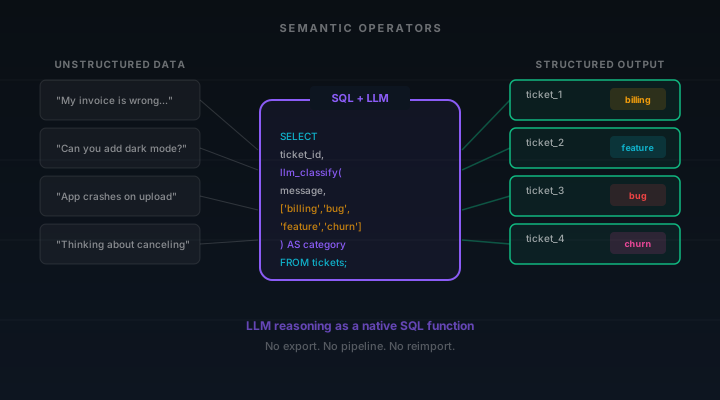
You have 50,000 support tickets in a database table. You need to classify each one by intent — billing issue, feature request, bug report, churn risk. The traditional approach: export the data, write a Python script to call an LLM API in a loop, handle rate limits and retries, parse the responses, then load the results back into your database. Three systems, two data movements, and a pipeline you have to maintain forever.
Semantic operators eliminate all of that. They introduce semantic operators as first-class functions inside the query engine, letting developers express semantic queries directly in SQL. Classification, summarization, entity extraction, and generation happen where the data already lives — no external pipelines, no data movement.
This is a rich space for AI powered data processing. Modern language models have created exciting opportunities to accelerate semantic filtering, perform bulk semantic queries, and apply semantic based analysis at scale. Semantic operators provide the declarative model that makes this possible — bringing state of the art natural language understanding into your analytics system with just a few operator calls.
Semantic operators are composable AI based operations that integrate large language models directly into a SQL query engine. They let developers express semantic queries using natural language criteria — filter rows by meaning, classify free form text, extract structured fields from unstructured data, and aggregate records using natural language expressions instead of rigid pattern matching.
The semantic operator model draws from research like the LOTUS framework, which introduced semantic operators as a declarative model for AI powered data processing. LOTUS demonstrated that bulk semantic queries over tabular data could achieve high efficiency with statistical accuracy guarantees, opening a rich space for execution plans similar to those in traditional relational model query optimization.
In Tacnode's analytics system, semantic operators are available through the llm extension. Setup is minimal:
-- Enable the extension
CREATE EXTENSION llm;

-- Configure your LLM provider
SET llm.provider = 'openai';
SET llm.model = 'gpt-4o';
SET openai.api_key = 'sk-...';
You can also configure Amazon Bedrock Claude as your provider (SET llm.provider = 'bedrock_claude') using existing AWS credentials, or point to any OpenAI-compatible endpoint with a custom base URL. The semantic operator model supports multiple ways to connect language models, letting each team choose the provider that fits their security and cost requirements.
Once configured, semantic operators provide powerful semantic capabilities anywhere you write SQL — in SELECT expressions, WHERE clauses, and INSERT pipelines. The underlying analytics system handles API calls, batching, and result parsing internally. Developers express semantic queries as naturally as they write COUNT() or SUM(), and the query engine manages the rest.
What makes semantic operators different from ad-hoc LLM API calls is their declarative nature. You specify what you want — classify this text, extract these fields, summarize these records — and the query engine determines how to execute it. This is the same principle that makes SQL powerful: declarative transformations over data, with the system optimizing execution plans behind the scenes.
The LOTUS research demonstrated that this declarative model creates a rich space for execution plans similar to those in relational model query optimization. When you write a semantic query, the analytics system can apply several novel optimizations: batching rows to reduce API calls, caching repeated natural language predicate evaluations, parallelizing operator calls across partitions, and offering statistical accuracy guarantees for bulk semantic processing.
This is fundamentally different from the export-process-reimport pattern that most existing systems rely on today. In that model, data leaves the database, passes through Python or Spark, hits an LLM API, and results flow back — each hop adding latency and introducing stale data. Semantic operators collapse that pipeline into the query engine itself.
For AI agents, this declarative model means agents can perform bulk semantic queries through standard SQL without needing custom data processing code. The analytics system provides high level abstractions — semantic filtering, semantic similarity matching, entity extraction, extreme multi label classification — as composable AI based operations that work on the whole dataset.
The most immediate use of semantic operators is semantic filtering — using natural language criteria instead of rigid SQL predicates. Traditional WHERE clauses require exact matches or pattern matching. Semantic operators let you accelerate semantic filtering by describing what you want in plain English:
SELECT ticket_id, subject, message
FROM support_tickets
WHERE llm_classify(
  message,
  ARRAY['billing', 'bug_report', 'feature_request', 'churn_risk', 'general']
) = 'churn_risk'
AND created_at > NOW() - INTERVAL '24 hours';
This returns only tickets the language model classifies as churn risks — a natural language predicate that no regex or keyword search could replicate. The semantic operator evaluates each row against the natural language criteria and returns a boolean value or category label.
Semantic filtering shines when the classification boundaries are fuzzy. "Is this customer email a complaint or a question?" is trivial for modern language models but nearly impossible with traditional structured data queries. Semantic operators bring this capability into the analytics system as a native operation.
For bulk semantic processing, the query engine can optimize execution: batching rows together, caching repeated classifications, and applying statistical accuracy guarantees to accelerate semantic filtering across the whole dataset. LOTUS queries match this pattern — the system determines optimal execution plans for how to distribute LLM operator calls across the data.
Unstructured data is only useful when you can query it. Semantic operators let you perform entity extraction — pulling structured fields from unstructured fields and free form text:
SELECT
  log_id, raw_message,
  llm_extract(raw_message, 'error_code') AS error_code,
  llm_extract(raw_message, 'affected_component') AS component,
  llm_extract(raw_message, 'severity: low/medium/high/critical') AS severity
FROM application_logs
WHERE level = 'ERROR'
  AND timestamp > NOW() - INTERVAL '1 hour';
This extracts error codes, affected components, and severity levels from raw log messages — one or more attributes that exist in the text but are not in the schema. The language model interprets the natural language and returns structured values you can filter, group, and aggregate with standard SQL.
Data enrichment follows the same pattern. Missing descriptions, inferred categories, normalized messy input — any field that can be reasonably derived from existing data is a candidate for a semantic operator. The model name and operator description tell the query engine what to extract; the analytics system handles the rest.
For example usage of enrichment at scale, consider product catalogs with incomplete metadata. Semantic operators can infer categories, generate descriptions, and populate tags across the whole dataset in a single query — no separate data processing pipeline, no external service.
Real-world data processing rarely involves one row at a time. Teams need to perform bulk semantic queries across thousands or millions of records — classifying customer feedback, summarizing incident logs, extracting entities from contracts. This is where the query engine and execution plans become critical.
The LOTUS framework demonstrated that semantic operators create a rich space for execution plans. When you submit a bulk semantic query, the analytics system generates an execution plan that determines how to distribute work across the language models, batch API calls for efficiency, and achieve high efficiency without sacrificing accuracy guarantees.
Key features of semantic operator execution plans include:
Batched operator calls. Instead of one API call per row, the query engine groups rows into batches, reducing overhead and improving throughput. A few operator calls can process what would otherwise require thousands of individual requests.
Statistical accuracy guarantees. For tasks like extreme multi label classification or semantic similarity matching, the system can sample and validate results, offering statistical accuracy guarantees that the bulk semantic processing meets quality thresholds. This approach of offering statistical accuracy guarantees makes semantic operators viable for production data processing at scale.
Cascading models. The execution plan can route simple cases to smaller, faster models and escalate ambiguous cases to more capable ones — using the model name configuration to select the right language model per complexity tier. This lets teams achieve high efficiency while controlling cost.
These optimizations exist because semantic operators operate within the query engine rather than as external scripts. The underlying analytics system has visibility into the full query, the data distribution, and the operator description, enabling several novel optimizations that ad-hoc Python pipelines cannot achieve.
What does AI powered data processing look like when semantic operators are native to the analytics system? Consider a few example usage patterns that demonstrate LOTUS effectiveness:
Summarization and aggregating records. Long-form content — support conversations, product reviews, incident logs — needs to be summarized before it's useful. Semantic operators turn this into a query that reads unstructured data, generates summaries using natural language projection, and writes the results directly back into structured data tables. The entire enrichment pipeline is a single SQL statement.
INSERT INTO review_summaries (product_id, summary, sentiment)
SELECT
  product_id,
  llm_summarize(review_text, 'Summarize in 2 sentences'),
  llm_classify(review_text, ARRAY['positive', 'negative', 'neutral'])
FROM product_reviews
WHERE processed = false;
Semantic search over structured data. Combine semantic similarity with traditional structured data queries to find records that match by meaning rather than keywords. This bridges the gap between unstructured and structured data — a natural language expression like "customers who complained about delivery speed" becomes a queryable predicate in the analytics system.
Intelligent field population. Missing data is everywhere — incomplete forms, optional fields, imported records with gaps. Semantic operators apply semantic based analysis to infer values from surrounding context. The language model reasons over existing columns to populate empty fields, using vast knowledge corpora to improve accuracy for domain-specific data.
Each of these patterns replaces what was traditionally a multi-step data processing pipeline involving data export, external API calls, result parsing, and data reimport. Semantic operators provide the high level abstractions that make AI based analytics accessible through standard SQL.
The LOTUS project pioneered the open source query engine approach to semantic operators, providing a pandas like API for AI based analytics systems. It demonstrated that semantic operators could be implemented as composable AI based operations with a relational model foundation — each operator taking tabular data as input and producing tabular data as output.
Tacnode builds on this philosophy by embedding semantic operators directly in the database query engine rather than requiring a separate analytics system. The key features of this approach:
No data movement. The data never leaves the database. There is no intermediate CSV, no Python glue code, no separate orchestration layer. The context lake becomes the place where data is stored, queried, and enriched — one system handling both traditional structured data and AI based analytics.
SQL-native interface. Developers express semantic queries using the same SQL they already know. No new language to learn, no separate API to integrate. The semantic operator model extends the relational model rather than replacing it.
Provider flexibility. The model name is configurable per session or per query. Teams can use OpenAI for natural language expressions that need state of the art reasoning, Bedrock Claude for workloads that must stay within AWS, or any OpenAI-compatible endpoint for self-hosted models. Multiple ways to connect language models means the analytics system adapts to your infrastructure, not the other way around.
Composability. Semantic operators compose with each other and with traditional SQL operators. You can filter semantically, then aggregate numerically, then summarize the results — building complex data processing pipelines from simple, declarative transformations.
Both semantic operators and semantic search work with meaning rather than exact matches, but they solve different problems. Understanding the distinction helps you choose the right tool for each data processing task:
| Capability | Semantic Operators | Semantic Search (Vectors) |
|---|---|---|
| What it does | LLM reasoning over data — classify, summarize, extract, generate using natural language criteria | Semantic similarity search across embeddings — find similar items by meaning |
| Best for | Enrichment, semantic filtering, entity extraction, extreme multi label classification | Retrieval, recommendations, RAG, finding similar unstructured data |
| Latency | Higher — language model API call per operator invocation | Lower — vector index lookup |
| Cost | Per-token LLM pricing per operator call | Compute at index time, cheap at query time |
| When to use | Small-to-medium batches, complex reasoning, bulk semantic queries | Large-scale retrieval, real-time semantic similarity |
Use semantic operators when:
You need to classify, summarize, extract, or generate data and the results should live in the same analytics system as the source. When the alternative is a Python script that exports data, calls an API, and reimports results — semantic operators eliminate that entire workflow. They are ideal for AI powered data processing where natural language criteria define the logic.
Be cautious when:
You are performing bulk semantic queries across millions of rows. Each semantic operator call invokes a language model, which means per-token costs and rate limits. For high-volume classification, consider using semantic operators to label a training set with accuracy guarantees, then train a lightweight model for bulk inference. Use semantic operators for the long tail — complex cases that need real reasoning from modern language models.
Don't use semantic operators for:
Simple pattern matching or keyword search. If a regex or full-text search index solves the problem, it is faster and cheaper. Semantic operators are for tasks that genuinely require natural language understanding — ambiguous classifications, nuanced summarization, context-dependent entity extraction across unstructured fields.
The deeper implication of semantic operators is architectural. They collapse the gap between "where data lives" and "where AI reasoning happens" — moving AI based analytics into the underlying analytics system itself.
In existing systems, data sits in a database, gets exported to a data processing layer (Python, Spark, Airflow), passes through an LLM API, and the results flow back — or worse, into a separate store. Every hop adds latency, introduces freshness decay, and creates another system to maintain.
Semantic operators eliminate the middle layer. The query engine becomes the AI reasoning engine. This is the context lake philosophy: all data, all reasoning, one analytics system. Your data doesn't move to the AI — the AI comes to the data.
For teams building AI agents and multi-agent systems, this means agents can query semantically enriched data through standard SQL without needing separate embedding pipelines, classification services, or enrichment jobs. The open source query engine approach handles storage, semantic search, and semantic operators in a single layer — making it possible to introduce semantic operators into existing workflows with minimal disruption.
Semantic operators are available as a Tacnode extension. Here are the key features and steps to get started:
llm extension with CREATE EXTENSION llm in your Tacnode databaseThe key mental shift is treating semantic operators as native SQL functions rather than external data processing services. Once that clicks, you will find example usage patterns everywhere — any column with unstructured fields or free form text that could benefit from AI powered data processing is a candidate for semantic operators. The declarative nature of the semantic operator model means you describe what you want, and the query engine figures out how to deliver it with high efficiency.
For teams already using the context lake for real-time data, semantic operators create exciting opportunities to enrich that data in place. This is the foundation of Semantic Context — where meaning-aware retrieval and structured queries operate together over the same live state. Combine semantic filtering with feature freshness, and your AI agents always reason over the latest, most richly annotated context — structured data and semantic understanding in one analytics system.

Former Meta and Microsoft. Built distributed query engines at petabyte scale. Author of the Composition Impossibility Theorem (arXiv:2601.17019).
Fresh Context Newsletter
The argument behind the posts — what breaks when AI acts on stale data, from the team building the Context Lake. About twice a month.
Book a demo and discover how Tacnode can power your AI-native applications.
Book a Demo