Snowflake Dynamic Tables vs Materialized Views (2026)
Refresh mechanics, target lag, costs, and limitations — when to use each, and where both fall short for real-time decisioning workloads. Updated August 2026.
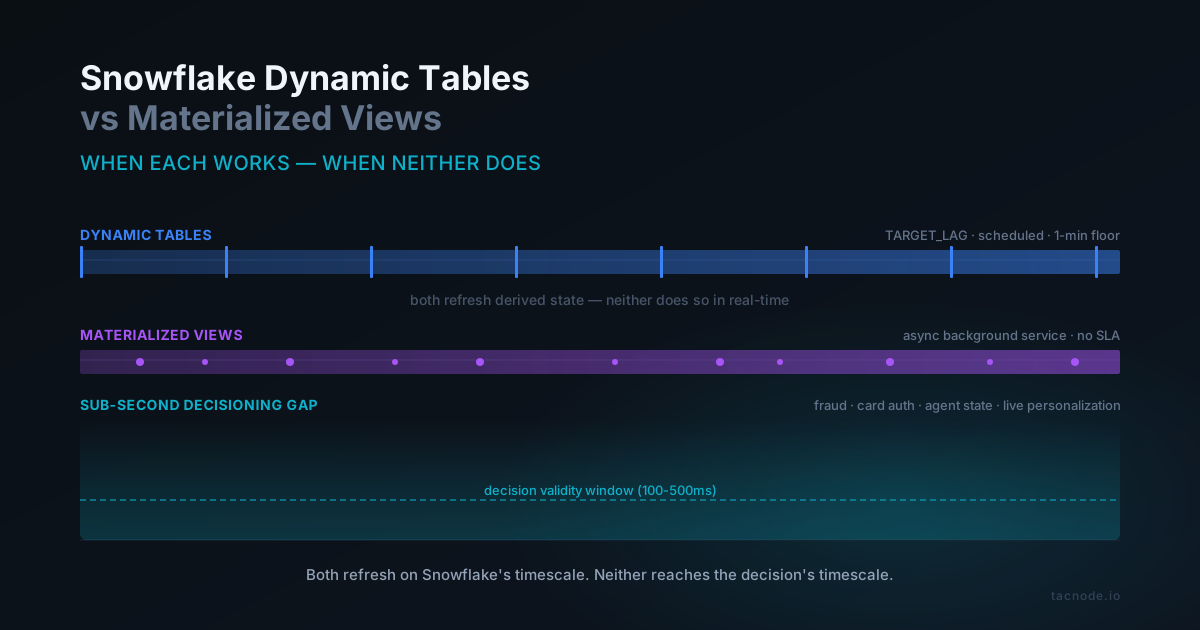
TL;DR: Snowflake Dynamic Tables use a scheduled TARGET_LAG parameter (minimum 1 minute) to automatically refresh a SQL query that can include joins, unions, and complex queries across multiple tables. Materialized Views are limited to a single source table without joins, maintained asynchronously by Snowflake, and automatically used by the query optimizer to rewrite queries transparently. Dynamic Tables replace the streams-and-tasks pattern for multi-level ELT pipelines. Materialized Views improve query performance on frequent aggregations. Both introduce latency that makes neither suitable for sub-second real-time decisioning use cases like fraud scoring, agent state, or session-level personalization.
Snowflake Dynamic Tables and Materialized Views both solve the same underlying problem: keeping derived state fresh without building and maintaining a data pipeline by hand. Both let you write a SQL query against source tables and get back something Snowflake keeps current as the underlying data changes. Both abstract away the scheduling, the incremental computation, and the orchestration.
But they are not interchangeable. Dynamic Tables are Snowflake’s more recent and more flexible option — they support joins, unions, windowed aggregations, and multi-level data pipelines — and they run on a scheduled refresh controlled by a TARGET_LAG parameter. Materialized Views are older, restricted to a single source table with no joins, and are maintained asynchronously by a background service that the Snowflake query optimizer can automatically rewrite queries against.
The comparison matters because choosing the wrong one introduces either unnecessary operational complexity or a ceiling on query performance you didn’t design for. And there’s a third case the comparison misses entirely: workloads where neither is fresh enough, regardless of which you pick.
What Are Snowflake Dynamic Tables?
Snowflake Dynamic Tables are declarative database objects that materialize the results of a SQL query and automatically refresh as the underlying data changes, using a TARGET_LAG parameter to specify the maximum acceptable delay between source updates and when those updates appear in the materialized result. Unlike Materialized Views, Dynamic Tables support complex queries with joins, unions, and windowed aggregations across multiple tables, making them suitable for multi-level data pipelines and ELT transformations.
A dynamic table is a table in the physical sense — it occupies storage, has a defined schema, and is queryable like any traditional table. What makes it dynamic is that its contents are defined by a SQL query against one or more source tables, and Snowflake keeps those contents current on a schedule you control. You never write to a dynamic table directly. You write to the source tables, and the dynamic table updates automatically.
Dynamic Tables were introduced to replace an operational pattern that had grown common and painful: chaining streams and tasks to build multi-stage transformation pipelines inside Snowflake. The streams and tasks pattern worked but required explicit procedural code — create a stream on each source, write tasks that merge changed data into target tables, schedule the tasks, handle dependencies between them, monitor for failures. Dynamic Tables collapse that entire workflow into a single declarative definition. For teams maintaining large streams and tasks codebases, migrating from streams and tasks to Dynamic Tables is one of the few Snowflake feature adoptions where the payoff is immediate.
Refresh Modes, Data Freshness, and Target Lag
The core of the mechanism is the refresh schedule. Rather than computing the defined query on every read, Snowflake pre-computes and stores the results, then maintains them as source data changes. How that maintenance happens is controlled by two parameters: refresh mode and target lag — together they govern the data freshness contract you can offer to downstream consumers of this data pipeline.
Three options are supported. Incremental refresh mode is the default when possible — Snowflake tracks change data capture on the source tables, identifies only the rows that changed since the last refresh, and applies just those changes. This is the same class of mechanism that powers incremental materialized views in other systems — incremental processing is significantly cheaper than recomputing the full result and is what makes this approach viable for large sources. Most simple SELECT queries, joins, and aggregations support incremental updates. Full refresh recomputes the entire table from scratch on each cycle — used when the defined query contains operations that can’t be updated incrementally (certain windowed analytics, non-deterministic functions, or patterns where tracking changed data would be more expensive than recomputing). More expensive but always correct. Auto refresh lets Snowflake choose between incremental and full automatically based on query complexity, and is the recommended default unless you have a specific reason to pin one option.
You set the refresh option when you create the object:
sql
CREATE OR REPLACE DYNAMIC TABLE orders_enriched
  TARGET_LAG = '5 minutes'
  WAREHOUSE = transform_wh
  REFRESH_MODE = INCREMENTAL
AS
  SELECT
    o.order_id,
    o.customer_id,
    c.customer_tier,
    o.amount,
    o.created_at
  FROM orders o
  JOIN customers c ON o.customer_id = c.customer_id;
TARGET_LAG is the maximum amount of time you want the materialized data to lag behind changes in the source. It’s expressed as an integer and a time unit — ’1 minute’, ’5 minutes’, ’1 hour’, ’1 day’. Snowflake schedules refreshes to meet that target as the data freshness vs latency contract. The minimum target lag is 1 minute. You cannot set a target lag of seconds. This is a hard platform floor, not a per-table configuration choice. Anyone who tells you the mechanism can refresh in seconds is confusing TARGET_LAG = ’60 seconds’ (which resolves to 1 minute) with actual sub-minute refresh behavior. The refresh service that manages every object of this kind across the platform has operational limits that prevent going below one-minute cadence.
Target lag values also apply downstream. When you chain these objects, you can set the lag of downstream tables to DOWNSTREAM, which means the downstream object refreshes only when its upstream dependency does. This lets you define a pipeline where only the final stage has a specific time schedule, and everything upstream refreshes on demand to meet that schedule efficiently.
Target lag is a direct input to compute costs. A shorter target lag means more frequent refreshes, which means more warehouse compute consumed per hour. A target lag of one minute means Snowflake attempts a refresh roughly every 30 seconds to stay ahead of the lag window. A target lag of one hour means refreshes happen every 30 minutes or so. Storage costs are separate and come from storing the materialized results plus Time Travel and fail-safe data retention.
You can alter the object after creation — change the target lag, change the warehouse, suspend or resume refreshes — using ALTER DYNAMIC TABLE. You cannot change the defined query after creation; to change the query, you drop and recreate:
sql
-- Change the target lag time
ALTER DYNAMIC TABLE orders_enriched SET TARGET_LAG = '10 minutes';

-- Suspend automatic refreshes
ALTER DYNAMIC TABLE orders_enriched SUSPEND;

-- Trigger a manual refresh
ALTER DYNAMIC TABLE orders_enriched REFRESH;

-- Resume scheduled refreshes
ALTER DYNAMIC TABLE orders_enriched RESUME;
Dynamic Tables vs Materialized Views vs Streams and Tasks
This is the comparison most teams come to Dynamic Tables from. Both Materialized Views and Dynamic Tables maintain derived state automatically. The differences sit in what they can express, how Snowflake maintains them, and how the query optimizer uses them.
Query complexity. Materialized Views in Snowflake have significant restrictions — must be defined on a single base table, can’t contain joins, unions, or subqueries, can’t use non-deterministic functions or external functions, can’t use windowed query patterns that depend on an ordering that changes as data arrives. These restrictions exist because Snowflake maintains them incrementally against a single source, and the maintenance logic is only tractable for a narrow set of SQL patterns. Snowflake Dynamic Tables support almost the full power of Snowflake SQL — multi-table joins and unions, windowed aggregations, stored procedures and external functions, references to other dynamic tables for multi-level pipelines. This is the single biggest reason to pick Dynamic Tables over Materialized Views when the derived state you want requires anything more than a simple single table query aggregation.
Maintenance model. Materialized Views are maintained by a Snowflake background service that runs continuously and asynchronously. There is no TARGET_LAG parameter for them — Snowflake decides when to refresh based on background-service scheduling, cluster availability, and load. Under heavy ingest, a materialized view can lag behind its source by several minutes. It is not a real-time mechanism, even though it is continuously maintained. Snowflake Dynamic Tables give you an explicit contract on data freshness via target lag — these tables are no more than TARGET_LAG behind the underlying data. The tradeoff is that you are now making an explicit choice between freshness and compute cost, which materialized views hide from you.
Query optimizer integration. The Snowflake query optimizer can automatically rewrite queries to use Materialized Views when a query against the source can be answered more efficiently from the materialized view. You don’t have to reference it by name. This preferred transparent query acceleration is one of the most useful properties of materialized views and a reason to prefer them for frequently-run single table query acceleration. The optimizer does not automatically rewrite queries against Dynamic Tables — these objects are standalone and queried by name. They don’t accelerate queries against their source tables; they’re a separate serving layer.
Choose Materialized Views when you have a high-volume query pattern that runs the same aggregation against one large table, and you want Snowflake to transparently improve query performance whenever that pattern is detected. Choose the scheduled-refresh alternative when you are building a multi-stage transformation pipeline with joins, unions, or windowed analytics, and you want a declarative alternative to streams and tasks.
Before this newer mechanism existed, the standard way to build a multi-level ELT pipeline in Snowflake was streams and tasks. A stream is a change tracking mechanism that records DML changes to a table. A task is a scheduled or triggered unit of work that runs SQL. The tasks approach create a stream on each source, write a task that consumes the stream and merges the changed data into a target table, chain tasks so downstream tables update after upstream ones, and monitor the entire thing. The dynamic table approach replaces all of that — instead of procedural code that defines how to process stream records, you write declarative code that defines what the output should look like. Snowflake handles change data capture, figures out the dependency graph, and orchestrates refreshes automatically. The tradeoff is flexibility — tasks can do arbitrary work (including stored procedures, external API calls, dynamic SQL), while the declarative version is limited to what a single SELECT statement can express. For pure transformation pipelines, the dynamic table version replaces streams-and-tasks as the right choice. For pipelines that need procedural logic or external integrations, tasks are still necessary.
Snowflake Hybrid Tables are a separate option worth understanding alongside this comparison. Hybrid Tables combine a row-store operational layer with Snowflake’s existing columnar analytics layer — they’re designed for hybrid transactional and analytical workloads (Snowflake Unistore) where you need both point lookups and analytics on the same table. Hybrid Tables are not a replacement for the scheduled-refresh mechanism. The scheduled-refresh tables materialize derived state from other tables; Hybrid Tables are the primary storage for transactional data. You might use a Hybrid Table as the source — capturing transactional writes in the Hybrid Table, then materializing aggregates or joins downstream. Hybrid Tables, Iceberg tables, external tables, and traditional tables can all serve as sources.
Dimension
Materialized Views
Dynamic Tables
Query support
Single base table, no joins
Multi-table, joins, unions, window functions
Refresh control
Async background service
Scheduled via TARGET_LAG (min 1 min)
Query optimizer rewrite
Yes, automatic
No, referenced by name
Freshness contract
No explicit SLA
TARGET_LAG contract
Chaining
Not supported
Supported (downstream dynamic tables)
Best for
Accelerating common aggregations
Multi-stage ELT pipelines
Building Multi-Stage Pipelines from Raw Data
This pattern is where the dynamic table approach earns its keep. The standard workflow: raw data lands in a landing table (often from Snowpipe or Snowpipe Streaming), and a chain of declarative objects applies data transformations through cleansing, deduplication, enrichment, and aggregation stages before producing the final reporting layer.
Common data workflows that fit this model:
Landing table to staged data. Raw JSON data from event streams lands in a single-column VARIANT landing table. The first stage parses the raw JSON data into typed columns, handling schema variations and missing fields. Subsequent stages apply data transformations — joining with reference data, computing derived fields, aggregating by key dimensions — until the data is ready for consumption. The transformation chain is a multi step declarative pipeline: each stage materializes its results, and the chain handles refresh ordering automatically.
Slowly-changing dimension transforms. A landing table captures customer or product changes. A downstream object joins the landing table with a current-state table and applies merge-style upsert logic to produce a slowly-changing dimension. The resulting declarative SQL pipeline replaces what would otherwise require streams-and-tasks code with explicit MERGE statements, custom retry logic, and error handling.
Incremental aggregation chains. A landing table captures transactional events. The first stage windowed-aggregates them by hour or day. The next stage cross-joins those aggregates with dimension tables. The result is an analytics-ready summary that processes data updates without you writing pipeline logic by hand.
For these data workflows, you alter table parameters via ALTER DYNAMIC TABLE rather than the conventional ALTER TABLE — refresh frequency, warehouse assignment, and suspend/resume controls are all surfaced as DDL operations on the dynamic object itself.
Dynamic Tables support most of the SQL features needed for production data transformations: windowed aggregations, joins, unions, support merge statements, external functions, and references to other declarative objects of the same kind. They support sequence functions for generating surrogate keys. They do not support every SQL feature — Snowflake explicitly lists unsupported patterns including certain non-deterministic functions, recursive CTEs, and time-travel operations that don’t fit incremental processing.
External function calls add a wrinkle. When the table definition references external functions (calling an AWS Lambda or Azure Function for ML scoring or complex transformations), Snowflake must invoke those external function calls during every refresh against the changed rows. Unlike regular SQL functions, external function calls have unpredictable latency and can throttle. For workflows that touch real time data processing on every refresh, this can be a meaningful operational consideration.
For teams with strict orchestration control requirements — where pipeline logic must be auditable and version-controlled — the dynamic table approach provides a declarative alternative to imperative streams and tasks code. The same definition handles both initial backfill and ongoing data updates from the source. The dynamic table approach reduces operational surface area significantly compared to manually orchestrating data transformations through hand-written streams and tasks, and it replaces single table query acceleration with multi-table compositions that materialized views can’t express.
Limitations and Costs
The mechanism solves real problems, but it has real limits. The most important to understand:
Refresh frequency floor. Target lag cannot go below 1 minute. If your use case needs sub-minute freshness, this is not the right mechanism.
No automatic query rewrite. The query optimizer does not redirect queries against source tables to the materialized result. You must query by name. Different from Materialized Views.
Query definition is immutable. You cannot alter the defined query of an existing object. Schema or query changes require dropping and recreating, which triggers a full initial refresh against the source data.
Compute cost scales with refresh frequency. A 1-minute target lag on a heavy query consumes warehouse compute continuously. Without careful dedicated warehouse sizing, cost can become significant.
Incremental refresh isn’t always possible. Some query patterns require full recomputation on each cycle. For large source tables, this can be expensive enough that the approach stops being economical.
No cross-region replication. These objects live in a single region and cannot be automatically replicated across regions the way Snowflake databases can.
Chaining complexity. While downstream chaining simplifies multi-stage pipelines, debugging a chain can be harder than debugging individual tasks because the refresh orchestration is more opaque.
For monitoring, the easiest path is the Snowsight UI — open the object and check the Refresh History tab for per-refresh detail, or use the Monitoring tab to see them all at once. For programmatic monitoring, SHOW DYNAMIC TABLES, SHOW DIRECTORY TABLES, and the Snowflake INFORMATION_SCHEMA views provide metadata including target lag, selected refresh option, latest refresh status, and size. For cost management, Snowflake recommends a dedicated warehouse for these refreshes — it makes it easier to attribute cost per object and lets you size the warehouse independently from your interactive query workload. If you run everything against a shared warehouse, you lose visibility into which specific tables are driving cost, and you risk refresh contention with interactive queries. Storage costs include the materialized results themselves, Time Travel data retention, and fail-safe storage — for a large footprint with frequent refreshes, Time Travel storage alone can exceed the source table storage.
When Dynamic Tables Work Well — And When They Don’t
Dynamic Tables are the right choice for a specific category of workload: multi-stage derived state that can tolerate minute-level or longer lag and benefits from a declarative refresh schedule. Several use cases are a natural fit:
Multi-level data pipelines where raw data flows through cleansing, enrichment, aggregation, and modeling stages before landing in reporting tables — the classic medallion architecture pattern. Each stage becomes a materialized object; downstream stages chain off upstream ones with downstream target lag, and the entire pipeline is maintained by the refresh service.
Cross-source transformations where the output combines data from multiple tables via joins and unions that materialized views can’t express. The dominant use case and the place Dynamic Tables clearly beat every older Snowflake mechanism.
ELT architectures where raw ingestion lands in source tables (often from Snowpipe or Snowpipe Streaming) and transformation happens inside Snowflake. The declarative model replaces the streams-and-tasks pattern with a much simpler definition.
Historical data backfills where you want a single definition that produces both the initial backfill and the ongoing incremental updates. The first refresh computes the full result; subsequent refreshes use incremental processing.
Reporting tables and dashboards that need fresher data than nightly batch but don’t need sub-minute freshness. A 5-minute or 15-minute target lag is a common sweet spot.
There’s a class of workload where neither approach is adequate, though, and it’s important to recognize when you’re looking at one. These are workloads where derived state must be available within the time budget of an automated decision — typically 100 to 500 milliseconds — and where real-time decisions commit before any correction is possible. Fraud scoring during card authorization. Per-transaction credit checks. AI agents making bounded-autonomy decisions against a shared account. Live personalization that must reflect current session state mid-checkout. In each case, the decision cannot wait for a 1-minute refresh cycle, and acting on stale derived state produces a wrong answer that can’t be undone.
The scheduled-refresh model has a 1-minute target lag floor. Even the best-case refresh cadence puts the materialized result behind the source by up to a minute. Materialized Views are maintained asynchronously with no explicit SLA, and under heavy ingest can lag even longer. Snapshot isolation on refresh ensures that when the refresh does complete, the result is consistent against a point-in-time snapshot — but that point-in-time is in the past by the time the decision engine queries it. The underlying issue is that both options are designed for serving derived state, not for decisioning on derived state. They are refresh mechanisms layered on top of a data warehouse architecture whose storage and compute model assumes queries happen after data settles. Sub-second decisioning inverts that assumption: the query happens while data is still changing, and the derived state must reflect changes that are actively occurring.
For workloads in this category, the answer is not a faster Snowflake refresh — the answer is a different kind of system. A real-time decisioning architecture serves shared context — the aggregates, velocity counters, and derived state the decision engine needs — from the same system that holds the latest committed data, with cross-system consistency guarantees that a scheduled warehouse refresh can’t provide. The mechanism: change data capture from source-of-truth databases feeds a single system where queries run on demand against the latest committed data. Expensive aggregates live in incremental materialized views refreshed on a schedule you set in SQL, typically every few seconds to minutes rather than on a one-minute floor, because each refresh applies only what changed since the last one. Point lookups, aggregations, and similarity search are all served from one consistent snapshot. This is the context lake approach: treat derived state as first-class infrastructure served from the same system and snapshot as the data the decision reads, not as a batch-refreshed artifact of the analytics stack.
This doesn’t mean Snowflake goes away. Most organizations running real-time decisioning also run Snowflake for analytics, reporting, and batch training of the models that drive decisions. Dynamic Tables and Materialized Views are excellent for those workloads. They are simply the wrong abstraction for the decision itself.
FAQ
Summary: Pick the Right Tool for the Freshness Window
Snowflake Dynamic Tables and Materialized Views solve the same abstract problem — automatic maintenance of derived state — but they’re designed for different workloads and operate on different maintenance models. Materialized Views are ideal when you have frequent aggregate queries against a single table and you want Snowflake to improve query performance transparently. Snowflake Dynamic Tables are ideal when you’re building multi-stage ELT pipelines with joins, unions, and windowed aggregations, and you want an explicit freshness contract via target lag.
Neither is the right answer for sub-second real-time decisioning. Dynamic Tables have a 1-minute refresh floor; Materialized Views have no explicit SLA and can lag several minutes under load. Both are designed to serve derived state, not to support decisions that commit against derived state within milliseconds.
If your workload is analytics, reporting, or ELT — Dynamic Tables or Materialized Views will probably do what you need. If your workload is automated decisioning against shared state under concurrency, you need an architecture that treats data freshness as a correctness requirement rather than a performance optimization — the live context side of your stack, not the analytical side. Recognizing which category your workload falls into is the first step. The second is picking the right tool for the freshness window you actually have.
SnowflakeDynamic TablesMaterialized ViewsChange Data CaptureData PipelinesReal-Time DataData Engineering