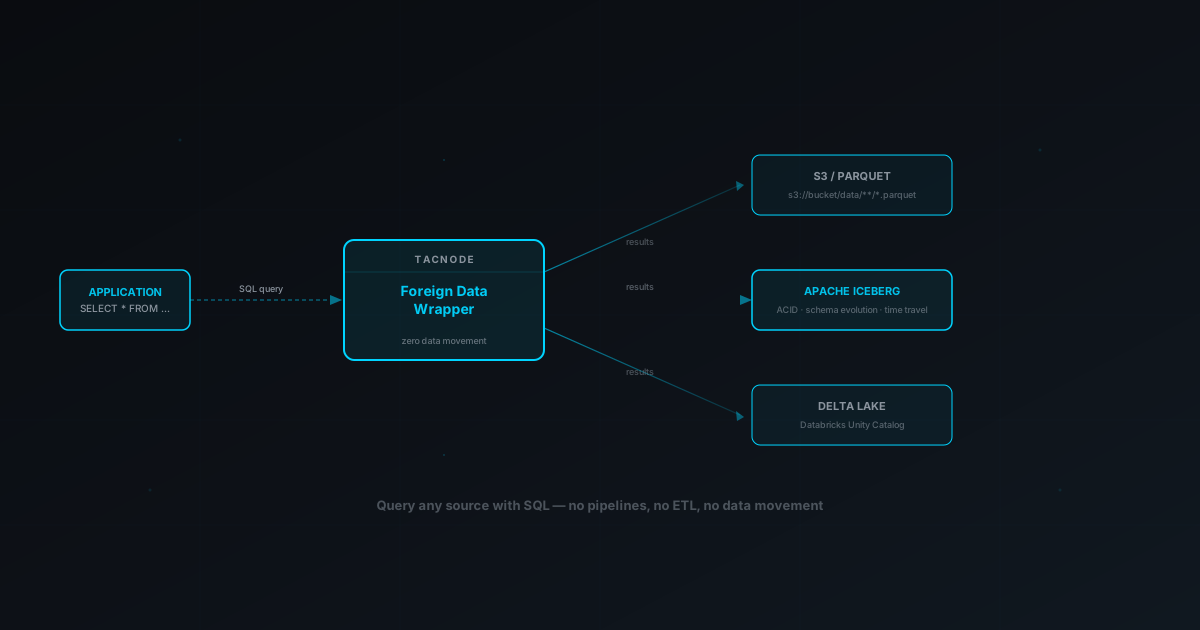
Foreign data wrappers let you query Parquet on S3, Iceberg tables, and Delta Lake catalogs with standard SQL and zero data movement. Complete setup guide, plus where querying the lake in place stops working for real-time decisions.
TL;DR: A PostgreSQL FDW lets you access external data — Parquet on S3, Apache Iceberg tables, Delta Lake via Unity Catalog, AWS Glue catalogs — using plain SQL with zero data movement. Create a foreign server, create user mapping credentials, then create foreign table definitions that point at the remote table. SELECT, JOIN, and aggregate as if the data were local. Predicate pushdown, projection pushdown, and partition pruning minimize transfer. Cache frequent queries with materialized views. All foreign tables are read-only.
Your analytics team needs to query Parquet files sitting in S3. Your ML engineers want to read from an Apache Iceberg catalog. A downstream reporting tool needs access to Delta Lake tables managed through Databricks Unity Catalog. The traditional answer is to build ETL pipelines — extract data from each source, transform it, load it into your database, and maintain those pipelines forever.
Foreign data wrappers offer a different path: query every one of those sources directly from your database using plain SQL, without moving a single byte.
A foreign data wrapper (FDW) is a PostgreSQL extension that lets you define foreign tables — virtual table definitions that point to remote sources. Once defined, you can access external data in remote databases, object storage, or data lake catalogs exactly like local tables: SELECT, JOIN, WHERE, GROUP BY. The FDW extension handles translation, pushes filters to the remote server where possible, and returns results as if they were stored locally.
This guide covers four FDW extensions available in Tacnode — file_fdw for S3 object storage, glue_fdw for AWS Glue catalogs, iceberg_fdw for Apache Iceberg, and delta_fdw for Delta Lake — including setup, type mapping, performance optimization, and the constraints you need to know.
How the FDW Extension Works
Foreign data wrappers follow the SQL/MED standard (SQL Management of External Data) — a SQL standard for accessing remote data from within a PostgreSQL database. The architecture has four components that layer on top of each other.
The FDW extension is a library that knows how to communicate with a specific type of remote server. Tacnode includes four: file_fdw for S3-compatible object storage, glue_fdw for AWS Glue, iceberg_fdw for Apache Iceberg catalogs, and delta_fdw for Delta Lake and Unity Catalog. Each must be installed once per database before use via CREATE EXTENSION.
A foreign server object stores the connection details for a specific remote server — the AWS region, catalog endpoint, or S3 bucket configuration. You create server entries to tell the PostgreSQL database how to reach each external data source. One foreign server definition can back multiple foreign tables pointing at different remote objects. You can list foreign servers with \des in psql.
A user mapping ties a local user to authentication credentials for the foreign server. When you create user mapping entries, you separate connection configuration from secrets — for example, setting the remote user password (password 'password') separately from the server endpoint. This lets different database users authenticate with different credentials against the same foreign server. For postgres_fdw connections to external PostgreSQL servers, you can also enable scram pass-through authentication.
A foreign table is a table definition that describes the schema of external data. It has columns declared like any create table statement, but no local storage. Queries against a foreign table are translated by the wrapper into whatever the remote server understands — S3 object reads, catalog API calls, or Iceberg metadata lookups. You can treat foreign tables the same as local tables in SELECT statements.
The setup sequence is always the same regardless of external data source: create extension, create foreign server, create user mapping, then create foreign table definitions or use the import foreign schema command in bulk.
file_fdw: Query Parquet and ORC Files on S3
file_fdw connects to S3-compatible object storage, letting you query Parquet and ORC files as SQL tables from your PostgreSQL database. This is the most common starting point — if your data is stored in S3, this is the FDW extension you want.
Supported file formats are Parquet and ORC. Both are columnar formats with built-in compression and embedded schema metadata, which means the wrapper can infer column types automatically. CSV is not supported.
Install the extension (the CREATE EXTENSION statement is required once per database):
sql
CREATE EXTENSION IF NOT EXISTS file_fdw;
Create a foreign server pointing to the remote server's AWS region:
sql
CREATE SERVER s3_production
  FOREIGN DATA WRAPPER file_fdw
  OPTIONS (AWS_REGION 'us-west-2');
Set up authentication. For private buckets, create a user mapping with your AWS credentials:
sql
CREATE USER MAPPING FOR CURRENT_USER
  SERVER s3_production
  OPTIONS (
    AWS_ACCESS_ID 'AKIA...',
    AWS_ACCESS_KEY 'your-secret-key'
  );
For publicly accessible buckets, the user mapping credentials are optional — the remote server access works without authentication.
Now create a foreign table. The DIR option points to the S3 prefix and FORMAT specifies the file type — note that column names and types must match the actual remote schema:
sql
CREATE FOREIGN TABLE sales_data (
  transaction_id BIGINT,
  customer_id INTEGER,
  product_id INTEGER,
  sale_date DATE,
  amount NUMERIC(10,2),
  region VARCHAR(50)
)
SERVER s3_production
OPTIONS (
  DIR 's3://analytics-bucket/sales/',
  FORMAT 'parquet'
);
That's it. You can now query this table with standard SQL:
sql
SELECT region, SUM(amount) AS total_sales
FROM sales_data
WHERE sale_date >= '2026-01-01'
GROUP BY region
ORDER BY total_sales DESC;
The wrapper reads only the Parquet files under the specified S3 prefix, applies column and predicate pushdown where possible, and returns the results. You never download the files — the data stays in S3.
Working with Partitioned Data on S3
Most production S3 datasets are partitioned — files organized into prefix hierarchies like s3://bucket/sales/region=us-east/year=2026/. The file_fdw extension supports partition pruning, meaning queries with filters on partition columns only scan the relevant partitions instead of reading every file.
When your Parquet or ORC data is partitioned by one or more columns, declare the partition keys in the foreign table options:
sql
CREATE FOREIGN TABLE partitioned_sales (
  transaction_id BIGINT,
  customer_id INTEGER,
  amount NUMERIC(10,2),
  sale_date DATE,
  region VARCHAR(50)
)
SERVER s3_production
OPTIONS (
  DIR 's3://analytics-bucket/sales/',
  FORMAT 'parquet',
  PARTITION_BY 'region,sale_date'
);
Now a query filtering on region only reads files under that region's prefix:
sql
-- Only scans s3://analytics-bucket/sales/region=us-east/
SELECT SUM(amount)
FROM partitioned_sales
WHERE region = 'us-east'
  AND sale_date >= '2026-01-01';
Without partition pruning, every query would scan every file in the directory. On large datasets this is the difference between seconds and minutes.
glue_fdw: Connect to AWS Glue Catalogs
If your organization uses AWS Glue as a metadata catalog, glue_fdw lets you query Glue-cataloged tables directly. Instead of pointing at raw S3 paths, you import table definitions from the Glue catalog — the wrapper reads the catalog metadata to know where files are, what format they use, and how they're partitioned.
sql
CREATE EXTENSION IF NOT EXISTS glue_fdw;
Create a foreign server pointing to the Glue catalog's region:
sql
CREATE SERVER glue_production
  FOREIGN DATA WRAPPER glue_fdw
  OPTIONS (AWS_REGION 'us-east-1');
Authenticate with IAM credentials:
sql
CREATE USER MAPPING FOR CURRENT_USER
  SERVER glue_production
  OPTIONS (
    AWS_ACCESS_ID 'AKIA...',
    AWS_ACCESS_KEY 'your-secret-key'
  );
The power of Glue integration is bulk import. Instead of manually writing CREATE FOREIGN TABLE for each table, import an entire Glue database at once:
sql
IMPORT FOREIGN SCHEMA "sales_database"
  FROM SERVER glue_production
  INTO public;
This inspects the Glue catalog and creates matching foreign tables in your public schema for every table in the sales_database. Column names, types, storage locations, and format details are all pulled from the catalog automatically.
You can be selective about what you import:
sql
-- Import only specific tables
IMPORT FOREIGN SCHEMA "analytics_db"
  LIMIT TO (orders, customers, products)
  FROM SERVER glue_production
  INTO public;

-- Import everything except staging tables
IMPORT FOREIGN SCHEMA "analytics_db"
  EXCEPT (staging_events, temp_loads)
  FROM SERVER glue_production
  INTO public;
For production environments, prefer IAM roles over hardcoded access keys. Monitor schema changes in Glue — if the upstream catalog changes, you'll need to drop and re-import the affected foreign tables to pick up the new definitions.
iceberg_fdw: Query Apache Iceberg Tables
Apache Iceberg is an open table format for large-scale analytics workloads, offering ACID transactions, schema evolution, time travel, and hidden partitioning. The iceberg_fdw extension connects to Iceberg catalogs and exposes Iceberg tables as foreign tables.
Iceberg supports multiple catalog backends. Tacnode integrates with REST Catalog (HTTP-based), Hive Metastore, AWS Glue (as an Iceberg catalog), and Hadoop filesystem catalogs.
sql
CREATE EXTENSION IF NOT EXISTS iceberg_fdw;
Create a foreign server pointing to your Iceberg REST catalog:
sql
CREATE SERVER iceberg_production
  FOREIGN DATA WRAPPER iceberg_fdw
  OPTIONS (
    ICEBERG_REST_CATALOG_ENDPOINT 'https://iceberg-catalog.company.com/api/catalog',
    CATALOG 'production_catalog'
  );
Authenticate with a catalog token:
sql
CREATE USER MAPPING FOR CURRENT_USER
  SERVER iceberg_production
  OPTIONS (
    TOKEN 'principal:data-reader;realm:company-realm'
  );
Import tables from an Iceberg namespace:
sql
IMPORT FOREIGN SCHEMA "sales_analytics"
  FROM SERVER iceberg_production
  INTO public;
Once imported, you query Iceberg tables the same way as any other foreign table — the wrapper handles metadata lookups, snapshot management, and file reads transparently.
Some things to know: write performance varies by catalog and storage backend. Schema evolution capabilities depend on your specific catalog implementation. Cross-catalog operations are not supported — each server connects to one catalog.
delta_fdw: Query Delta Lake via Unity Catalog
Delta Lake is an open storage layer that adds ACID transactions and schema enforcement on top of Parquet files. The delta_fdw extension integrates with Databricks Unity Catalog, letting you query Delta Lake tables managed in your Databricks workspace.
sql
CREATE EXTENSION IF NOT EXISTS delta_fdw;
Create a foreign server pointing to your Unity Catalog endpoint:
sql
CREATE SERVER unity_production
  FOREIGN DATA WRAPPER delta_fdw
  OPTIONS (
    UNITY_CATALOG_ENDPOINT 'https://dbc-12345678-9abc.cloud.databricks.com',
    AWS_REGION 'us-west-2',
    CATALOG 'production_catalog'
  );
Authenticate with both a Unity Catalog token and AWS credentials (since Delta Lake files live on S3):
sql
CREATE USER MAPPING FOR CURRENT_USER
  SERVER unity_production
  OPTIONS (
    UNITY_CATALOG_TOKEN 'dapi...',
    AWS_ACCESS_ID 'AKIA...',
    AWS_ACCESS_KEY 'your-secret-key'
  );
Import tables from a Unity Catalog schema:
sql
-- Import entire schema
IMPORT FOREIGN SCHEMA "sales_data"
  FROM SERVER unity_production
  INTO public;

-- Import selected tables
IMPORT FOREIGN SCHEMA "analytics"
  LIMIT TO (revenue_daily, customer_segments)
  FROM SERVER unity_production
  INTO public;
Delta Lake foreign tables are read-only. Schema changes in Unity Catalog require dropping and re-importing the foreign table definitions. Large unfiltered scans will read significant amounts of data from S3 — always use WHERE clauses to limit what the wrapper fetches.
Importing Schemas in Bulk
Manually writing CREATE FOREIGN TABLE for every external table is tedious when you have dozens of tables in a catalog. The IMPORT FOREIGN SCHEMA command automates the process — it inspects the remote source and creates foreign table definitions that match the remote schema. Each create foreign table match is generated from catalog metadata, so column names, types, and other properties align automatically.
The syntax is the same across all four wrappers:
sql
IMPORT FOREIGN SCHEMA remote_schema_name
  FROM SERVER server_name
  INTO public;
Foreign tables are imported into the public schema. Use LIMIT TO or EXCEPT to control which tables get imported.
For catalog-based wrappers (glue_fdw, iceberg_fdw, delta_fdw), the import foreign schema command reads catalog metadata to build table definitions. For file_fdw, schema import leverages embedded metadata in Parquet and ORC files to infer column names and types. Create foreign table note: partitioned tables are not supported with batch import for file-based sources — you'll need to create those foreign tables manually with PARTITION_BY.
When the remote source changes — new columns added, tables created or dropped — re-import to pick up the changes. Drop the stale foreign table first, then re-import:
sql
DROP FOREIGN TABLE IF EXISTS orders;
IMPORT FOREIGN SCHEMA "production_db"
  LIMIT TO (orders)
  FROM SERVER glue_production
  INTO public;
Data Type Mapping Across Formats
When the wrapper reads external data, it converts source types to PostgreSQL types. The mapping is straightforward for basic types but has important edge cases.
Parquet and ORC share the same type mapping. BOOLEAN maps to BOOLEAN. INT and INTEGER map to INTEGER. BIGINT maps to BIGINT. FLOAT maps to REAL. DOUBLE maps to DOUBLE PRECISION. STRING maps to TEXT. VARCHAR and CHAR preserve their declared lengths. DECIMAL preserves precision and scale. BINARY maps to BYTEA. TINYINT maps to SMALLINT for compatibility. Arrays are mapped recursively — ARRAY<INTEGER> becomes INTEGER[].
Delta Lake follows the same basic mappings with one important distinction: Delta's timestamp type (with timezone) maps to TIMESTAMPTZ, while timestamp_ntz (without timezone) maps to TIMESTAMP. Decimal precision is preserved.
Iceberg offers the most granular type support, including direct UUID to UUID mapping and TIME with microsecond precision. Fixed and variable-length binary types both map to BYTEA.
MAP and STRUCT types are not supported across any format. If your external data contains nested structures like MAP<STRING, INTEGER> or STRUCT<name STRING, age INT>, those columns cannot be exposed through foreign tables. The workaround is to flatten nested structures before they reach the foreign table — either by preprocessing the source data or by restructuring the upstream pipeline to produce flat schemas.
Only simple arrays qualify for type mapping. Complex nested arrays containing MAPs or STRUCTs will fail.
Query Performance: Pushdown and Partition Pruning
Foreign data wrappers don't naively fetch all data and filter locally. Three optimization strategies minimize data transfer and improve query performance.
Predicate pushdown sends your WHERE clause conditions to the data source. When you filter on sale_date or region, the wrapper applies those filters at the source level rather than fetching everything and discarding rows locally. This can reduce data scanned by orders of magnitude on large datasets.
Projection pushdown sends only the columns you SELECT. If your query needs three columns out of fifty, the wrapper reads only those three from the Parquet or ORC files. Since both formats are columnar, this is especially effective — the wrapper skips entire column chunks without reading them.
Partition pruning limits which files or partitions are scanned based on your query predicates. If data is partitioned by date and your query filters to January 2026, the wrapper only reads files in the January partition directory. Combined with predicate pushdown, this means a well-structured query over partitioned data touches a tiny fraction of the total dataset.
To get the most from these optimizations: always include WHERE clauses that align with your partition columns. Select only the columns you need rather than using SELECT *. Structure your S3 data with clear partition hierarchies. For large datasets accessed frequently, consider materialized views to avoid repeated scans entirely.
Caching Foreign Data with Materialized Views
Foreign tables are read-only views of external data — every query re-reads from the source. For frequently accessed datasets or complex joins against foreign tables, this means repeated network overhead. Materialized views solve this by caching query results locally.
Create a materialized view over a foreign table to snapshot the data:
sql
CREATE MATERIALIZED VIEW sales_summary AS
SELECT
  region,
  DATE_TRUNC('month', sale_date) AS month,
  COUNT(*) AS order_count,
  SUM(amount) AS total_revenue
FROM sales_data
WHERE sale_date >= '2025-01-01'
GROUP BY region, DATE_TRUNC('month', sale_date);
Queries against sales_summary read from local storage — no S3 round trips, no network latency. You refresh the materialized view when you need updated data:
sql
REFRESH MATERIALIZED VIEW sales_summary;
This pattern is especially valuable for dashboards and reporting queries that run the same aggregations repeatedly. The foreign table gives you live access to the source. The materialized view gives you fast, repeated reads. Use both together: foreign tables for ad-hoc exploration, materialized views for production workloads.
You can also join materialized views (cached foreign data) with local tables, creating a unified query layer where some data comes from S3, some from Iceberg, and some lives natively in the database — all accessed through standard SQL.
Accessing Data Stored in Remote Databases
While the data lake extensions covered above focus on S3, Iceberg, Delta Lake, and Glue, the PostgreSQL ecosystem includes wrappers for accessing remote databases directly. The postgres_fdw extension — included in standard PostgreSQL — lets you access external PostgreSQL servers, connecting one database to another and treating remote tables as local queryable objects.
For Oracle databases, the oracle_fdw extension provides similar functionality — point it at the remote server, set up authentication with the remote user credentials, and import foreign schema or define individual tables. The same pattern applies to mysql_fdw for MySQL and tds_fdw for SQL Server.
In each case, the pattern is the same: the extension provides access to the remote database, the server object describes the connection, the user mapping authenticates, and each foreign table exposes an actual remote table in the local server's public schema. You can then join local and foreign tables freely — running queries that combine data across multiple databases and external data sources.
This makes FDWs a practical tool to migrate data between databases incrementally. Instead of a bulk ETL job, you can access data directly through a foreign table and insert it into local tables in batches — create table definitions locally, then populate them from the remote access layer. Or create a materialized view that caches remote data locally and refresh it on a schedule. This blog post focuses on data lake FDWs, but the postgres_fdw pattern for connecting to a remote postgres server follows the same architecture.
Cost Estimation and Query Planning
When the query planner encounters a foreign table, it needs a cost estimate to decide how to execute the query. The wrapper provides cost estimation hints — estimated row counts, average row widths, and selectivity — that help the planner choose between nested loops, hash joins, and other strategies.
For data lake sources (S3, Iceberg, Delta Lake), cost estimation is approximate. The wrapper uses catalog metadata or file statistics to estimate row counts, but the actual transfer depends on network latency, file sizes, and how effectively predicates push down. Gathering local statistics with ANALYZE on foreign tables in your PostgreSQL database can improve the query plan for joins between local tables and foreign tables.
If a query produces a suboptimal plan, check with EXPLAIN. You may need to adjust cost parameters or restructure the query. For complex queries that access multiple foreign tables on different remote servers, the planner evaluates each scan independently — it cannot push cross-server joins to the remote server.
Constraints and Limitations
Foreign data wrappers are powerful but not without boundaries. Understanding the constraints upfront prevents surprises in production.
All foreign tables are read-only. You can SELECT from them — including JOINs with local tables, aggregations, subqueries, and CTEs — but INSERT, UPDATE, and DELETE are not supported. To copy data from a remote table, query the foreign table and use insert statements to write results into a local table or materialized view.
Foreign tables are created in the public schema. When using IMPORT FOREIGN SCHEMA, the target is always INTO public. You cannot import into other schemas.
CSV files are not a supported format. file_fdw works with Parquet and ORC — both columnar formats with embedded schema metadata. If your data is in CSV files, convert to Parquet before you create foreign table definitions.
MAP and STRUCT types are not supported. External data containing nested complex data types like MAP<STRING, INT> or STRUCT must be flattened at the remote data source before being queried through a foreign table.
Schema changes in remote databases require foreign table recreation. If the remote database adds columns with new types, renames fields, or changes the schema of the remote table, the foreign table definition becomes stale. Drop and re-create (or re-import via import foreign schema) to pick up changes. There is no automatic sync between the local server and the remote server.
IMPORT FOREIGN SCHEMA does not support partitioned tables for file-based sources. If your S3 data is partitioned, you must create foreign table definitions manually with the PARTITION_BY option for each partitioned source.
Foreign table operations are excluded from local transaction boundaries. A query against a foreign table reads whatever state the remote server has at query time — it doesn't participate in your local database BEGIN/COMMIT transaction.
Choosing the Right Wrapper
Each wrapper targets a specific type of data source. Here is how to decide which one to use.
Use file_fdw when your data lives as Parquet or ORC files in S3 or S3-compatible object storage. This is the most common scenario for data engineering teams that produce files from Spark, Flink, or other batch processing systems. You control the S3 paths, file formats, and partition layout directly.
Use glue_fdw when your organization uses AWS Glue as its metadata catalog. Glue already knows where your files are, what format they use, and how they are partitioned. Importing from Glue is faster and less error-prone than manually defining file_fdw tables, because the catalog metadata does the work for you.
Use iceberg_fdw when your data is managed as Apache Iceberg tables. Iceberg adds ACID transactions, schema evolution, and time travel on top of file storage. If your data engineering team writes Iceberg tables from Spark or Flink, this wrapper gives you SQL access to those tables without duplicating the data.
Use delta_fdw when your data lives in Delta Lake, particularly when managed through Databricks Unity Catalog. If your analytics or ML teams use Databricks as their primary workspace, delta_fdw bridges the gap between Databricks-managed data and SQL access.
In all cases, the same functionality applies: the FDW gives you SQL access to external data directly without moving it. You define the foreign server once, create user mapping once, and every subsequent query works with standard SQL — joins between local and foreign tables, aggregations, window functions, CTEs, all of it. The only option is read access — you cannot insert data into a remote table through an FDW.
Querying the Lake in Place vs. Decisions on the Hot Path
Querying the lake in place means joining live operational rows with Iceberg or Parquet history through foreign tables, without copying the history into your database. It removes reverse ETL for reads that happen occasionally and can wait for a scan. It doesn’t serve a decision that runs on every request: that decision needs derived context computed ahead of time, refreshed incrementally, read in one snapshot alongside the latest state, and its own output written back for the next decision.
Foreign tables over the lake are no longer a niche extension. Operational databases increasingly embed a columnar analytical engine behind them, so a single SQL statement can join today’s rows with years of history in Iceberg or Parquet and push the heavy scan to an engine built for it. That’s a real improvement, and it raises a fair question: if the operational database can read the lake directly, what’s left to build?
The answer depends on what’s doing the reading.
What querying in place fixes
The old way to get lake history into an application was reverse ETL. You guessed which tables the application would need, copied them into the operational database, and kept the copy in sync. Every new question meant another pipeline.
For a large class of reads, that’s now unnecessary:
Enrichment in a support or back-office tool. A support agent opens a case and sees the customer’s full purchase history next to it. One person, one query, and a second or two of latency is fine.
Data tiering. Keep hot rows in the operational database, move cold rows to Iceberg, and keep querying both. The primary gets smaller, storage gets cheaper, backups get faster.
AI agents doing open-ended lookups. An agent that occasionally needs three years of account history shouldn’t require a pipeline built in advance for a question nobody predicted.
These reads share a shape: a question arrives occasionally, nobody can predict exactly what it will touch, and the answer can take as long as a scan takes. For that shape, querying the lake in place is the right design, and the wrappers in this guide are built for it.
Where it stops: a decision on every order
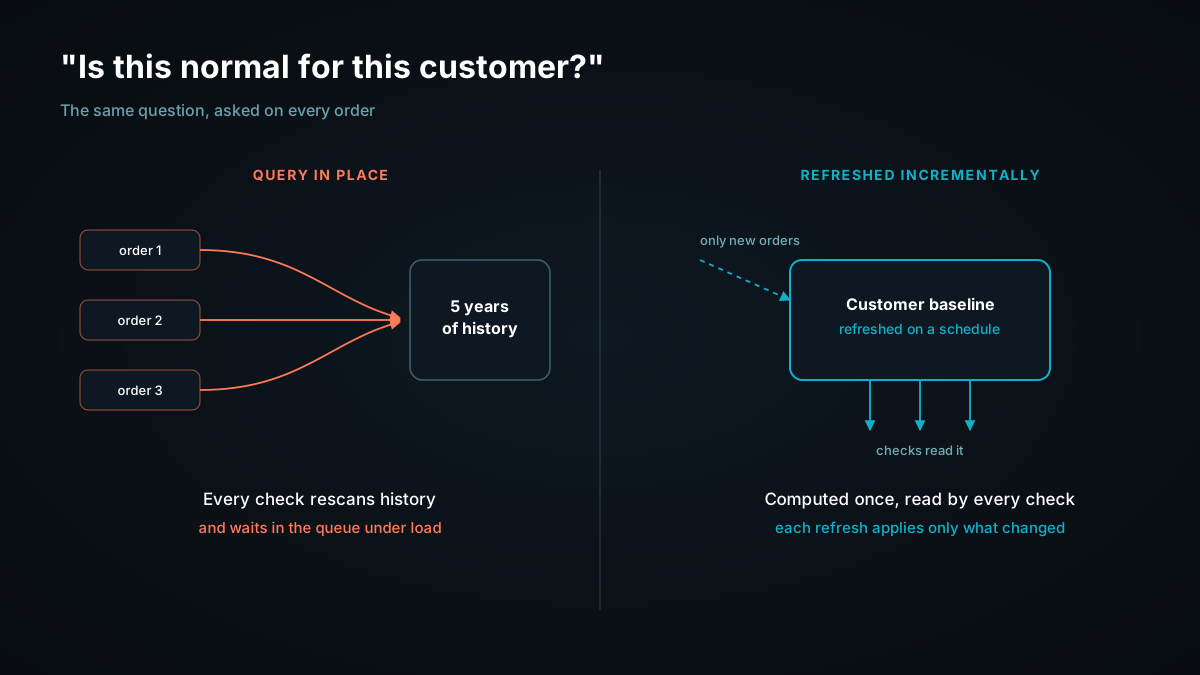
Now take a fraud check. On every order, it asks: is this normal for this customer? At the moment the order comes in, that check needs four things, and a live foreign-table read provides none of them.
1.A derived answer, ready before the check asks. “Normal for this customer” is an aggregate over years of history: typical order size, usual merchants, usual times. Querying the lake in place computes it again on every order. Parquet is laid out for scanning many rows, not for fetching one customer’s rows thousands of times a second. Caching helps with repeat reads, but the work is still repeated per decision, and every one of those scans competes for the same memory as the transactional workload.
2.One snapshot. The local rows come from the query’s transaction snapshot. The lake rows come from whatever snapshot the last lake write produced. As the limitations above note, foreign tables sit outside the local transaction. For a report, a few minutes between the two doesn’t matter. For a fraud check, the order placed thirty seconds ago is often the one that matters, and in a tiered setup the boundary between “recent rows here” and “old rows there” moves whenever the tiering job runs.
3.Request concurrency. Analytical scans inside an operational database are usually sized against a slice of memory, with extra queries queued. Queueing is the right behavior for analytics. A checkout can’t wait in a queue.
4.A place to write the result. The flag, the hold, or the step-up challenge is new state, and the next order from the same customer, possibly a second later, has to see it. Foreign tables are read-only, so the write half of the loop has to go somewhere else.
Querying in place recomputes “normal” on every decision. A hot path needs it computed ahead of time and refreshed incrementally.
Why caching the lake brings back the sync job
The usual fix is the one in Caching Foreign Data with Materialized Views: materialize the result locally and read that. It works for dashboards. For a hot path, look at what it means. A materialized view over a foreign table can’t see which lake rows changed, so each refresh re-queries the lake. The baseline is now a copy that’s only as fresh as its last full rebuild, which is the reverse ETL job again with simpler syntax.
That’s the distinction we drew about HTAP’s return: removing copies answers where data lives. A decision also needs to know when the data it read was true, and it needs that thousands of times a second. When a decision acts on context that was already out of date by the time it ran, that’s the context gap, and moving the storage doesn’t close it.
What the hot path needs instead
Start from the decision, not the storage:
Load the history the decision depends on once. Then keep it current from new events, either written directly or arriving by change data capture from the system of record.
Keep expensive derived context in an incremental view. Each refresh applies only what changed since the last one, so it can run every few seconds where a full rebuild would run hourly. Cheaper signals run on demand against the latest committed data, which is often good enough on its own.
Read raw and derived context together. The latest order, the customer baseline, and any similarity lookup are read from one system in one snapshot, instead of from two systems that last agreed whenever a sync ran.
Write the decision back. The verdict becomes context for the next check.
-- History loaded once into a local table; new orders arrive by direct write or CDC
CREATE MATERIALIZED VIEW customer_baseline
WITH (refresh_mode = 'incremental') AS
SELECT customer_id,
       COUNT(*)         AS lifetime_orders,
       AVG(total_amount) AS avg_order_amount,
       MAX(total_amount) AS max_order_amount
FROM orders
GROUP BY customer_id;

-- Each run applies only the orders since the last refresh
REFRESH MATERIALIZED VIEW customer_baseline;
Incremental views don’t refresh on their own. The view refreshes when REFRESH MATERIALIZED VIEW runs, and you schedule that in SQL, typically every few seconds to a few minutes, depending on what the decision can tolerate. The check reads the baseline as of its last refresh and the newest orders as of the latest commit, in the same query. Signals that must reflect the very latest write, like order count in the last ten minutes, are computed on demand instead. See the materialized view docs for syntax and supported query shapes, and incremental materialized views for how incremental maintenance works.
When the decision state (verdicts, holds, per-customer limits) is written to Tacnode, those writes are fully ACID, so two concurrent checks can’t both act on a stale view of it. When the orders themselves live in another system of record and arrive by CDC, Tacnode doesn’t enforce anything in that ledger. What it does is give the check accurate context, so it doesn’t approve an order it would have flagged had it seen the current state.
The foreign tables in this guide have the same limit as any lake query read in place: an Iceberg table read where it sits answers as of its last write, outside Tacnode’s snapshot. That’s fine for analysis and for history that no longer changes. For a hot path, the history the baseline depends on is loaded in, so the baseline and the latest order are part of the same state.
Which approach fits which read
Most teams will use both: foreign tables for the reads that never should have needed a pipeline, and a context lake, not a data lake, for the few decision paths where the context has to be current.
What the read looks like
Query the lake in place
Cache it in a materialized view
Incremental view, decision written back
Analyst or support tool joining live rows with history
✅ Built for this
Unnecessary
More than you need
AI agent making occasional, unpredictable lookups
✅ Built for this
Unnecessary
Needed when agents act on shared state
Moving cold data out of the operational database
✅ Built for this
—
—
Repeated dashboard over history that rarely changes
Rescans each time
✅ Built for this
Works
Derived signal read thousands of times a second, refreshed every few seconds
Rescans per read, queues under load
Each refresh re-queries the lake
✅ Built for this
Decision whose output the next decision must read
Read-only
Read-only copy
✅ Built for this
Frequently Asked Questions
Foreign Data WrapperPostgreSQLData LakeApache IcebergDelta LakeS3Data Federation