ETL Pipelines: What They Are, How They Work, and When to Eliminate Them
ETL pipelines extract data from source systems, transform it into a usable format, and load it into a destination. This guide covers how ETL pipelines work, common architectures, tools, failure modes, and when streaming and CDC approaches eliminate the need for batch ETL entirely.
TL;DR: ETL pipelines extract data from data sources, transform it into structured data, and load it into a target system like a data warehouse or data lake. These data pipelines work well for batch ETL but introduce structural latency — every stage adds delay between when an event occurs and when it’s queryable. ELT flips the order (loading data raw, then transforming in the warehouse), but both are batch processing paradigms. For real time processing use cases — fraud detection, AI agents, live personalization — change data capture (CDC) and streaming pipelines eliminate the batch window entirely. The key differences between ETL pipelines and modern data pipelines determine which approach fits each use case.
Every data team builds ETL pipelines. Whether you’re moving customer data from a CRM system into a data warehouse, transforming raw event logs into analytics-ready tables, or feeding machine learning models with training data from multiple sources, an ETL pipeline is the process that makes it happen.
ETL stands for Extract, Transform, Load — the three stages that define how data pipelines move data from where it’s created to where it’s used. The extract transform load concept is decades old, but ETL and data pipelines remain the backbone of modern data integration infrastructure. Data pipelines built on the ETL pattern are also the source of persistent problems in data engineering: stale data, broken transforms, silent failures, and the growing gap between when an event occurs and when your data pipelines can act on it.
What Is an ETL Pipeline? The Extract Transform Load Process
An ETL pipeline is a data integration workflow that extracts data from one or more sources, transforms it into a consistent and usable format of structured data, and loads it into a target system — typically a data warehouse, data lake, or analytics platform. ETL pipelines automate the movement and data processing of information from multiple sources and disparate data sources, making structured data and unstructured data queryable and ready for analysis, reporting, and machine learning.
An ETL pipeline is a sequence of automated steps that processes data from point A to point B while reshaping it along the way. The “pipeline” metaphor is literal — data flows through stages, each performing a specific operation, and the output of one system becomes the input of the next. Among all data pipelines used for data integration, ETL pipelines are the most widely deployed pattern for handling data at scale.
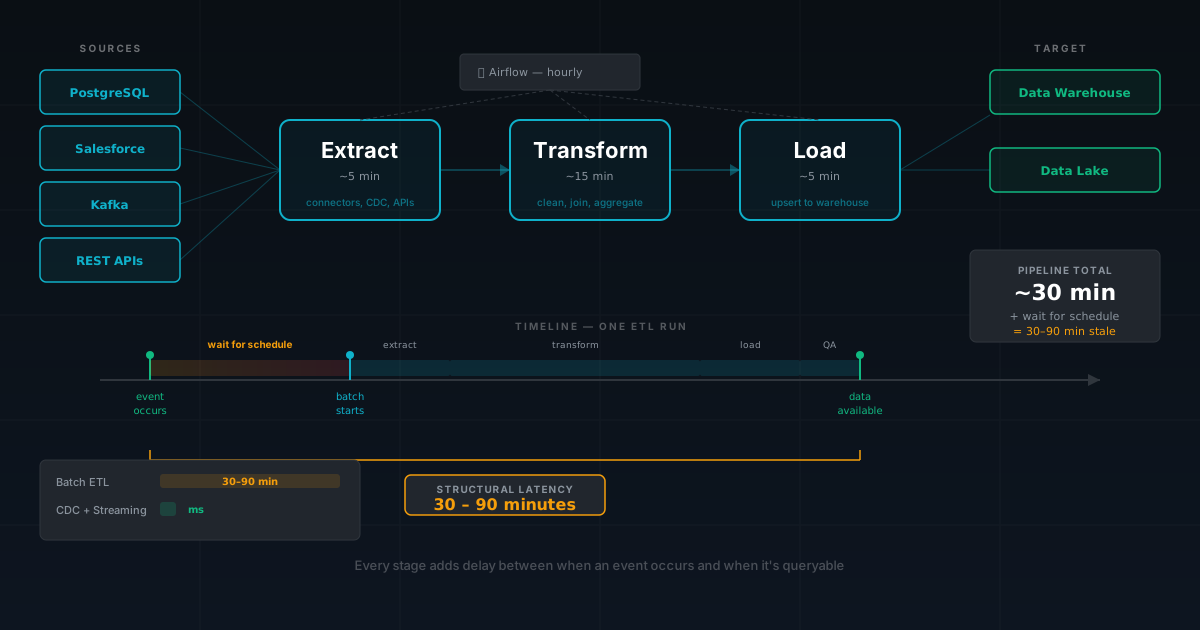
The three stages of the ETL extract transform load process in ETL and data pipelines:
Extract — Connect to data sources and pull data out. Sources for data pipelines include relational databases (PostgreSQL, MySQL, SQL Server), SaaS applications (Salesforce, HubSpot, Stripe), CRM systems, APIs, flat files in various data formats (CSV, JSON), message queues, and event streams. Extracting data can be full (pull everything) or incremental (pull only what changed). ETL tools handle the connectors, authentication, and data extraction logic. These ETL processes manage each data pipeline.
Transform — The transformation phase where data pipelines clean, validate, restructure, enrich, and aggregate the extracted data. This is where business logic lives in ETL pipelines: data cleansing, deduplication, standardizing data types, joining records from multiple sources, computing derived fields, and filtering out invalid records. The transform step converts data into structured data that matches the target system schema. Applying data transformations is often the most complex part of building data pipelines.
Load — Write the transformed data into the target system. Data pipelines can load as a full overwrite, an append, or an upsert. Loading data must handle schema compatibility, data types, and transaction semantics to maintain data integrity. Whether loading data into a data warehouse, data lake, or operational data storage system, the load step determines how structured data is organized for downstream queries in the target system.
ETL pipelines run on a schedule — hourly, daily, or weekly — batch processing data in scheduled runs. Each batch processing run extracts a window of data, transforms it, and loads the results into the target system. Between runs, the target system doesn’t reflect changes in data sources. This batch processing window is fundamental to how ETL and data pipelines work, and it’s also their most significant limitation.
Data Pipeline vs ETL Pipeline: Key Differences
The terms “data pipeline” and “ETL pipeline” are often used interchangeably, but understanding the data pipeline vs ETL key differences matters for choosing the right data strategies.
A data pipeline is any system that moves data from one system to another — a broad category that includes ETL pipelines, ELT pipelines, streaming pipelines, CDC pipelines, and event-driven architectures. A data pipeline vs ETL comparison reveals that ETL pipelines are a specific type of data pipeline that follows the extract transform load pattern with batch computation.
Key differences between a data pipeline vs ETL pipeline:
Scope. ETL pipelines are batch workflows that extract, transform, and load on a schedule. Data pipelines encompass real-time architectures, real time data streaming, event-driven systems, and any approach that moves data between systems. When evaluating data pipeline vs ETL, the key differences center on whether you need batch or continuous operation.
Latency. ETL pipelines introduce minutes-to-hours latency from batch processing runs. Modern data pipelines can move data with sub-second latency through streaming. This is one of the key differences that shapes data strategies and architecture decisions.
Data flow. ETL pipelines follow a linear data flow: extract → transform → load. Modern data pipelines support branching data flow patterns, fan-out, fan-in, and continuous data movement. The data flow in a data pipeline vs ETL setup differs fundamentally.
Computation model. ETL pipelines handle data in scheduled batches. Modern data pipelines can operate continuously, processing data for each event as it arrives — a critical distinction for real time processing workloads.
Understanding data pipeline vs ETL key differences helps data engineers choose the right data strategies for each workload. Many organizations use ETL and data pipelines in parallel — ETL pipelines for batch processing analytics, streaming pipelines for operational workloads.
How ETL Pipelines Work: Architecture, Data Storage, and Data Flow
A typical ETL pipeline architecture involves several components and ETL tools working together to manage data integration across data pipelines:
Source connectors in ETL tools read from data sources. Each connector handles the specific protocol — JDBC for databases, REST for SaaS APIs, SFTP for file-based data sources. Well-designed connectors handle pagination, rate limiting, and error recovery when extracting data for data pipelines.
Staging area provides temporary data storage for extracted data before the transform step. This is usually cloud storage (S3, GCS, Azure Blob) or a staging schema in the target database. Staging decouples extraction from transformation, allowing each stage of the ETL pipeline to run independently while processing data efficiently and making it easier to debug data pipeline failures.
Transform engine applies business logic and data transformations. This can be a SQL-based tool (dbt), a code-based framework (Python with Pandas or PySpark), or a visual tool (Informatica, Talend, Pentaho Data Integration, Matillion). Data pipelines read from staging, begin processing data — standardizing data, data cleansing, computing aggregates — and write structured data to the target system.
Orchestrator schedules and coordinates data pipelines. ETL tools like Apache Airflow, Dagster, Prefect, and cloud-native schedulers define the order of operations, handle dependencies between data pipelines, manage retries on failure, and provide monitoring for ETL and data pipelines.
Target system receives transformed data. Data warehouses (Snowflake, BigQuery, Redshift), data lakes (Delta Lake, Iceberg on S3), cloud data warehouses, and operational databases serve as the target system for data pipelines.
The following ETL pipeline diagram illustrates the typical data flow:
1.Orchestrator triggers the data pipeline on schedule
2.Extractors pull data from each source into data storage staging
3.Transform engine applies business logic, standardizing data, and data cleansing
4.Loading data writes structured data to the target system
5.Orchestrator marks the ETL process complete (or handles failures)
These ETL processes work together as a proven architecture that works — ETL and data pipelines are well-understood, well-tooled, and battle-tested. The problem isn’t that ETL pipelines don’t work — it’s that batch processing runs on a schedule, and more use cases demand real time processing responses rather than waiting for the next batch.
ETL Pipeline Examples: Data Warehouse, Data Lake, and Sensor Data Patterns
ETL pipelines appear everywhere organizations need to move and begin processing data between systems. Here are common data pipeline patterns:
CRM systems to data warehouse. Data pipelines extract customer data from multiple sources — CRM systems, subscription data from Stripe, and support tickets from Zendesk. Transforms deduplicate contacts, standardize fields from multiple sources, and join customer data. The ETL process loads structured data into a Snowflake data warehouse for business intelligence teams to analyze data. ETL and data pipelines that integrate data from CRM systems are among the most common patterns.
Application database to analytics data warehouse. Data pipelines extract order, inventory, and customer tables from a production database. Transforms compute daily aggregates, customer lifetime value, and cohort assignments. The ETL process loads structured data into a BigQuery cloud data warehouse for dashboards and reporting.
Event logs to data lake. Data pipelines extract clickstream events from Kafka or application logs from S3 data storage. Transforms parse JSON payloads, filter bot traffic, sessionize events, and enrich with user attributes. The ETL process loads structured data into a partitioned Parquet dataset in a data lake for ad-hoc analysis by data scientists.
Sensor data and IoT data pipelines. Data pipelines collect data from sensor data streams and IoT devices that generate unstructured data in different data formats. ETL processes convert sensor data by standardizing readings, data cleansing of outliers, and aggregating time-series data into structured data. The result loads into a data warehouse for analytics.
Healthcare data pipelines. Data pipelines extract patient data from electronic health records, claims systems, and lab databases. The ETL pipeline applies governance rules, ensures data integrity for sensitive data, and standardizes data across data formats. Data pipelines load structured data into a compliant target system that protects patient data while enabling clinical analytics.
Multi-source ML feature data pipelines. Data pipelines collect data from the payments database, user behavior streams, and vendor APIs — extracting data from multiple sources simultaneously. Transforms compute features: transaction velocity, spending patterns, session duration. The ETL process loads structured data into a feature store as the target system for model training. These data pipelines must move data with minimal latency for feature freshness.
Legacy systems and data migration. When organizations are processing data migration from legacy systems to modern platforms, data pipelines handle the transition by extracting structured data and unstructured data, running validation and conversion, and loading into the new target system. Migration from legacy systems requires careful data integrity validation at every stage of the data pipeline.
Each of these data pipeline examples follows the ETL extract transform load pattern: pull data out, transform it, load it into the target system. The variation across data pipelines is in the sources, the complexity of transforms, and the freshness requirements.
ETL Pipeline in Python: A Simple Example
Python is the most common language for building ETL pipelines. Here’s a minimal ETL pipeline that extracts order data from a PostgreSQL source, transforms it into daily aggregates, and loads it into a data warehouse — the kind of data pipeline every data engineering team has written:
This ETL pipeline illustrates the core pattern: connect to a data source, extract a window of data, apply transforms (filtering, cleaning, aggregating), and load structured data into the target system. In production ETL pipelines, you would add error handling, logging, and an orchestrator like Airflow to run this data pipeline on a schedule.
The limitation is visible in the code: WHERE created_at >= %(start)s AND created_at < %(end)s. The data pipeline processes a fixed batch window. Anything that arrives after the window closes is missed until the next run. This is the structural latency of batch ETL — and the reason teams move to CDC and streaming when freshness requirements tighten.
ETL vs ELT: Key Differences in Data Pipelines
ETL vs ELT represents one of the most important architecture decisions for data engineers building data pipelines. The key differences between ETL vs ELT center on where transforms happen in the data pipeline.
Traditional ETL pipelines transform data before loading data into the target system. ELT — Extract, Load, Transform — flips the order: loading data raw first, then running transforms inside the target system using SQL. Understanding ETL vs ELT key differences is essential for modern data pipelines.
ELT emerged because cloud data warehouse platforms made compute cheap and elastic. Instead of running transforms on a separate cluster, ELT data pipelines load raw data directly into the cloud data warehouse and use the warehouse’s own SQL engine for transformation. ETL tools like dbt formalized this data processing approach, letting data teams write transform logic as SQL data models that run inside the cloud data warehouse.
The ETL vs ELT key differences matter in practice. ELT simplified data transformations and made them accessible to SQL-literate analysts using modern ETL tools. But ELT didn’t solve the fundamental freshness problem — both ETL and ELT data pipelines are batch paradigms. ETL vs ELT is a debate about where to transform, not whether batch operation is fast enough.
Whether ETL pipelines or ELT data pipelines, you’re still waiting for batch processing to complete before the target system reflects reality. For daily reporting, batch processing is fine. For real-time decisions, the ETL vs ELT distinction is less important than the key differences between batch processing and streaming pipelines.
Key Differences
ETL Data Pipelines
ELT Data Pipelines
Transform location
External engine (Spark, Python, Informatica)
Inside the target system (SQL in cloud data warehouse)
Raw data
Often discarded after transforms
Preserved — you can re-transform
Transform language
Code or visual ETL tools
SQL
Compute
Separate cluster
Cloud data warehouse compute
Loading data
Loading data after transformation
Loading data before transformation
Structured data
Structured data loaded into target system
Raw data loaded, then converted to structured data
ETL Tools: The Modern Data Pipeline Stack
The ETL tools landscape has matured. Here’s how major categories of data processing tools break down:
Extraction ETL tools:
Fivetran, Airbyte, Stitch — managed ETL tools with connectors for SaaS, CRM systems, and database sources
Debezium — open-source change data capture for extracting data from databases via streaming data pipelines
Singer (Meltano) — open-source ETL tools with community-maintained connectors
Pentaho Data Integration — open-source ETL tool for data integration with visual data pipeline workflows
Transform ETL tools:
dbt — SQL-based ETL tool for data transformations, the de facto standard for ELT data pipelines
Apache Spark — distributed ETL tool for large-scale data processing in data pipelines
Pandas / Polars — Python ETL tools for smaller datasets
Data pipeline orchestration ETL tools:
Apache Airflow — the most widely used open-source tool for orchestrating ETL and data pipelines
Dagster — software-defined assets with built-in data processing observability
Prefect — Python-native ETL tool for data processing management with dynamic workflows
Cloud-native ETL pipeline tools: AWS Step Functions, Google Cloud Composer, Azure Data Factory
Managed ETL platforms for data pipelines:
Informatica, Talend, Matillion — enterprise ETL tools for building data pipelines with visual interfaces
AWS Glue — serverless ETL tool on AWS
Google Dataflow — managed ETL tool for batch and streaming pipelines
dbt tests and data contracts enforce data quality expectations in data pipelines
Data governance platforms ensure data quality, sensitive data compliance, and data lineage across data pipelines
Most data teams align their data strategies and combine multiple ETL tools: Fivetran or Airbyte for extraction, dbt for transforms, Airflow or Dagster for orchestrating data pipelines, a cloud data warehouse as the target system, and observability tools for monitoring. Choosing the right ETL tools is a core part of building data pipelines that deliver data quality and reliability.
When ETL Pipelines Break: Data Pipeline Failure Modes
ETL pipelines are deceptively simple in concept and frustratingly fragile in practice. These data pipeline failure modes consume data engineering time:
Schema drift. A source changes its schema — a column is renamed, data types change, a new field appears. ETL tools may not detect the change, and the transform logic assumes the old schema. The ETL process either fails or silently produces wrong transformed data in the target system. Data contracts help enforce data quality but require buy-in from data source owners.
Silent data loss in data pipelines. A source API returns empty results, and the data pipeline interprets it as “no new data.” Or incremental data extraction misses records. The data pipeline succeeds, but relevant data is missing from the target system — and nobody notices until a dashboard looks wrong. Data quality checks in data pipelines catch this, but only if they exist.
Late-arriving batch data. Events arrive after the batch processing window closes. A mobile app sends data when the device reconnects. A partner system delivers batch data on a 24-hour delay. The ETL process already ran, so this data is missed until the next full refresh or a backfill ETL process runs.
Transform bottlenecks in data pipelines. As data volumes grow, transforms that were fast become slow. A join in the target system that took 30 seconds now takes 30 minutes because one table grew 10x. The data pipeline misses its SLA, and the target system shows stale data. Data engineers scramble to optimize data pipeline transforms.
Cascading data pipeline failures. Data pipeline A feeds data pipeline B, which feeds data pipeline C. When one ETL process fails, downstream ETL processes produce misleading results in the target system. Data observability catches cascading failures across data pipelines, but only after monitoring is configured.
The staleness tax. Every ETL pipeline introduces a gap between when data is created and when structured data is available in the target system. Data pipelines that run hourly mean your data is always between 0 and 60 minutes old. For analytics, acceptable. For fraud detection, dynamic pricing, or AI agent context, batch processing latency is not — and that’s where real time data processing is needed.
ETL Data Pipelines, Data Freshness, and Real Time Data Processing
The relationship between data pipelines and data freshness is straightforward: every data pipeline hop adds latency.
Consider a typical 5-stage ETL pipeline:
1.Extract from source — 5 minutes
2.Stage to cloud data storage — 2 minutes
3.Transform (dbt run) — 15 minutes
4.Data quality checks — 3 minutes
5.Loading data to target system — 5 minutes
Total: 30 minutes, plus the wait between scheduled runs. If the data pipeline runs hourly, your structured data is between 30 and 90 minutes old when loading data reaches the target system. This is the structural latency of batch ETL pipelines — it cannot be reduced below the sum of stage durations, no matter how fast each stage runs.
For many data pipeline use cases, batch processing freshness is adequate:
Daily reporting — hourly data freshness exceeds requirements for these data pipelines
Monthly compliance — daily data pipeline runs are sufficient
Ad-hoc analytics — analysts rarely need sub-minute data from data pipelines
For other use cases, batch freshness from data pipelines is a liability:
Fraud detection — a 30-minute data pipeline delay means undetected fraud
Real time analytics — dashboards that lag reality miss critical signals
Inventory — the target system doesn’t reflect recent orders
The question isn’t whether ETL pipelines are good or bad — it’s whether the freshness your data pipelines provide matches what your use cases demand. This is the fundamental reason organizations adopt streaming pipelines alongside batch ETL.
Beyond Batch: Real Time Data Streaming Alternatives to ETL Pipelines
When batch ETL pipelines can’t meet freshness requirements, three alternative data pipeline architectures replace or augment them:
Change data capture (CDC) lets data pipelines stream row-level changes from databases as they happen. Instead of extracting data every hour, CDC reads the database’s write-ahead log and emits an event for every insert, update, and delete. Downstream data pipelines see changes within seconds — continuous data movement rather than batch. ETL tools like Debezium make CDC data pipelines accessible.
CDC is the most direct replacement for batch extraction in ETL pipelines. You replace the “Extract” stage with continuous data movement — the transform and load stages of your data pipelines can remain batch processing or also go streaming.
Stream processing data pipelines replace batch processing transforms with continuous data processing. Instead of running transforms hourly, a stream processor — Flink or Kafka Streams, or a streaming database — applies logic to each event as it arrives. Data pipelines produce continuously updated transformed data — no batch window, no schedule. streaming pipelines enable real time processing and analytics that batch processing ETL pipelines cannot deliver.
Event-driven data pipelines replace the entire pipeline-as-batch metaphor. Instead of extracting data and processing data through stages, systems emit events when state changes and other systems subscribe. Data pipelines react to events continuously rather than on a schedule. Enterprise integration patterns like publish-subscribe provide the design vocabulary for these data pipeline architectures.
Many organizations run batch ETL pipelines for analytics and real time data processing in parallel. The mistake is using batch ETL pipelines for everything when some use cases need sub-second freshness. Data engineers must evaluate the differences between batch and real time data processing to choose correctly.
Data Pipeline Approach
Latency
Complexity
Best For
Batch ETL pipelines
Minutes to hours
Low
Analytics, reporting, compliance
ELT data pipelines
Minutes to hours
Low-Medium
Analytics with raw data retention
CDC + batch transform
Seconds (extract), minutes (transform)
Medium
Hybrid data pipelines — fresh extraction, batch analytics
CDC + streaming pipelines
Seconds end-to-end
Medium-High
Real time analytics, feature serving
Event-driven data pipelines
Sub-second
High
Fraud detection, AI agents, live systems
Building ETL Data Pipelines: Practical Guide for Data Teams
Whether building ETL pipelines or modern data pipelines, here are the data strategies that matter:
Start with the target system query. Before configuring ETL tools, define what structured data the target system needs and what queries it must support. Work backward from the dashboard, the data models, or the API. This prevents building data pipelines that move data nobody uses.
Use incremental extraction. Full extractions are wasteful. Incremental extraction — pulling only data that changed — reduces load on data sources, decreases computation time, and scales with data volumes. Use timestamps, change tracking, or CDC for incremental extraction in your data pipelines.
Standardize structured data across sources. When data pipelines collect from multiple sources, standardizing data is essential for data quality. Define canonical data types, naming conventions, and data models. Ensure data pipelines produce consistent structured data in the target system regardless of which source the data came from.
Version transform logic. Treat transform code in data pipelines like application code: version control, code review, automated testing. ETL tools like dbt made this standard — your SQL lives in Git and is tested before deployment to production ETL processes.
Enforce data quality and data governance. Validate row counts after extraction. Run quality checks on transformed data. Verify quality before loading data into the target system. Implement data governance policies that protect sensitive data, ensure accuracy, and maintain lineage. Data governance is essential for data pipelines that handle sensitive data or customer data.
Monitor data pipeline freshness. A successful data pipeline that takes 4 hours when it used to take 30 minutes is a problem. Track data freshness alongside data pipeline success/failure. Set SLAs per data pipeline and alert when freshness degrades. Monitoring data pipelines means watching freshness continuously, not just checking whether a data pipeline succeeded.
Plan for data pipeline backfills. Data pipelines will need to reprocess historical data — after a bug fix, a schema change, or new transform rules. Design data pipelines so backfills using historical data are a parameter (date range), not a separate data pipeline.
ETL and Data Pipelines for Machine Learning
ML data pipelines have specific requirements that analytics data pipelines don’t:
Feature data processing in data pipelines. Data pipelines must transform raw data into features — the input variables data models use for predictions. Feature data pipelines aggregate data (average transaction amount over 30 days), compute ratios, calculate time-based windows, and generate embeddings. Data scientists depend on these ETL processes to deliver structured data reliably.
Training-serving consistency across data pipelines. Features computed in training ETL processes must match production serving exactly. If training ETL processes compute “average order value over 30 days” at midnight, but serving computes from an hourly cache, distributions diverge. This training-serving skew silently degrades data model accuracy — one of the key differences between analytics and ML data pipelines.
Feature freshness in data pipelines. When data pipelines deliver stale features, data models make worse predictions. If a fraud model learned from features with sub-second freshness, serving those features from hourly ETL processes undermines effectiveness — the same data model, worse latency.
Point-in-time correctness in data pipelines. Training data must reflect historical data state at the time each prediction was made. If data scientists train on current feature values, they introduce data leakage. Time travel queries and properly timestamped historical data snapshots in data pipelines prevent this.
For these reasons, many ML teams are moving from batch feature data pipelines to streaming — ensuring that production data pipelines deliver features as fresh as they were during training.
Data Migration: From Batch ETL Data Pipelines to Continuous Context
Data migration from batch ETL and data pipelines to streaming represents a common evolution. Many organizations discover that the multi-hop architecture — extracting data into staging, transforming in a separate engine, loading into a serving layer — creates a structural context gap: derived state always lags the events that should update it, and different systems serve different snapshots of reality.
Closing that context gap doesn’t have to be all-or-nothing:
Phase 1: Replace batch extraction with CDC, keeping transforms as batch. This step alone reduces freshness lag in data pipelines.
Phase 2: Move transforms from batch to streaming. Data pipelines compute transformed data continuously rather than on a schedule.
Phase 3: Eliminate the multi-hop data pipeline entirely — ingest, prepare derived context, and serve it all under one consistent snapshot. No staging area, no separate transform engine, no cache that drifts from the source of truth.
Each phase delivers incremental value. Transferring data between systems during data migration requires careful data quality validation. The differences between batch ETL and streaming data pipelines become clear through data migration — continuous operation eliminates categories of data processing problems that batch approaches cannot solve.
The Tacnode Approach: Closing the Context Gap ETL Data Pipelines Create
Traditional ETL data pipelines exist because no single system could ingest data, prepare derived context, and serve it all under one consistent snapshot. You extract from the operational database because you can’t query derived state alongside raw state transactionally. You transform in a separate engine because the warehouse can’t keep derived context current as events arrive. You load into a serving layer because the warehouse and the cache reflect different moments. The result is the context gap: derived state — aggregated features, velocity counts, joined context — lags behind the events that should update it, and different systems serve different snapshots of reality at different moments.
The Tacnode Context Lake closes that context gap. Data arrives via CDC or streaming ingestion and is immediately available under one consistent snapshot. Incremental materialized views keep derived context — features, aggregations, joined state — current within the same transactional boundary as the raw data, so every query sees a version of reality that actually existed. ETL and data pipelines traditionally move data through multiple hops; Tacnode handles it in a single system:
Extraction is replaced by CDC and streaming ingestion — data pipelines become continuous
Transformation runs as incremental materialized views inside the transactional boundary — not batch
Loading data disappears — structured data is queryable in data storage the moment it arrives
Data freshness is measured in milliseconds, not hours
For teams that still need batch ETL data pipelines for some workloads — compliance reporting, historical data backfills — the platform supports both. The key difference is that batch becomes a choice, not a constraint on your data pipelines. The context gap — preparation lag plus retrieval inconsistency — disappears when context infrastructure replaces the composed stack. A single platform ingests, prepares, and serves all the context a decision needs — raw and derived, under one consistent snapshot — without the multi-hop architecture that creates the gap in the first place.
Frequently Asked Questions
Key Takeaways
ETL pipelines are foundational data integration infrastructure — ETL and data pipelines have been processing data between systems for decades, and data pipelines will continue serving batch analytics and reporting. The core ETL extract transform load pattern is simple, well-served by modern ETL tools, and understood by every data engineer building data pipelines.
The shift happening now is recognizing that batch ETL is a design choice, not a requirement for data pipelines. Change data capture gives data pipelines continuous extraction. Streaming gives data pipelines real time data processing operation. Consolidating into one system eliminates the multi-hop data pipeline architecture entirely. Each step reduces the latency between when data is created and when data pipelines can deliver it for decisions.
The right question isn’t “ETL data pipelines or streaming data pipelines?” — it’s “what freshness does each use case need, and do our data pipelines deliver it?” For many workloads and data strategies, hourly batch processing ETL data pipelines are perfectly adequate. For the workloads where they aren’t, real time processing and modern data pipelines are mature, accessible, and increasingly the default choice as a data strategy for integration at scale.