
Similarity Search: What It Is, How It Works, and Why Most Teams Implement It Wrong
Similarity search ranks by vector proximity, not exact keywords. Learn how embeddings, ANN indexes, and hybrid search work — and why bolting on a separate vector database creates an infrastructure trap most teams don't see coming.
Every time you type a messy, half-formed question into a search engine and somehow get exactly what you need back, you're experiencing semantic search in action.
You didn't use the right keywords. You didn't match any exact phrases. But the search engine transforms your intent into results that actually make sense. That's not magic — it's a fundamental shift in how search engine technology processes human language.
But here's what most guides on semantic search won't tell you: understanding what it is and how it works is the easy part. The hard part is implementing semantic search without accidentally building an infrastructure mess that slows your team down for years.
Let's fix both problems.
What Is Semantic Search?
Semantic search is a search technique that focuses on understanding the contextual meaning and intent behind a user's search query rather than just matching exact keywords.
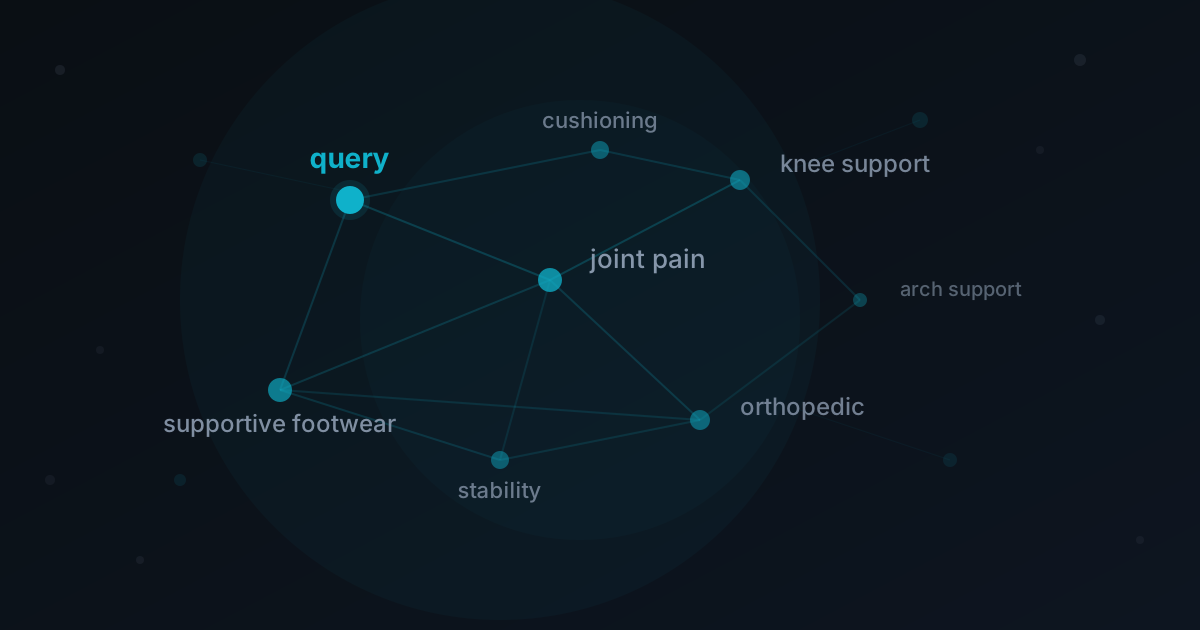
When you search for "running shoes for bad knees," a traditional keyword search engine scans for documents containing those literal matches — "running," "shoes," "bad," "knees." It's finding exact matches, nothing more. If a document uses the phrase "supportive footwear for joint pain," a keyword search engine misses it entirely.
A semantic search engine works differently. It understands that "bad knees" and "joint pain" live in the same conceptual space. It recognizes that "running shoes" and "supportive footwear" are related concepts. Semantic search focuses on meaning, not strings.
In retrieval terms, it's useful to separate two related ideas: similarity retrieval (nearest neighbors in vector space) and broader semantic retrieval (intent/concept-aware retrieval that may combine vectors, structure, and rules).
This article focuses primarily on the vector-similarity side of semantic search, since that's what most teams implement first.
This distinction — between matching words and understanding intent — is what makes semantic search important for any application dealing with real users asking real questions.
How Does Semantic Search Work?
Understanding how semantic search works requires understanding a few key concepts from natural language processing, machine learning, and information retrieval.
Vector Embeddings Turn Language Into Math
At the core of every semantic search engine is a simple idea: convert text into numerical representations that capture semantic meaning.
These numerical representations are called vector embeddings — dense vectors that position words, sentences, or entire documents in a high-dimensional vector space. In this same vector space, things that mean similar things sit close together, and things that mean different things sit far apart.
For a simple example, the sentence embeddings for "how to train a puppy" and "dog obedience tips for beginners" would land near each other in vector space, even though they share zero exact keyword matches. The vector representations capture the semantic relationships between the concepts, not just the surface-level words.
This is what enables semantic search to process human language the way humans actually use it — messy, ambiguous, full of synonyms and implied meaning.
From Query to Results
Here's how vector-similarity search (the most common semantic search implementation) works in practice, step by step:
1. Index your data. An embedding model converts your existing documents into vectors and stores them in a searchable index.
2. Embed the query. When a user submits a search query, that query gets converted into query vectors using the same embedding model.
3. Compare vectors. The search engine compares the query vectors against all document vectors using a similarity metric (cosine similarity is the most common).
4. Rank by proximity. Results are ranked by how close each document vector sits to the query vector — closer means more semantically relevant.
5. Return results. The most relevant results are returned to the user.
No keyword matching. No brittle exact matches. The system ranks content based on contextual meaning and intent relevance, surfacing more relevant search results even when the words don't line up.
Broader semantic retrieval can add additional constraints and interpreted logic on top of this similarity layer.
The Role of Knowledge Graphs and Query Expansion
More advanced semantic search implementations layer on additional techniques. A knowledge graph maps entities and their relationships — connecting "Apple" to both "fruit" and "technology company" depending on context. This helps disambiguate queries and improve context relevance.
Query expansion is another technique where the search engine automatically broadens a user's search query with related terms. If someone searches "EV tax credits," the system might also search for "electric vehicle incentives" and "clean energy rebates" to surface a wider set of relevant results.
These techniques combined — vector search capabilities, knowledge graphs, query expansion — are what enables search engines to deliver results that feel almost eerily accurate.
Semantic Search vs. Lexical Search
Understanding the difference between semantic search and lexical search is critical for anyone building search into a product.
Lexical search (also called keyword search or full-text search) works by finding exact matches between the words in a query and the words in a dataset. It's fast, predictable, and has been the backbone of search for decades. Traditional search engines like early Google relied heavily on lexical search combined with signals like PageRank.
The problem: lexical search has no semantic understanding. It doesn't know that "cheap flights" and "affordable airfare" mean the same thing. If a user's search query doesn't contain the exact keywords in your documents, they get nothing — or worse, irrelevant results.
Semantic search flips this by using vector embeddings to understand meaning. It handles synonyms, typos, rephrased questions, and even cross-language queries naturally. It surfaces more relevant results because it understands search intent, not just search terms.
Practically, this section compares lexical search with vector-similarity search. In production systems, teams often combine that with additional semantic constraints.
But semantic search has its own tradeoffs. Search speed can be slower, especially on large datasets without proper indexing. And sometimes you actually want exact keyword matches — like searching for a unique identifier, an error code, or a specific product SKU.
This is why the best modern search implementations use a hybrid approach: combining lexical search for precision on exact matches with semantic search for recall on meaning-based queries. The system can blend scores from both methods to deliver the most relevant results for any given query.
| Lexical Search | Semantic Search | |
|---|---|---|
| How it works | Exact keyword matching | Vector similarity on meaning |
| Synonyms | Misses them entirely | Handles naturally |
| Typos | Returns nothing | Still finds relevant results |
| Speed | Very fast | Slower without proper indexing |
| Precision | High for exact terms | High for intent-based queries |
| Best for | IDs, codes, exact lookups | Natural language questions |
Why Semantic Search Matters Now
Three things converged to make semantic search go from academic concept in computer science to production-ready technology:
Embedding models got good. Transformer-based models (the same artificial intelligence architecture behind large language models) made it possible to generate high-quality sentence embeddings that capture nuanced semantic meaning. Earlier approaches struggled with context — they couldn't tell the difference between "bank" as a financial institution and "bank" as a riverbank. Modern models handle this effortlessly.
Compute got cheap. Running vector similarity calculations across millions of dense vectors used to be prohibitively expensive. Hardware improvements and optimized indexing algorithms (like HNSW) brought search speed to acceptable levels for production workloads.
Users got impatient. People expect to type natural language questions and get relevant answers instantly. They don't want to guess the right keywords. Any application — from e-commerce to internal knowledge bases to customer support — that still relies on keyword matching alone is delivering a frustrating experience.
If your application serves users who are searching through data, documents, or products, semantic search isn't a nice-to-have anymore. It's table stakes.
Implementing Semantic Search: The Infrastructure Trap
Here's where most guides stop. They've explained what semantic search is, how it works, and why it matters. Then they hand-wave at implementation with something like "just use a vector database."
In reality, implementing semantic search usually means bolting a dedicated vector search system onto your existing architecture. And this is where teams walk into a trap.
The Typical Architecture
Most teams building semantic search end up with something like this:
1. A primary database (PostgreSQL, MySQL) for transactional data and data schemas
2. A separate vector database (Pinecone, Weaviate, Qdrant) for embeddings and vector search
3. An embedding pipeline to convert documents into vectors
4. A sync layer to keep the vector database up to date when source data changes
5. An application layer that queries both systems and merges results
That's five moving pieces just to answer the question "what's the most relevant document for this query?"
Every piece adds latency, operational complexity, and failure modes. The sync layer alone is a constant source of bugs — stale embeddings, missed updates, consistency gaps between your primary data and your vector space.
Role-Based Access Control Gets Messy Fast
It gets worse when you need role-based access control. If different users should see different subsets of your dataset, you now need to enforce permissions across two separate systems. Your primary database has its own access control. Your vector database has its own. Keeping them in sync is a nightmare, and a single mismatch means either leaking data to users who shouldn't see it or hiding relevant results from users who should.
The Alternative: Unified Search Infrastructure
The architectural mistake isn't choosing semantic search — it's assuming you need a separate system to do it.
A database that natively supports vector search capabilities alongside traditional queries, transactional workloads, and analytical processing eliminates the entire sync problem. Your embeddings live next to your source data. Your access control is defined once, in one place. Your queries can combine vector similarity with structured filters in a single operation.
This is the approach behind a Context Lake — a single PostgreSQL-compatible system that handles vector search, full-text search, transactional queries, and analytics in one place. No embedding pipeline to maintain. No sync layer to debug at 2 AM. No separate vector database bill.
When your data and your embeddings live together, implementing semantic search goes from a quarter-long infrastructure project to a feature you ship in a week.
Getting Started with Semantic Search
Whether you're adding semantic search to an existing application or building something new, here's what to focus on:
Choose your embedding model wisely. The quality of your semantic search is directly tied to the quality of your embeddings. Models like OpenAI's text-embedding-3-large or open-source options like BGE and E5 are solid starting points. Match the model to your domain — a general-purpose model works for most use cases, but specialized domains (legal, medical, scientific) may benefit from fine-tuned models.
Start with hybrid search. Don't go pure semantic from day one. Combine vector search with lexical search to cover both intent relevance and exact match use cases. This gives you better results across a wider range of search queries while you tune your semantic layer.
Think about your data schemas early. How you structure and chunk your existing documents matters. Splitting a 50-page PDF into paragraph-level chunks with metadata produces much better results than embedding the whole thing as one blob. Schema design directly impacts search quality.
Don't ignore search speed. Vector search at scale requires proper indexing. Approximate nearest neighbor (ANN) indexes like HNSW trade a tiny bit of accuracy for massive improvements in search speed. For most applications, this tradeoff is well worth it.
Keep your architecture simple. Every additional system you add is a system you have to maintain, monitor, secure, and pay for. Before reaching for a dedicated vector database, ask whether your existing infrastructure — or a unified alternative — can handle it natively.
Semantic Search Is Just the Beginning
Semantic search is a foundational capability, not a destination. Once your data is embedded and searchable by meaning, you unlock a cascade of possibilities: retrieval-augmented generation (RAG) for LLM-powered applications, recommendation engines, anomaly detection, classification, and more.
The teams that move fastest aren't the ones with the most sophisticated machine learning pipelines. They're the ones with the simplest, most unified data architecture — where adding a new capability doesn't require adding a new system.
That's what a Context Lake is designed for. One database. Every workload. No separate systems required.
Written by Alex Kimball
Building the infrastructure layer for AI-native applications. We write about Decision Coherence, Tacnode Context Lake, and the future of data systems.
View all postsContinue Reading
Ready to see Tacnode Context Lake in action?
Book a demo and discover how Tacnode can power your AI-native applications.
Book a Demo