
Private Link
Secure your Tacnode connections with Private Link technology, enabling private network access without exposing data to the public internet.
Private Link enables secure, private network connections between your VPC and Tacnode nodegroups without exposing traffic to the public internet. This enterprise-grade connectivity solution provides the highest level of network security for your data warehouse operations.
How Private Link Works
Private Link creates a secure tunnel between your Virtual Private Cloud (VPC) and Tacnode’s infrastructure, similar to a dedicated VPN connection. Each nodegroup operates within its own isolated VPC, ensuring complete separation between different workloads and customers.
Architecture Overview
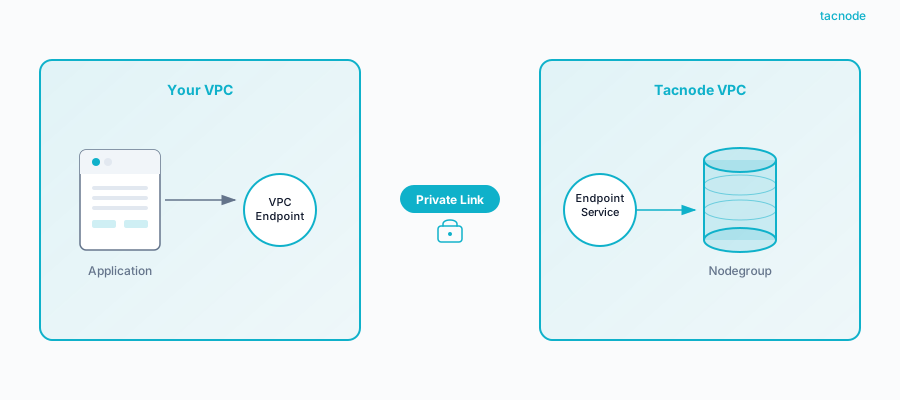
Key Components:
- Your VPC: Your private cloud environment where applications and users reside
- Private Endpoint: The connection point in your VPC that provides access to Tacnode
- Tacnode VPC: Isolated cloud environment hosting your nodegroup
- Secure Tunnel: Encrypted, private network path between endpoints
Benefits of Private Link
Enhanced Security
- Private Network Communication: All traffic flows through private networks, eliminating public internet exposure
- Encrypted Transit: Data encryption in transit using industry-standard protocols
- Network Isolation: Complete isolation from other customers and public network threats
- Reduced Attack Surface: Eliminates public endpoints that could be targeted by attackers
Advanced Access Control
- Security Group Integration: Apply AWS/cloud provider security group rules to control traffic
- Source Authentication: Implement endpoint-level authentication policies
- Network-Level Filtering: Control access at the network layer before it reaches the database
- Granular Permissions: Combine network controls with database-level permissions
Operational Excellence
- Low Latency: Traffic remains within the same availability zone for optimal performance
- High Availability: Built-in redundancy and failover capabilities
- Monitoring Integration: Native integration with cloud provider monitoring and logging
- Scalable Bandwidth: Automatic scaling to handle varying workload demands
Compliance and Governance
- Data Sovereignty: Keep data within specific geographic regions
- Audit Capabilities: Comprehensive flow logs for all network communications
- Compliance Ready: Meets requirements for PCI DSS, HIPAA, SOC 2, and other standards
- Policy Enforcement: Integrate with enterprise policy management systems
When to Use Private Link
Production Environments
Private Link is strongly recommended for all production deployments where data security is critical:
- Financial Services: Banking, insurance, and investment platforms
- Healthcare: Patient data and medical record systems
- Government: Sensitive government and public sector data
- Enterprise: Corporate data warehouses with confidential information
Multi-Tenant Applications
Applications serving multiple customers or business units:
- SaaS Platforms: Multi-tenant software applications
- Data Analytics: Shared analytics platforms with sensitive data
- Business Intelligence: Executive dashboards and reporting systems
- Customer Portals: External-facing applications with internal data access
Regulatory Compliance
Environments subject to strict regulatory requirements:
- Data Residency: Requirements to keep data within specific regions
- Network Security: Mandated private network communications
- Audit Requirements: Need for comprehensive network activity logging
- Access Controls: Strict requirements for network-level access restrictions
Implementation Requirements
Prerequisites
Before setting up Private Link connectivity:
- VPC Configuration: Properly configured VPC with appropriate subnets
- Network Planning: IP address ranges that don’t conflict with Tacnode networks
- Security Groups: Defined security group rules for database access
- DNS Configuration: Proper DNS resolution for private endpoints
- Monitoring Setup: CloudWatch or equivalent monitoring for network flows
Network Planning Considerations
- IP Address Management: Ensure non-overlapping CIDR blocks
- Subnet Architecture: Design subnets for different access tiers
- Routing Configuration: Set up proper route tables for private traffic
- DNS Resolution: Configure private DNS for seamless connectivity
- Bandwidth Planning: Estimate bandwidth requirements for your workloads
Configuration Steps
For detailed Private Link configuration instructions, refer to the Network Configuration Guide.
High-Level Setup Process
- Request Private Link: Contact Tacnode support to enable Private Link for your account
- VPC Preparation: Configure your VPC with appropriate subnets and security groups
- Endpoint Creation: Create the private endpoint in your VPC
- DNS Configuration: Set up private DNS resolution for Tacnode services
- Security Rules: Configure security groups and network ACLs
- Connection Testing: Validate connectivity and performance
- Monitoring Setup: Enable flow logs and monitoring for the connection
Validation and Testing
After setup, validate your Private Link connection:
-- Test basic connectivity
SELECT version();

-- Verify private network routing
SELECT inet_server_addr();

-- Test query performance
EXPLAIN ANALYZE SELECT COUNT(*) FROM your_table;
Best Practices
Security Configuration
- Use dedicated security groups for database access
- Implement least-privilege network access rules
- Regularly review and audit network configurations
- Enable comprehensive flow logging for security monitoring
Performance Optimization
- Place compute resources in the same availability zone as Private Link endpoints
- Monitor network bandwidth utilization and scale appropriately
- Use connection pooling to optimize connection management
- Implement proper retry logic for transient network issues
Operational Management
- Document network architecture and configuration
- Implement infrastructure as code for reproducible deployments
- Set up monitoring and alerting for network health
- Plan for disaster recovery and failover scenarios
Private Link connectivity provides the foundation for secure, high-performance data warehouse operations in cloud environments, ensuring your sensitive data remains protected while maintaining operational efficiency.