pg_cron: Scheduling Postgres Jobs (and Refreshing Materialized Views)
How to install pg_cron on self-hosted Postgres, Amazon RDS, Cloud SQL, Azure and Supabase, write schedules, read job history, and run the job most teams install it for: refreshing a materialized view on a schedule without blocking readers.
pg_cron is a cron-based job scheduler for PostgreSQL that runs inside the database as an extension. A background worker reads jobs from the cron.job table and executes each job’s SQL command on its schedule, using standard cron syntax or a seconds interval. Every run is logged to cron.job_run_details for monitoring and troubleshooting.
pg_cron was written at Citus Data and is maintained in the citusdata/pg_cron repository (Citus is part of Microsoft). It is released under the PostgreSQL License and supports PostgreSQL 10 and later. The latest release at the time of writing is v1.6.8 (September 8, 2026), which added PostgreSQL 19 support; v1.6.6 added PostgreSQL 18 support.
A few properties are worth knowing before you write your first job:
It lives in one database. pg_cron’s metadata tables are created in the database named by cron.database_name (default postgres). Jobs can target other databases, but you schedule them from that one.
Jobs don’t overlap themselves. According to the README, pg_cron runs multiple jobs in parallel but only one instance of each job at a time. If a run is due while the previous run is still going, it is queued and starts when the first finishes.
Schedules run in GMT by default. Set cron.timezone (available since v1.5) if you want local time.
It does nothing on a standby. pg_cron runs no jobs while the server is in hot standby, and starts automatically if the server is promoted.
How to Install and Enable pg_cron
Every platform follows the same three steps: load the library at server start, restart, create the extension. What differs is where you set the parameters.
Self-hosted PostgreSQL
Install the package for your Postgres major version. On Debian or Ubuntu with the PGDG repository:
bash
sudo apt-get -y install postgresql-18-cron
On Red Hat, Rocky, Fedora or Amazon Linux with PGDG:
bash
sudo yum install -y pg_cron_18
Then edit postgresql.conf:
ini
shared_preload_libraries = 'pg_cron'
cron.database_name = 'postgres'   # the database that holds pg_cron's metadata
cron.timezone = 'UTC'             # optional; default is GMT
If shared_preload_libraries already lists other libraries (say, pg_stat_statements), append rather than replace: ’pg_stat_statements,pg_cron’. Restart Postgres, connect to the database you named in cron.database_name, and run:
sql
CREATE EXTENSION pg_cron;

-- optional: let a non-superuser schedule their own jobs
GRANT USAGE ON SCHEMA cron TO app_owner;
Running pg_cron locally with Docker
The official postgres image doesn’t include pg_cron, but its Debian-based variants already have the PGDG apt repository configured, so a two-line Dockerfile adds it:
dockerfile
FROM postgres:18
RUN apt-get update && apt-get install -y postgresql-18-cron && rm -rf /var/lib/apt/lists/*
The image doesn’t touch shared_preload_libraries, so pass the two settings as server flags when you start the container:
Then run CREATE EXTENSION pg_cron; in the postgres database. The Alpine variants don’t have the PGDG packages; use a Debian tag. The supabase/postgres image ships pg_cron preinstalled if you’d rather not build your own.
Amazon RDS and Aurora PostgreSQL
On RDS for PostgreSQL (engine 12.5 and later) and Aurora PostgreSQL, you can’t edit postgresql.conf. Instead:
1.Create or modify a custom DB parameter group (DB cluster parameter group for Aurora) and add pg_cron to shared_preload_libraries. If you use rds.allowed_extensions, add pg_cron there too.
2.Reboot the instance so the parameter group change takes effect.
3.Connect as a user with rds_superuser (the default postgres master user works) and run CREATE EXTENSION pg_cron; in the postgres database.
RDS runs pg_cron jobs through background workers, and cron.use_background_workers and cron.host can’t be changed there. AWS recommends keeping max_worker_processes above cron.max_running_jobs, because a job fails if no background worker is free.
Google Cloud SQL for PostgreSQL
Set the cloudsql.enable_pg_cron database flag to on (this restarts the instance), optionally set the cron.database_name flag, then run CREATE EXTENSION pg_cron;. Cloud SQL supports only background-worker mode, not libpq connections, so you don’t need to touch authentication settings. Per the Cloud SQL flags reference, cron.max_running_jobs defaults to 5 there.
Azure Database for PostgreSQL (flexible server)
Azure needs two separate settings. Add pg_cron to the azure.extensions allowlist, and add it to shared_preload_libraries under Server parameters, then restart. If you skip the preload step, CREATE EXTENSION fails with pg_cron can only be loaded via shared_preload_libraries, per Azure’s extension notes. Azure doesn’t support passing a non-null username to cron.schedule_in_database, so jobs run as the scheduling user, which should have azure_pg_admin.
Supabase
Supabase exposes pg_cron as Supabase Cron. Enable it from Integrations → Cron in the dashboard, or with SQL:
sql
create extension pg_cron with schema pg_catalog;

grant usage on schema cron to postgres;
grant all privileges on all tables in schema cron to postgres;
Supabase recommends no more than 8 concurrent jobs, each running no longer than 10 minutes. Dropping the extension deletes every job.
The pg_cron README also lists support on Aiven, Crunchy Bridge, DigitalOcean, Neon and others. Heroku Postgres doesn’t support it.
pg_cron Syntax: Cron Expressions and Seconds
pg_cron’s schedule parser comes straight from Paul Vixie’s cron, so standard five-field expressions work:
text
┌───────────── minute (0-59)
│ ┌─────────── hour (0-23)
│ │ ┌───────── day of month (1-31, or $ for last day)
│ │ │ ┌─────── month (1-12)
│ │ │ │ ┌───── day of week (0-6, Sunday=0; 7 is also Sunday)
│ │ │ │ │
* * * * *
Some examples:
Two pg_cron extensions to the syntax:
Seconds intervals. Since v1.5.0, you can schedule a job with ’[1-59] seconds’, such as ’10 seconds’. You can’t combine seconds with other fields; it’s an interval, not a sixth cron field.
Last day of month.$ in the day-of-month field means the last day of the month (v1.6.0 and later).
pg_cron’s API is four functions. You can write to cron.job directly if you have privileges, but the functions are the supported path.
cron.schedule
sql
-- Unnamed job: returns the job id
SELECT cron.schedule('0 3 * * *', 'VACUUM ANALYZE orders');

-- Named job (preferred): easier to find, alter and unschedule
SELECT cron.schedule(
    'nightly-vacuum-orders',
    '0 3 * * *',
    'VACUUM ANALYZE orders'
);
Use dollar quoting for commands that contain single quotes:
sql
SELECT cron.schedule(
    'purge-old-events',
    '30 3 * * 6',
    $$DELETE FROM events WHERE event_time < now() - interval '1 week'$$
);
Name your jobs. Calling cron.schedule again with the same job name updates that job rather than adding a duplicate, which makes job definitions safe to keep in migration files.
cron.schedule_in_database
Since pg_cron 1.4, you can run a job in a database other than the one holding pg_cron’s metadata:
The full signature is (job_name, schedule, command, database, username DEFAULT NULL, active DEFAULT true). Leave username null to run as yourself.
cron.unschedule
sql
SELECT cron.unschedule('purge-old-events');   -- by name
SELECT cron.unschedule(42);                   -- by job id
cron.alter_job
sql
-- Change only the schedule
SELECT cron.alter_job(42, schedule := '*/10 * * * *');

-- Pause a job without deleting it
SELECT cron.alter_job(42, active := false);

-- Point an existing job at another database
SELECT cron.alter_job(job_id := 42, database := 'analytics');
Every argument after job_id defaults to NULL, meaning “leave unchanged.” An RLS policy on cron.job means users see and modify only their own jobs unless they’re a superuser or have bypassrls.
pg_cron Job History: cron.job and cron.job_run_details
SELECT jobid, jobname, schedule, database, active
FROM cron.job
ORDER BY jobid;
cron.job_run_details holds one row per run: runid, jobid, job_pid, status (starting, connecting, sending, running, succeeded, failed), return_message, start_time, end_time. This query is the one you’ll run most:
sql
SELECT j.jobname,
       d.status,
       d.start_time,
       d.end_time - d.start_time AS duration,
       d.return_message
FROM cron.job_run_details d
JOIN cron.job j USING (jobid)
ORDER BY d.start_time DESC
LIMIT 20;
Filter on status = ’failed’ to find broken jobs; return_message holds the Postgres error text.
Purge run history. pg_cron never cleans cron.job_run_details on its own. A job running every 10 seconds writes 8,640 rows a day. Schedule the cleanup with pg_cron itself, as both the README and AWS recommend:
sql
SELECT cron.schedule(
    'purge-cron-history',
    '0 0 * * *',
    $$DELETE FROM cron.job_run_details WHERE end_time < now() - interval '7 days'$$
);
If you don’t want run history at all, set cron.log_run = off; failures still reach the Postgres server log.
Background Workers vs. libpq Connections
pg_cron can execute a job in two ways, and which one you’re using explains most “my job never ran” reports.
libpq connections (self-hosted default). The scheduler opens a normal client connection to cron.host (default localhost) as the job’s user. That connection has to pass pg_hba.conf authentication. If it can’t, runs fail with a connection error in return_message. Fixes: allow trust for local connections for that user, add a .pgpass entry, or set cron.host to a Unix socket directory (such as ’/tmp’ or ’’ for the default) and trust local socket connections.
Background workers. Set cron.use_background_workers = on and each job runs in a Postgres background worker with no network authentication. Concurrent jobs are then bounded by max_worker_processes (default 8, and shared with parallel query, logical replication and other extensions), so raise it:
ini
cron.use_background_workers = on
max_worker_processes = 20
Amazon RDS and Cloud SQL use background workers and don’t expose the choice. In both modes, cron.max_running_jobs caps how many jobs run at once (32 in the upstream default, 5 on RDS and Cloud SQL). Both cron.use_background_workers and cron.max_running_jobs need a restart to change.
Running pg_cron Jobs Across Databases
pg_cron can only be installed in one database per cluster. If you run CREATE EXTENSION pg_cron somewhere other than cron.database_name, it errors and tells you jobs must be scheduled from the configured database.
Two ways to handle multiple databases:
Keep metadata in postgres and target others with cron.schedule_in_database or cron.alter_job(..., database := ...). This is the usual choice.
Set cron.database_name to your application database if you only have one. Then you can create jobs from the same session you run migrations in.
On older RDS guidance you’ll see UPDATE cron.job SET database = .... It works, but cron.alter_job does the same thing through the supported API, and AWS notes the job can fire once in the wrong database before the update lands.
Common pg_cron Jobs
Targeted VACUUM. Autovacuum covers most tables, but a hot queue table or a table you bulk-delete from nightly may need a scheduled pass:
CREATE MATERIALIZED VIEW daily_order_totals AS
SELECT DATE_TRUNC('day', created_at) AS order_day,
       customer_id,
       COUNT(*)    AS order_count,
       SUM(amount) AS total_amount
FROM orders
GROUP BY 1, 2;

CREATE UNIQUE INDEX daily_order_totals_uidx
    ON daily_order_totals (order_day, customer_id);
The unique index isn’t optional. Per the PostgreSQL docs, CONCURRENTLY is only allowed when the view has at least one UNIQUE index that uses only column names and covers all rows: no expression index, no WHERE clause. The view must also already be populated, so the first refresh after WITH NO DATA has to be a plain one.
Step 2: Wrap the refresh in a procedure.
sql
CREATE OR REPLACE PROCEDURE refresh_daily_order_totals()
LANGUAGE plpgsql
AS $$
BEGIN
    -- give up rather than queue forever behind a manual refresh or a DDL lock
    PERFORM set_config('lock_timeout', '30s', true);
    REFRESH MATERIALIZED VIEW CONCURRENTLY daily_order_totals;
END;
$$;
A procedure keeps the cron command short, lets you add a timeout, and lets you refresh dependent views in order (refresh the base view first, then views built on it).
SELECT start_time,
       end_time - start_time AS refresh_duration,
       status
FROM cron.job_run_details
WHERE jobid = (SELECT jobid FROM cron.job WHERE jobname = 'refresh-daily-order-totals')
ORDER BY start_time DESC
LIMIT 50;
Duration is the number that matters. Tracked over a few weeks, it tells you when the refresh will stop fitting inside its schedule.
What happens when refreshes overlap
Two separate guards stop a slow refresh from stacking up:
1.pg_cron won’t start a second copy of the same job. If the 10:05 run is still going at 10:10, the 10:10 run waits and starts as soon as 10:05 finishes. Refreshes then run back to back, with no idle time between them.
2.Postgres allows one refresh per view at a time. The docs state that even with CONCURRENTLY, “only one REFRESH at a time may run against any one materialized view.” A manual refresh from psql, or a second job pointed at the same view, waits for the lock. The lock_timeout in the procedure turns that wait into a clean failure you can see in cron.job_run_details.
Plain vs. concurrent refresh
CONCURRENTLY keeps SELECTs running during the refresh, but it isn’t free: Postgres computes the full new result and diffs it against the old one. When most rows change, a plain REFRESH MATERIALIZED VIEW uses fewer resources and finishes faster, at the cost of blocking readers. For a view nobody reads overnight, schedule a plain refresh at 3 a.m. For a view behind a live dashboard or API, use CONCURRENTLY. Either way, the whole query re-runs over every source row on every refresh. Postgres has no built-in incremental mode.
pg_cron Troubleshooting
Also check the Postgres server log. pg_cron logs each statement before running it (cron.log_statement = on by default), and launcher errors go there rather than into cron.job_run_details.
Symptom
Likely cause
Fix
pg_cron can only be loaded via shared_preload_libraries
Library not preloaded, or server not restarted
Add to shared_preload_libraries, restart
CREATE EXTENSION refuses in your app database
pg_cron must live in cron.database_name
Create it there; use cron.schedule_in_database for other databases
No rows in cron.job_run_details
Job inactive, wrong timezone expectation, cron.log_run = off, or server is a standby
Check cron.job.active, SHOW cron.timezone, pg_is_in_recovery()
Runs fail with a connection or authentication error
libpq mode can’t pass pg_hba.conf
Trust local socket, .pgpass, or cron.use_background_workers = on
permission denied for table ...
Job runs as the scheduling user, who lacks privileges on the object
Grant the privilege, or schedule as the object owner
Jobs stuck in starting
No free background worker or cron.max_running_jobs reached
pg_cron is a scheduler, not a workflow engine. Know the edges before you build on it:
Minute granularity for cron expressions, plus a separate 1-59 second interval mode. Nothing finer than one second.
No dependencies, retries or backfills. Job B can’t wait on job A. Chain steps inside one procedure, or use an orchestrator (Airflow, Dagster) when you need a DAG.
One metadata database per cluster, and no jobs on standbys.
Jobs share the database’s resources. A heavy refresh at peak hours competes with production queries for CPU, I/O and locks.
Concurrency is capped by cron.max_running_jobs and, in background-worker mode, max_worker_processes.
History grows without bound until you purge it.
When a Schedule Can’t Keep Derived Data Fresh
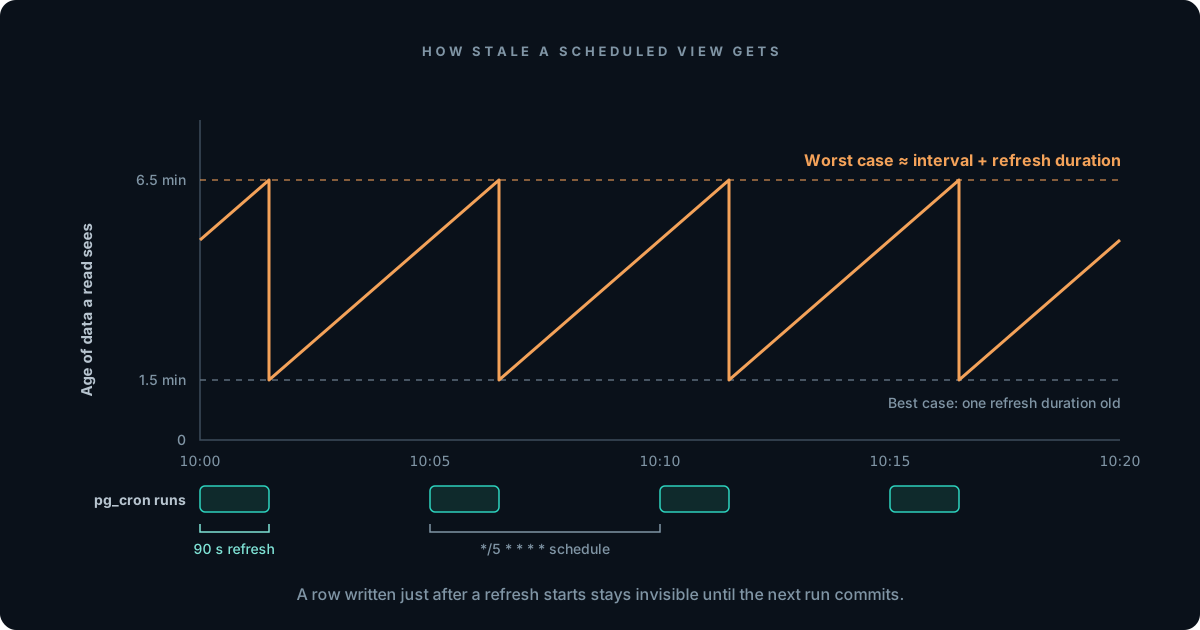
pg_cron controls when a materialized view refreshes. It can’t change how stale the view gets between refreshes. For a scheduled refresh, the worst case works out to:
A row written one second after a refresh starts misses that run, waits for the next scheduled run, and becomes visible only when that run commits. With a 5-minute schedule and a 90-second refresh, a read can see data about 6.5 minutes old. Shrink the interval and you hit the duration floor: once a refresh takes longer than its interval, pg_cron runs them back to back, and staleness settles at about two refresh durations, while the database spends all its time recomputing the same aggregate over rows that mostly didn’t change. Add a second or third view on its own schedule and each reflects a different moment, so a request that reads all three combines state that never coexisted. That’s stale data by design, not by bug.
For dashboards and reports, that’s fine. For a fraud check, a credit limit or an agent’s next action, the options are to maintain the derived result incrementally instead of recomputing it:
pg_ivm maintains supported view shapes incrementally inside Postgres, updating the view as base tables change.
Trigger-maintained summary tables give you full control of the logic, at the cost of write-path overhead and hand-written maintenance code.
CDC into a stream processor or incremental engine, which keeps derived state current outside the source database. Our incremental materialized views guide compares these approaches.
The Tacnode Context Lake™ is one option in that last group, and it keeps the scheduling pattern from this guide while shrinking the interval. Derived state defined in SQL is refreshed with the same REFRESH MATERIALIZED VIEW statement on a schedule you set, but an incremental view applies only what changed since the last refresh instead of recomputing the whole result, so the refresh can run every few seconds where a full rebuild runs hourly or daily, without locking the table. Reads are served at request concurrency, and every read is served from one coherent snapshot instead of several systems that each reflect a different moment. It presents the PostgreSQL wire protocol, so you define views in SQL and query them with the Postgres drivers you already use.