Snowflake Alternatives and Competitors (2026): Ranked by Workload
Snowflake is a strong default for BI and cross-team SQL, but teams go looking for Snowflake alternatives when continuous workloads keep warehouses running around the clock, when derived data has to be fresher than a one-minute target lag, or when a customer-facing request needs an answer at request concurrency. Here are ten Snowflake competitors, from Databricks and BigQuery to ClickHouse, Pinot, and DuckDB, ranked by the workload you are actually running.
Snowflake alternatives get evaluated when one of four limits shows up: the cost of always-on compute for continuous workloads, freshness (derived data refreshed by Dynamic Tables has a one-minute minimum target lag), concurrency for user-facing serving, or several systems each holding a different version of reality at the moment a decision runs. Each points to a different category.
These four reasons look alike from a distance. They lead to very different products.
The cost of always-on compute for continuous workloads. Snowflake bills virtual warehouses per second, with a 60-second minimum each time a warehouse starts, and credits per hour double with each size step: an X-Small uses 1 credit per hour, a Small 2, a Medium 4, up to 512 for a 6X-Large. For bursty BI, auto-suspend keeps that cheap; by default a warehouse suspends after 600 seconds of inactivity. A continuous workload never goes idle. A Dynamic Table refreshing every minute, a stream of micro-batch loads, or an API that queries every few seconds keeps the warehouse running around the clock. An X-Small that never suspends burns 24 credits a day; a Medium burns 96. Scaling out for concurrency with multi-cluster warehouses requires Enterprise Edition. Fair for bursty analytics; expensive for a job that never stops.
Freshness of derived data. Snowflake’s ingestion is fast: Snowpipe Streaming advertises ingest-to-queryable latency “as low as 5 seconds,” while file-based Snowpipe makes data available “within minutes.” Raw rows are not what most decisions read, though. They read derived values: a customer’s spend in the last hour, the count of failed logins this session, an exposure total across open positions. In Snowflake, derived state is maintained by Dynamic Tables, and the minimum target lag is 60 seconds. Values below that fail validation. We covered the refresh mechanics in detail in Snowflake Dynamic Tables vs Materialized Views. A minute is fine for a dashboard. It is a long time for a fraud check.
Concurrency for user-facing serving. Warehouses were designed for analysts, not for every request in a product. Snowflake’s answer is interactive warehouses, covered below. They speed up serving. They do not change how fresh the derived data underneath is.
Several systems, several versions of reality. This one rarely shows up on alternatives lists because it is not a Snowflake problem alone. A typical real-time path has an operational store, a cache, a stream processor, and a warehouse, each advancing at its own pace. The fraud model reads a velocity count from the cache, the account record from Postgres, and a risk aggregate from the warehouse. Each is correct on its own. Together they describe a moment that never existed. Swapping Snowflake for another warehouse keeps the same problem with a different logo on one box.
The first three reasons point to other analytical engines. The fourth points to a different kind of system.
How to Choose: What Are You Using Snowflake For?
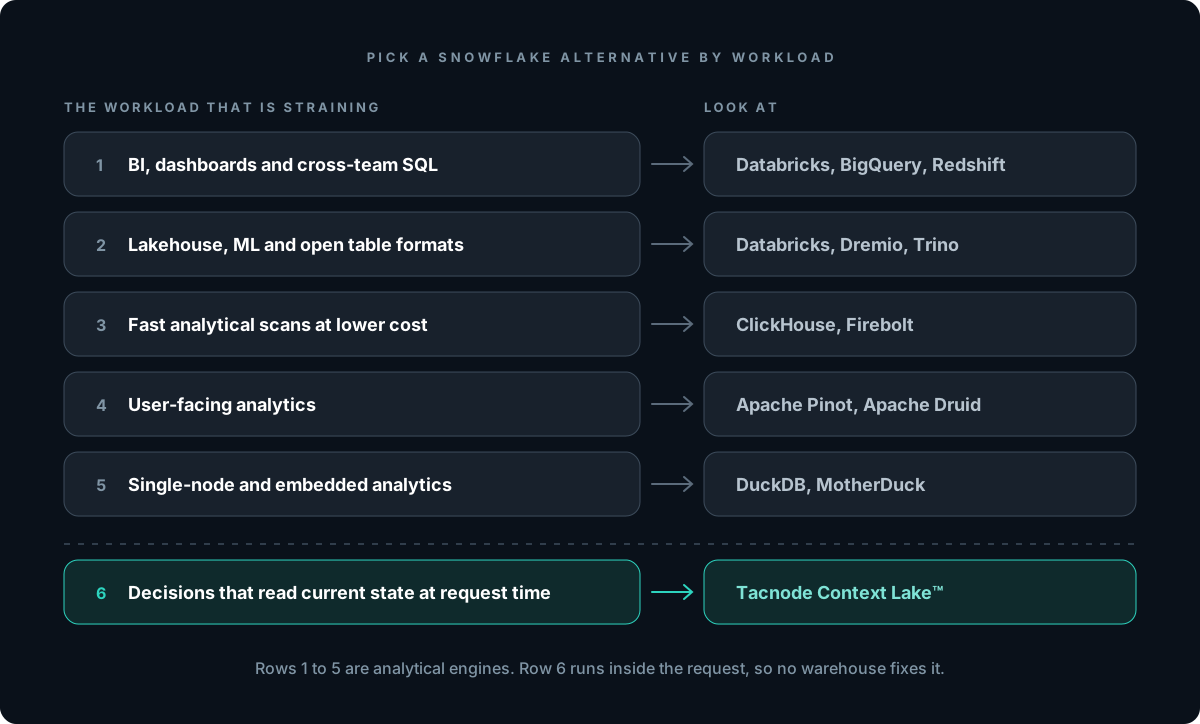
Before you compare pricing pages, name the workload that is actually straining:
1.BI, dashboards, and cross-team SQL. Scheduled reports, dbt models, ad-hoc analysis, data sharing. Snowflake’s home turf. If you are leaving for cost or ecosystem reasons, look at Databricks, BigQuery, or Redshift.
2.Lakehouse, ML, and open table formats. Data science notebooks, model training, Iceberg or Delta tables on object storage. Look at Databricks, Dremio, or Trino.
3.Fast analytical scans at lower cost. Wide tables, heavy aggregations, log and event analytics. Look at ClickHouse or Firebolt.
4.User-facing analytics. Every query is a customer’s page load or API call, and the data is mostly append-only events. Look at Apache Pinot or Apache Druid.
5.Single-node and embedded analytics. Datasets that fit on one machine, analytics inside an app, local development. Look at DuckDB or MotherDuck.
6.Decisions that read current state at request time. Fraud checks, credit and risk limits, in-session personalization, agent actions. The decision runs inside a request, reads derived values that change with every event, and its outcome becomes input to the next decision. Look at the Tacnode Context Lake™.
Most companies run several of these. Be honest about which one is causing the pain. If it is number 6, no warehouse will fix it, including a faster one.
The Workload Most Lists Miss: Decisions on Current State
Almost every entry on the usual competitor lists is an analytics engine. They differ in price, scan speed, and openness. They share one assumption: queries happen after data settles.
A decision that runs inside a request inverts that assumption. A card authorization, a withdrawal approval, a bet acceptance, a recommendation slot mid-session, an agent’s next tool call: each has a short window, and each reads state that is still changing. If the spend total the fraud check reads is a minute old, the check approves what it would have blocked had it seen the last five transactions. If two agents read the same budget from a cache before either write lands, both spend it.
This is the context gap: the decision acts on context that is incomplete, inconsistent, or outdated at the moment it runs. It comes from pipeline lag (derived values computed somewhere else, on a schedule) and from inconsistent reads (the pieces of context pulled from different systems at different moments). A warehouse with a one-minute refresh floor has the first. A stack of warehouse, cache, and stream processor has both. For background on what “real time” has to mean here, see What Is Real-Time AI.
1. Tacnode Context Lake™: Best for Decisions That Read Current State
Snowflake vs Tacnode: Unlike Snowflake, the Tacnode Context Lake™ is not built to answer questions about the past. It holds the decision context: everything a decision reads (source data from the systems you already run, the derived signals computed from it, and retrieval such as full-text and vector search) and everything it decided (verdicts, scores, holds, per-agent limits, agent actions). That context stays current sub-second behind the write and is served at the concurrency of the request path, in one coherent snapshot.
Tacnode sits inside the decision loop, not beside it. Source data arrives by CDC or streams from your operational systems. Services and agents read their context from Tacnode, decide, and write the outcome back, where it becomes context for the next decision. For decision state held in Tacnode, writes are ACID: two concurrent agents cannot both claim the same budget. For data your own systems of record own, Tacnode gives the decision accurate context, so it doesn’t approve what it would have blocked if it had seen current state.
What it does well:
Freshness where decisions need it. Derived signals such as velocity counts, rolling exposure, and session aggregates stay current sub-second behind the write, not on a refresh schedule. Live context is the core of the product.
One coherent snapshot. Point lookups, range scans, aggregations, and similarity search resolve in one system against the same set of ingested events, so a decision doesn’t stitch together reads from systems that advanced at different speeds.
Request concurrency. Built to serve every request in the decision path, not an analyst queue.
Decisions written back. Holds, limits, and agent actions live next to the context that produced them, with transactional guarantees on that state.
PostgreSQL wire protocol. Existing drivers, ORMs, and SQL work.
The warehouse stays. Tacnode exports its tables to Apache Iceberg, so your warehouse or lakehouse can query the same data in place without a sync job.
Enterprise-ready on AWS. Runs in your cloud account, available through AWS Marketplace, SOC 2 and HIPAA.
Where it’s not the right choice:
If the workload is BI, scheduled reporting, or petabyte-scale historical analysis, keep a warehouse. Tacnode is not a Snowflake replacement for dashboards.
If your decision path runs at low volume, plain Postgres is usually enough.
If you only need analytics to be a few minutes fresher, Snowpipe Streaming or a shorter target lag may close the gap without a new system.
Best for: teams whose Snowflake pain is really request-time pain. Fraud and risk platforms, credit and exposure limits, exchanges and trading apps where a balance must reflect the trade that just executed, in-session personalization (Tacnode runs in production at a top-three US delivery platform for exactly that), and multi-agent systems where concurrent agents act on shared state.
2. Databricks: Lakehouse for ML, AI, and Open Formats
Snowflake vs Databricks: This is the comparison most teams start with. Unlike Snowflake, Databricks grew out of Apache Spark and treats open table formats on your own object storage as the foundation, with SQL warehouses, notebooks, ML tooling, and governance on top. Snowflake started as a SQL warehouse and added open formats; Databricks started as a data engineering and ML platform and added a warehouse. Pricing is in Databricks Units, pay-as-you-go at per-second granularity.
Databricks is also moving into operational workloads. Lakebase, its managed Postgres built on the Neon acquisition, became generally available on AWS on February 3, 2026. On June 16, 2026, Databricks announced LTAP, which it describes as unifying “transactions, analytics, streaming, and operational data on a single copy of storage.” And Real-Time Mode for Spark Structured Streaming went generally available in March 2026 for low-latency stream processing.
What it does well:
Open lakehouse on Delta Lake and Iceberg, on S3, Azure storage, or Google Cloud Storage
Spark for large-scale data engineering and ML training pipelines
Integrated ML lifecycle, notebooks, model serving, and Unity Catalog governance
A Postgres option (Lakebase) inside the same platform
Where it’s not the right choice:
If your team mostly writes SQL for dashboards, Databricks brings more platform than you need
One copy of storage is a storage property. It does not by itself make derived values fresh and consistent at the instant a high-concurrency decision reads them. We break this down in Databricks Lakebase and LTAP vs the Context Lake
A fast stream processor still writes its output somewhere, and the decision reads wherever that is
Fits: organizations where analytics sits alongside data science, ML, and AI engineering, and open formats matter more than a pure-SQL experience.
3. Google BigQuery: Serverless SQL on Google Cloud
Snowflake vs BigQuery: Unlike Snowflake’s virtual warehouses, BigQuery has no warehouse to size or suspend. You either pay per query or buy capacity. On-demand pricing is $6.25 per TiB scanned, with the first 1 TiB per month free; capacity pricing uses slots through editions. For teams already on Google Cloud, that model removes the “is the warehouse running?” question entirely.
BigQuery also has more streaming depth than many realize. Rows written through the Storage Write API are available for query as soon as the write is acknowledged. Materialized views read the unrefreshed changes from base tables at query time to return current results. Continuous queries run SQL over incoming data and export to Pub/Sub, Bigtable, or Spanner.
What it does well:
Serverless: no clusters, no sizing, no suspend policies
Streaming inserts that are queryable on acknowledgment
Where it’s not the right choice:
Per-TiB pricing punishes high-frequency serving. A query that scans a table on every API call gets billed on every API call
Materialized views support a limited set of aggregation functions and cannot be nested on other materialized views
Continuous queries require Enterprise or Enterprise Plus reservations, and stateful operations such as joins and aggregations were still in Preview at the time of writing
Continuous queries push results out to another system for serving, which puts you back into a multi-system path
If you are AWS-first, it means operating a second cloud
Fits: Google Cloud shops that want a warehouse with zero capacity management and are comfortable with per-query or slot pricing.
4. Amazon Redshift: The AWS-Native Warehouse
Snowflake vs Redshift: Unlike Snowflake, which runs across three clouds, Amazon Redshift is AWS’s own warehouse, with both provisioned clusters and Redshift Serverless. Serverless bills in RPU-hours, metered per second with a 60-second minimum. One detail worth knowing before you migrate: Redshift Serverless bills every incoming query, including the SELECT 1 health checks that connection pools send.
Redshift’s strongest argument is AWS integration. Zero-ETL integrations replicate Aurora, RDS, DynamoDB, and several SaaS applications into Redshift without a pipeline to maintain, with a configurable refresh interval. Streaming ingestion reads Kinesis Data Streams and Amazon MSK directly into materialized views, which AWS describes as “near real-time” analytics. Concurrency scaling adds cluster capacity automatically when queries start queuing.
What it does well:
Tight integration with AWS data sources, IAM, and networking
Zero-ETL replication from AWS operational databases
Streaming ingestion from Kinesis and MSK without an S3 staging step
Where it’s not the right choice:
Streaming materialized views do not support JOINs on the stream itself; you join in a second view
Zero-ETL and streaming data land on a refresh cadence, so freshness is a setting you trade against compute cost
Like every warehouse here, it answers analytical queries, not every request in a decision path
Fits: AWS-centric teams that want their warehouse inside the same account boundary, billing, and IAM as the rest of their stack.
5. ClickHouse and ClickHouse Cloud: Fast Columnar Analytics
Snowflake vs ClickHouse: Unlike Snowflake, ClickHouse is an open-source (Apache 2.0) columnar engine you can run yourself, or consume as ClickHouse Cloud, which bills per compute-unit-hour (one unit is 8 GiB RAM and 2 vCPU) with compute that scales to zero when a service is idle. Teams evaluate it when Snowflake bills for event and log analytics climb.
What it does well:
Fast aggregations over wide, denormalized tables
Strong compression for event and time-series data
Open source, so self-hosting is an option
Managed tiers (Basic, Scale, Enterprise) on AWS, GCP, and Azure
Where it’s not the right choice:
JOIN-heavy dimensional models are harder than in Snowflake; see ClickHouse Alternatives for where teams hit that wall
Materialized views behave like insert triggers, which makes updates and deletes awkward
No operational read path for point lookups and transactional reads on the same data
Fits: high-volume event, log, and product analytics where scan cost matters more than a broad SQL ecosystem.
6. Apache Pinot: User-Facing Analytics APIs
Snowflake vs Apache Pinot: Unlike Snowflake, Apache Pinot was built for analytics served directly to end users at high concurrency. It ingests from Kafka in real time and answers aggregation queries on fresh events. Pinot also supports full and partial upserts on real-time tables, which most real-time OLAP engines do not.
What it does well:
Designed for many concurrent, low-latency analytical queries
Real-time ingestion from Kafka
Indexing options, including star-tree, that pre-aggregate common query shapes
Upserts on streaming tables
Where it’s not the right choice:
Upserts require the input stream to be partitioned by primary key; if it is not, the docs say you need a stream processing job such as Flink to repartition it first
Read-oriented: it answers analytical questions but is not where decisions write state back
Controllers, brokers, and servers to run and monitor
Not a general warehouse for cross-team BI
Fits: customer-facing dashboards and analytics APIs over event streams where every query is a page load.
7. Apache Druid: Real-Time Analytics on Event Data
Snowflake vs Apache Druid: Unlike Snowflake, Apache Druid describes itself as “a real-time analytics database designed for fast slice-and-dice analytics.” Streaming data from Kafka or Kinesis is “immediately available for querying,” which makes it a common choice for observability, clickstream, and operational metrics.
What it does well:
Real-time and batch ingestion, with data queryable on arrival
Time-based partitioning and rollups for time-series workloads
Decoupled compute and object storage
High-concurrency slice-and-dice queries
Where it’s not the right choice:
Druid’s own docs state it “supports streaming inserts, but not streaming updates”; updates run as background batch jobs
Not suited to large fact-to-fact joins
A heavier operational footprint than a managed warehouse
A poor fit for mutable state such as balances, limits, or holds
Fits: time-series and event analytics where data is append-mostly and the priority is fresh aggregates at interactive speed.
8. Firebolt: Managed Warehouse Tuned for Speed
Snowflake vs Firebolt: Unlike Snowflake, Firebolt positions itself as an analytical engine for engineers, with sparse and aggregating indexes aimed at low-latency analytical queries. Compute is billed per Firebolt Unit hour with storage priced separately. In 2025 it also released Firebolt Core, a free, self-hosted edition of the same query engine.
What it does well:
Indexing designed for fast repeated analytical queries
Decoupled compute and storage on AWS
SQL-first experience for data engineers
A free self-hosted option for teams that want to run it themselves
Where it’s not the right choice:
A smaller ecosystem and community than Snowflake, Databricks, or BigQuery
Still an analytical engine: derived state lags writes, and decisions do not write back to it
Fits: teams that like the managed-warehouse model but need faster, more predictable analytical queries for data applications.
9. DuckDB and MotherDuck: Single-Node and Embedded Analytics
Snowflake vs DuckDB: Unlike Snowflake, DuckDB is an MIT-licensed, in-process analytical engine. It runs inside your application, notebook, or script with no server at all. MotherDuck is the managed cloud service built on it, with a free Lite plan, a Business plan at $250 per month plus usage, per-second billing on most instance types, and “Dual Execution” that splits queries across local and cloud compute.
What it does well:
Zero infrastructure; reads Parquet, CSV, and JSON directly
MotherDuck adds sharing and cloud storage without a warehouse to manage
Where it’s not the right choice:
Single-node by design; not a distributed warehouse
Not built for high-concurrency multi-tenant serving
No streaming ingestion model for continuously arriving data
Fits: smaller data teams, embedded analytics, and local development. For many companies overpaying for Snowflake, the honest answer is that their data fits here.
10. Dremio and Trino: Query Engines for the Open Lakehouse
Snowflake vs Dremio and Trino: Unlike Snowflake, these engines do not ask you to load data into them. Trino is a distributed SQL query engine that federates across sources, joining an S3 table with a MySQL table in one query. Dremio is a lakehouse platform built on Apache Iceberg, offered as Dremio Cloud at $0.20 per Dremio Compute Unit, as self-managed Dremio Enterprise, or as a free Community Edition. Its Reflections accelerate repeated dashboard queries on Iceberg tables in your own storage.
What it does well:
Query data where it lives, in open formats on your object storage
Federation across databases, lakes, and warehouses (Trino)
Acceleration for repeated BI queries (Dremio Reflections)
Where it’s not the right choice:
You own more of the platform: catalogs, file layout, and compaction
Federated queries are only as fresh and fast as the slowest source
Built for analytical reads, not request-time decisions
Fits: organizations standardizing on Iceberg that want to avoid a proprietary storage layer and keep several engines reading one copy of the lake.
Snowflake Alternatives Compared
The table is qualitative on purpose; vendor benchmarks rarely survive a change in workload shape. The column most comparisons leave out is the fifth: whether the system can sit inside a request, read context sub-second behind the last write, and take the decision’s outcome back as state for the next one.
Query-time for raw rows; MV and continuous-query paths
No
Google Cloud analytics
Redshift
AWS warehouse
Provisioned or RPU-hours
Refresh interval on streaming and zero-ETL
No
AWS-native analytics
ClickHouse
Columnar OLAP
Open source or compute-unit-hours
Insert-trigger materialized views
No
Event and log analytics
Apache Pinot
Real-time OLAP
Open source
Real-time on streams
Analytics only
User-facing analytics APIs
Apache Druid
Real-time OLAP
Open source
Real-time inserts, batch updates
Analytics only
Time-series and clickstream
Firebolt
Managed warehouse
Per Firebolt Unit hour; free Core
Load and refresh cadence
No
Fast analytics for data apps
DuckDB / MotherDuck
Embedded analytics
Free; MotherDuck plans
Batch
No
Local and embedded analytics
Dremio / Trino
Lakehouse query engine
Per DCU; open source
As fresh as the source tables
No
Querying Iceberg in place
Snowflake (baseline)
Cloud warehouse
Credits per warehouse-hour
Dynamic Tables, 60-second minimum target lag
Serving via interactive warehouses; not a write-back path
BI, dbt, data sharing
Can Snowflake Close the Gap on Its Own?
Snowflake has shipped real answers to each of the first three pressures, and they deserve a fair look before you migrate anything.
For ingestion freshness, Snowpipe Streaming gets rows queryable in seconds. If your problem is “the dashboard is 15 minutes behind,” this may be all you need.
For serving,interactive tables and interactive warehouses, generally available since December 11, 2025, target sub-second queries for dashboards and data-powered APIs. Since September 14, 2026 they also read standard, dynamic, Iceberg, and hybrid tables without copies. Note the constraints: a 5-second maximum query runtime, no UPDATE or DELETE on interactive tables, and a 60-second minimum TARGET_LAG for auto-refresh. If your problem is a slow customer-facing dashboard, test this first.
For operational data,hybrid tables add row storage with indexes, and Snowflake Postgres, built on the Crunchy Data acquisition, became generally available on February 24, 2026. Read the hybrid table limits closely, though: roughly 16,000 operations per second per database for an 80/20 read/write mix, 2 TB of hybrid table data per database, no availability on Google Cloud, and no support for Dynamic Tables, streams, Snowpipe, or Snowpipe Streaming on hybrid tables.
What these features do not change is the freshness contract for derived state: aggregates maintained by Dynamic Tables or auto-refreshing interactive tables still carry a 60-second minimum target lag. And a Postgres service next to the warehouse is two systems to keep in step, the same several-versions-of-reality problem in a new place. For analytics, a reasonable trade. For a decision that must see the transaction that landed a second ago, it is the gap.
When Snowflake Is Still the Right Choice
Snowflake is not the wrong answer because alternatives exist. Keep it when:
Your core workload is BI, reporting, dbt modeling, and ad-hoc SQL across teams
Data sharing and the Snowflake Marketplace are part of how you work with partners
Workloads are bursty enough that auto-suspend keeps compute costs in line
Minute-level freshness is enough for every consumer of the data
You value multi-cloud portability across AWS, Azure, and Google Cloud
A common pattern is to keep Snowflake for analysis and move only the request-time decisions elsewhere. With Iceberg on both sides, the two can read the same tables without another sync job.
Frequently Asked Questions
SnowflakeSnowflake AlternativesCloud Data WarehousesDatabricksReal-Time AnalyticsReal-Time Decisions