Databricks Competitors and Alternatives (2026): Ranked by Workload
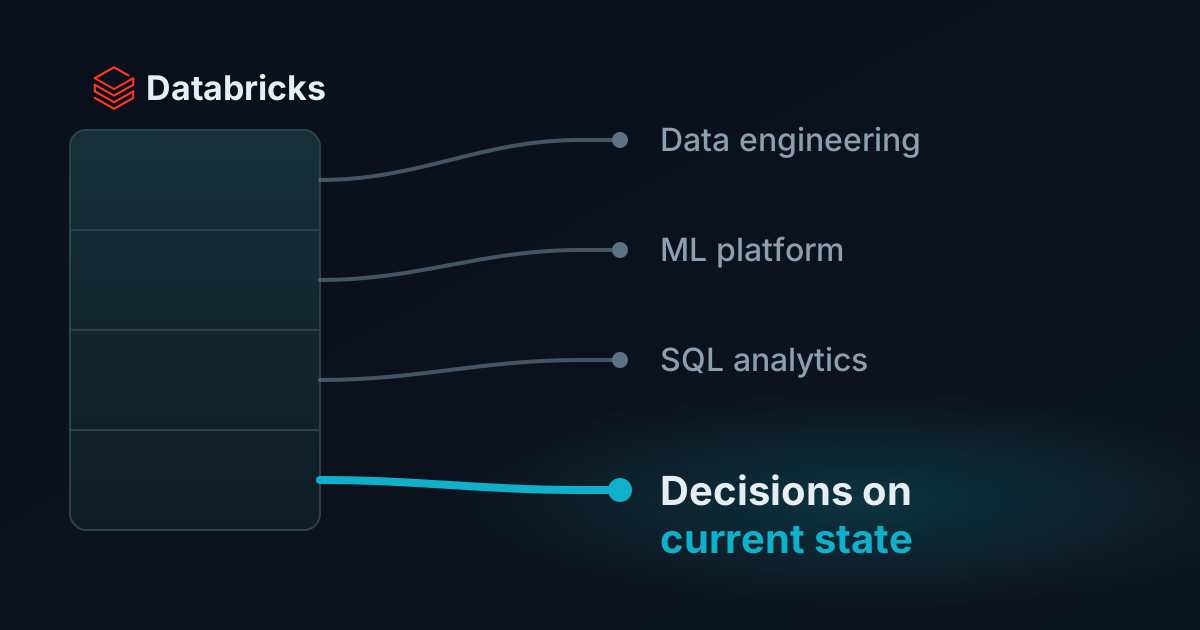
Databricks competitors depend on which job Databricks does for you. It does four: lakehouse data engineering, ML platform, SQL analytics, and, with Lakebase, serving applications. Each job has different competitors. Here are twelve Databricks alternatives, from Snowflake, BigQuery and Microsoft Fabric to SageMaker, ClickHouse and open-source Spark, sorted by the workload you actually run.
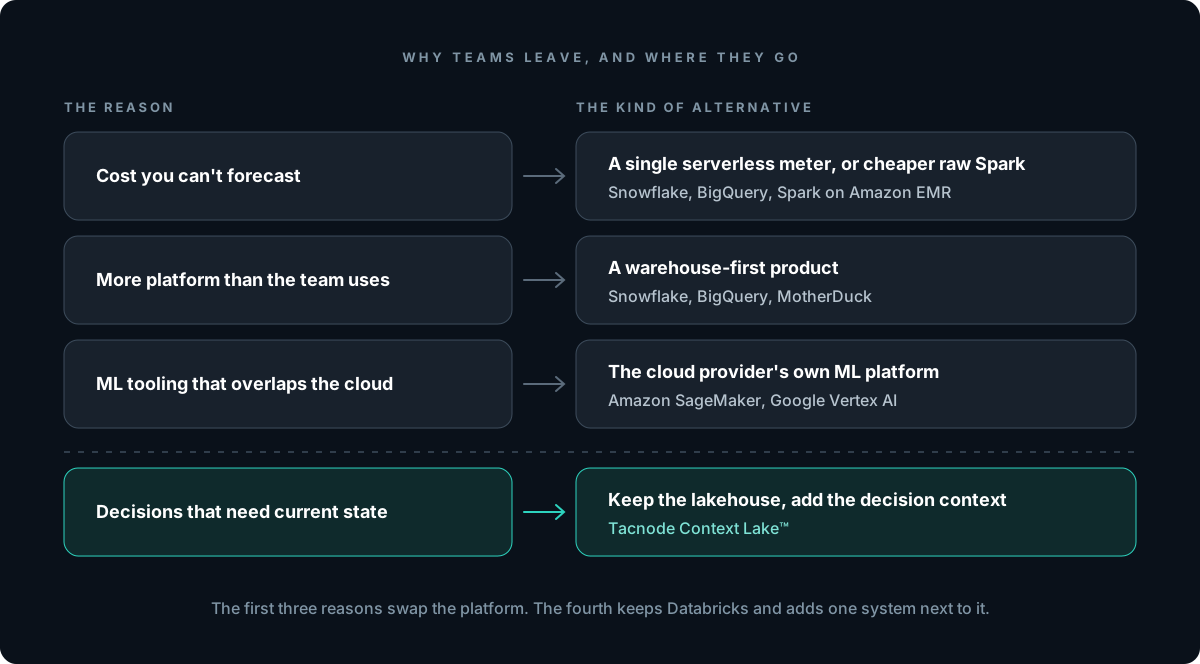
Databricks alternatives come up for four reasons: cost that is hard to predict across DBUs and cloud bills, a platform heavier than a SQL-only team needs, ML tooling that competes with the cloud provider’s own, and decisions that must act on state newer than the lakehouse holds. Each reason points to a different category of alternative, so name the reason first.
Cost you can’t forecast. Databricks bills in Databricks Units (DBUs), “a normalized unit of processing power,” with per-second granularity. On classic compute, the storage, networking and instances come as a separate bill from your cloud provider. Teams moving off Databricks for cost usually want either a single serverless meter (BigQuery, Snowflake) or cheaper raw Spark (EMR).
More platform than the team uses. If the only thing running on Databricks is dbt models and dashboards, notebooks, MLflow and cluster policies are overhead. A warehouse-first product is a simpler fit for a SQL-only team.
ML tooling that overlaps the cloud provider. AWS-native and Google-native teams already pay for SageMaker or Vertex AI. When the model lifecycle lives there, keeping a second ML platform is a question worth asking.
Decisions that need current state. The lakehouse is built to store and transform data at scale. A fraud check, a spend limit or an agent’s next step has to act on what happened a second ago, under concurrent load. Databricks’ answer is to sync lakehouse tables into Lakebase Postgres. Whether that is enough depends on how fast your state changes, which is the section most lists leave out.
How to Choose: What Is Databricks Doing for You?
Before comparing vendors, write down which of these jobs Databricks does in your stack:
1.Lakehouse and data engineering. Spark pipelines, Delta tables, medallion architecture layers, governance in Unity Catalog. Alternatives: Snowflake, BigQuery, Microsoft Fabric, Dremio, Starburst, Spark on EMR.
2.ML platform. Feature engineering, training, experiment tracking with MLflow, model serving. Alternatives: Amazon SageMaker, Google Vertex AI.
3.SQL analytics. Databricks SQL warehouses behind BI tools and customer-facing dashboards. Alternatives: ClickHouse, MotherDuck, Firebolt, plus the warehouses above.
4.Decisions on current state. A service or agent reads context at request time and acts on it: approve, block, rank, hold, route. Databricks answer: Lakebase plus synced tables. Alternative: Tacnode.
Most teams run two or three of these. Name the one causing the pain: an alternative that fits job 1 does nothing for job 4.
The Workload Most Lists Miss: Decisions on Current State
Most “databricks competitors” lists cover only analytics and ML products. They miss the job that has grown fastest: decisions that read context at request time and cannot wait for a batch.
Databricks sees this workload too. Its answer has three parts:
Synced tables, which copy Unity Catalog tables into Lakebase in one of three modes. Snapshot is a one-time full copy. Triggered runs on a schedule and, per the docs, gets expensive when run more often than every five minutes. Continuous is “real-time streaming with seconds of latency” and carries the highest cost.
LTAP (Lake Transactional/Analytical Processing), announced June 16, 2026, which puts operational and analytical data “on a single copy of storage in the lake.”
For app backends and many feature lookups, that is a reasonable design. The gap shows up when a decision has three properties at once. The state it reads changes on every event. The context is derived (a velocity count, an exposure total, a similarity score) rather than a single row. And many decisions read and write that state at the same time.
In that case the synced table is always some seconds behind the source, and the derived signals still have to be computed somewhere, usually in a pipeline that has its own lag. Two services can read the same account at different stages of propagation. We walked through this in detail in Databricks Lakebase and LTAP vs. Tacnode Context Lake. The short version: putting OLTP and OLAP on one copy of storage removes copies. It does not make derived context current when the decision reads it, and a decision that writes its verdict to Lakebase still reads lakehouse data that arrived through a sync seconds behind.
That is the job the Tacnode Context Lake™ was built for, which is why it sits first on the list below. It does not replace the lakehouse.
1. Tacnode Context Lake™: Best for Decisions on Current State
Databricks vs Tacnode: Databricks stores, transforms and models data at lakehouse scale, then syncs a copy to Lakebase for applications. The Tacnode Context Lake™ holds the decision context itself: the source data a decision reads, the signals derived from it, and the decisions it makes, all current sub-second behind the write and read in one coherent snapshot. It sits inside the decision loop. A service or agent reads context from Tacnode, decides, and writes the verdict, hold, limit or action back, where it becomes context for the next decision.
Where it fits:
Source data arrives continuously.Change data capture and streams bring data in from the systems you already run, including operational databases and Kafka. No scheduled refresh.
Derived signals are computed against the same state. Most reads run on demand against the latest committed data. Expensive aggregates are maintained incrementally as events land, so a rolling count and the row it describes reflect the same set of events.
Decision state is written to Tacnode. Holds, per-agent limits, verdicts and agent actions are committed with ACID guarantees and concurrent writes serialized, so two agents can’t both claim the same budget.
One system for the read patterns a decision needs. Point lookups, range scans, aggregations, full-text and vector search are all served from one system against one snapshot, instead of across a cache, a warehouse and a vector store.
It works with the lakehouse, not against it. Tacnode presents the PostgreSQL wire protocol, exports tables to Iceberg for warehouses to query in place, and queries Iceberg tables written by other engines, so a decision can join fresh operational rows with lakehouse history without copying it in.
Runs in your cloud account on AWS, with SOC 2 and HIPAA, and is available through AWS Marketplace.
Where it’s not the right choice:
It is not a lakehouse for petabyte-scale BI or batch data engineering. Keep Databricks, Snowflake or BigQuery for that.
It does not train or host models. It serves context to them.
If your decisions tolerate minutes of staleness, or run at low volume, Lakebase synced tables or plain Postgres are simpler.
Best for: fraud and risk checks, credit and spend limits, in-session personalization, and fleets of AI agents acting on shared state, where the decision must see what happened a second ago and many decisions run at once.
2. Snowflake: Warehouse-First Alternative for Data Engineering and BI
Databricks vs Snowflake:Snowflake started as a SQL warehouse and grew toward the lakehouse. Databricks started from Spark and a data lake and grew toward the warehouse. The two now overlap heavily. Snowflake’s architecture separates a central storage layer from independent compute clusters called virtual warehouses, each of which “doesn’t share compute resources with other virtual warehouses,” and it runs on AWS, Azure and Google Cloud.
Where it fits:
SQL-first teams that want a managed warehouse with little tuning
Workload isolation by giving each team or job its own virtual warehouse
Python, Java and Scala code through Snowpark, run in the same compute
Heavy Spark-native ML and streaming pipelines are more at home on Databricks
Warehouse refresh cadence isn’t built for decisions on second-old state; Snowflake Postgres raises the same sync question as Lakebase
Credit consumption at high query volume needs active management
Fits: teams whose Databricks usage is mostly SQL transformation and BI, and who want one managed warehouse for every analyst in the company. For a side-by-side, see our data lakehouse comparison.
3. Google BigQuery: Serverless Warehouse for Google Cloud Teams
Bursty, ad-hoc analysis where per-query pricing beats always-on compute
Where it falls short:
On-demand pricing punishes unfiltered scans; cost control depends on partitioning and slot reservations
Complex Spark pipelines and custom ML training fit Databricks or Vertex AI better
A warehouse is not built to serve high-concurrency decisions on state that changed a second ago
Fits: Google Cloud shops that want the lowest operational overhead for analytics and don’t need Spark-level control of compute.
4. Microsoft Fabric: Unified Analytics for Azure and Power BI Shops
Databricks vs Microsoft Fabric:Microsoft Fabric is a SaaS analytics suite built on OneLake, a single data lake per tenant on Azure Data Lake Storage that stores tables in Delta Parquet or Iceberg format. Its engines (T-SQL, Apache Spark, Analysis Services) all read the same copy. Azure Databricks competes with it directly for Azure customers, and the two interoperate: OneLake is readable from Azure Databricks.
Where it fits:
Organizations standardized on Power BI; Direct Lake mode reads OneLake tables without an import copy
Governance through Microsoft Entra and OneLake security roles that apply across engines
Where it falls short:
Azure only
Workloads in a capacity draw from the same pool, so heavy Spark jobs and report refreshes need planning
Advanced ML engineering and MLOps are deeper on Databricks
Fits: Microsoft-centric enterprises where the reporting surface is Power BI and the goal is fewer vendors.
5. Dremio: Iceberg Lakehouse With Query Acceleration
Databricks vs Dremio: Databricks’ native table format is Delta Lake. Dremio is built around Apache Iceberg and positions itself as the query engine and catalog for an Iceberg lakehouse. Its engine runs on Apache Arrow, which Dremio co-created, and it speeds up repeated queries with Reflections, optimized Iceberg copies of datasets that the planner substitutes automatically.
Where it fits:
Teams committed to Iceberg who want to avoid Delta as the center of gravity
BI directly on the lake, with Reflections standing in for many warehouse extracts
Not an ML platform; notebooks, training and model serving live elsewhere
Reflections are refreshed copies, so freshness depends on the refresh schedule
Smaller ecosystem than Databricks or Snowflake
Fits: SQL analytics on an open Iceberg lake, for teams that want lakehouse economics without a Spark-centric platform.
6. Starburst and Trino: Federated SQL Across Sources
Databricks vs Starburst: Databricks wants the data in the lakehouse. Starburst queries it where it already lives. It runs Trino, the open-source distributed SQL engine that began as Presto at Facebook and was renamed Trino in December 2020. Starburst Galaxy, the managed version, runs on AWS, Google Cloud and Azure and connects to object stores, warehouses and databases.
Where it fits:
One SQL query across a data lake, a warehouse and an operational database, without copying data first
Data mesh setups where domains keep ownership of their own stores
An open-source path: Trino can be run yourself
Where it falls short:
Federation means each query’s speed depends on the slowest source
No native ML platform
Trino is a query engine, not storage; you still choose and run the table format and catalog
Fits: organizations with data spread across many systems who need a single SQL entry point more than a single platform.
7. Apache Spark on Amazon EMR: The Open-Source Databricks Alternative
Databricks vs EMR: Databricks is a managed platform around Apache Spark. Amazon EMR runs open-source Spark, Hive and other frameworks on AWS infrastructure you control, and EMR Serverless runs Spark and Hive jobs “without managing clusters and servers,” scaling resources to the job and billing for what you use.
Where it fits:
Cost-driven teams running mostly batch Spark pipelines on AWS
Teams comfortable with open formats (Delta Lake, Iceberg and Hudi are all open source) and their own orchestration
Job-by-job billing with no platform fee on top
Where it falls short:
EMR supplies infrastructure, not a workspace. Comparisons note that collaborative notebooks, MLflow and governance are yours to assemble
More engineering time on tuning, upgrades and job reliability
Same batch cadence as any Spark pipeline for downstream consumers
Fits: AWS teams whose Databricks spend is mostly Spark ETL and who have the platform engineers to run it themselves. This is the most common answer to “databricks alternatives open source.”
8. Amazon SageMaker: AWS-Native ML and Unified Studio
Databricks vs SageMaker: Databricks bundles ML into its data platform. AWS went the other way: in December 2024 it renamed the original SageMaker to SageMaker AI and launched a next-generation Amazon SageMaker with Unified Studio and a lakehouse spanning S3 data lakes and Redshift warehouses, accessible through Apache Iceberg–compatible engines.
Where it fits:
AWS-standardized teams training and deploying models close to their data
Managed training, hosting and MLOps inside the AWS security and billing boundary
Pairing with Redshift, EMR and Glue rather than a third-party platform
Where it falls short:
The experience spans several AWS services; Databricks feels more integrated to data engineers
AWS only
Feature serving at request time still needs a store that keeps derived features current; see how to evaluate a feature store
Fits: ML teams on AWS who want the model lifecycle in native services and see Databricks as a second, overlapping platform.
9. Google Vertex AI: Google Cloud’s ML Platform
Databricks vs Vertex AI:Vertex AI is Google Cloud’s platform for training, tuning and deploying models, with Model Garden for Gemini and partner models, a managed feature store with online serving, and pipelines for orchestrating ML workflows. For Google Cloud teams, Vertex AI plus BigQuery covers most of what Databricks ML and Databricks SQL do together.
Where it fits:
Teams building on Gemini and other foundation models
Managed training and serving tied to BigQuery data
Pipeline orchestration for end-to-end ML workflows
Where it falls short:
Google Cloud only
Less natural for Spark-heavy feature engineering
Online features are only as fresh as the sync that feeds them
Fits: Google Cloud ML teams consolidating on first-party services.
10. ClickHouse: Real-Time Analytics on Event Data
Databricks vs ClickHouse:ClickHouse is “a high-performance, column-oriented SQL database management system for online analytical processing,” available as open source and as ClickHouse Cloud. Databricks SQL warehouses run Photon, a native C++ vectorized engine, over lakehouse storage. ClickHouse is the pick when dashboards over event data must stay fast under many concurrent users.
Where it fits:
User-facing analytics and observability over append-heavy event data
Wide denormalized tables and time-series rollups
Self-hosting under an open-source license
Where it falls short:
JOIN-heavy dimensional models and updates are weaker; we cover this in ClickHouse alternatives
Not an ML platform or data engineering workspace
Materialized views behave like insert triggers, which makes derived state fragile under updates
Fits: teams that moved dashboards off Databricks SQL because they needed interactive speed on event streams.
11. MotherDuck and DuckDB: Lightweight Analytics Without Clusters
Databricks vs MotherDuck:MotherDuck is a serverless cloud warehouse built on DuckDB, the in-process analytical engine. Its dual execution model runs each part of a query where the data is, locally on a laptop or in the cloud. For teams whose data fits comfortably on a few machines, it replaces cluster management with nothing.
Where it fits:
Small and mid-sized analytics teams whose Databricks clusters are mostly idle
Local development with the same engine as production
Embedded analytics and notebooks, including open-source DuckDB with no service at all
Where it falls short:
Not designed for petabyte-scale Spark pipelines
No ML platform
Not built for high-concurrency operational serving
Fits: teams that adopted Databricks for SQL analytics and discovered their data was smaller than the platform.
12. Firebolt: Managed Warehouse for Low-Latency Queries
Databricks vs Firebolt:Firebolt is a cloud warehouse aimed at data applications that need fast, concurrent SQL. It also ships Firebolt Core, a free self-hosted edition packaged as a single Docker image, whose query engine is the same as the managed service’s.
Where it fits:
Customer-facing analytics that need consistent query speed at concurrency
Engineers who want warehouse SQL without Spark
Self-hosting through Firebolt Core where data residency requires it
Where it falls short:
Smaller ecosystem than Databricks, Snowflake or BigQuery
Not an ML or data engineering platform
Built for analytical queries, not for high-concurrency writes of decision state on the request path, even though it supports ACID multi-statement transactions
Fits: teams whose Databricks workload is serving SQL to applications and who want a warehouse tuned for it.
Databricks Competitors Compared
The table is qualitative on purpose; vendor benchmarks rarely survive a change in workload shape. The last column is the one other lists leave out: whether the product can serve state that changed a second ago, in one coherent read, while other decisions write to it.
Tool
Competes With Databricks On
Deployment
Open Source Option
Decisions on Current State
Tacnode Context Lake™
Decisions on current state (vs. Lakebase + synced tables)
Your AWS account
No
Yes: source data, derived signals and decision state in one snapshot
Databricks vs Snowflake vs BigQuery: The Short Version
Databricks vs Snowflake. Choose Databricks when Spark, streaming pipelines and ML are central and your engineers want control of compute. Choose Snowflake when SQL is the main interface, many analysts share the platform, and you’d rather manage warehouses than clusters. Both now ship a managed Postgres (Lakebase and Snowflake Postgres), and both reach it from the analytical side by syncing or sharing storage.
Databricks vs BigQuery. Choose BigQuery if you are on Google Cloud and want no infrastructure to size, with pricing per query or per slot. Choose Databricks if you need multi-cloud portability, heavy Spark, or deeper MLOps than BigQuery ML plus Vertex AI give you.
All three are analytical platforms. None of them is designed to hold decision state that many services and agents read and write at once. That is a different workload, and it is usually added next to whichever lakehouse you pick.
Open-Source Databricks Alternatives
Much of Databricks is open source already, so an open-source Databricks alternative is mostly a question of what you are willing to operate:
Apache Spark on EMR, Kubernetes or your own clusters for pipelines
Delta Lake or Apache Iceberg for table format, with Trino for SQL
MLflow for experiment tracking and model registry, which runs outside Databricks
DuckDB for single-node analytics, ClickHouse for real-time analytics
Firebolt Core as a free self-hosted warehouse engine (free to use, with license restrictions on hosting a competing service)
The trade is always the same: lower license cost, more engineering time. Budget the platform team before you budget the savings.
When Databricks Is Still the Right Choice
Databricks is not the wrong answer because alternatives exist. Keep it when:
Spark is central to your pipelines and you want a managed runtime with notebooks, jobs and governance in one place
Data engineering, analytics and ML share the same data and the same team
You need to run on more than one cloud with the same platform
Unity Catalog is your governance backbone
Your applications need a Postgres next to the lakehouse and can work with data that is seconds behind; Lakebase with synced tables handles that without another vendor
Teams that outgrow Databricks are usually asking it to do a job it wasn’t built for: cheap BI for hundreds of analysts, ML inside one cloud’s native tools, or decisions on state newer than any sync can deliver. The first two call for a different platform. The third calls for keeping Databricks and adding the system that holds the decision context.