AI Agents and Schema Migrations: Two Agents, One Schema
When AI agents run schema migrations against one live database, both changes apply and the result can be wrong. Where it happens and how to coordinate.
TL;DR: When AI agents run schema migrations against the same database, they don’t conflict the way two code edits do. There’s no merge step: each DDL statement applies, and the combined schema can be one neither agent planned. If your migrations go through pull requests and one pipeline, that’s already serialized and you’re fine. If agents run DDL against a shared database or deployed app directly, give them one path for schema changes, a version check in the same transaction as the DDL, and a lock timeout.
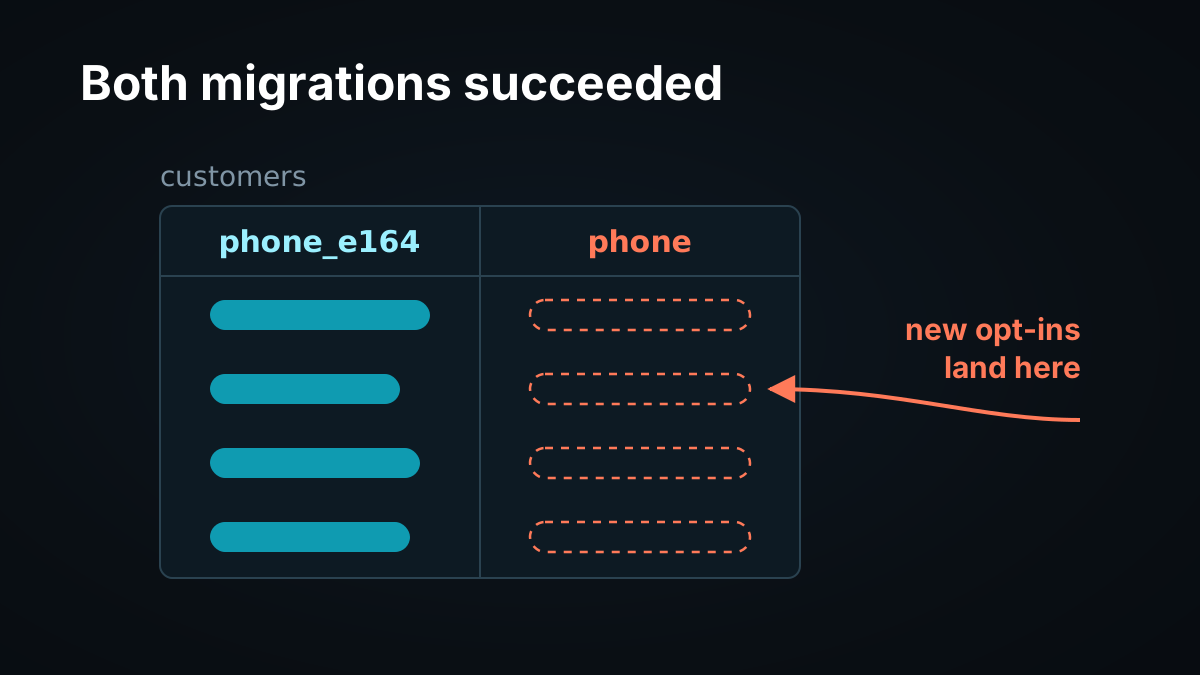
Two agents are working on the same app. One is normalizing phone numbers. The other is adding SMS opt-in. Both look at the schema, both plan changes and both apply them. Each migration succeeds. The app breaks an hour later, and when you look at the customers table you find two phone columns, one of them empty, with new writes going to the empty one.
Nothing failed loudly. Every statement committed. The database did exactly what it was told, twice, by two agents that each thought they were the only one changing the table. It’s a race condition on the schema itself.
Code doesn’t behave like this, and that difference decides whether you have a problem at all.
Why Can’t Two Agents’ Schema Migrations Just Merge?
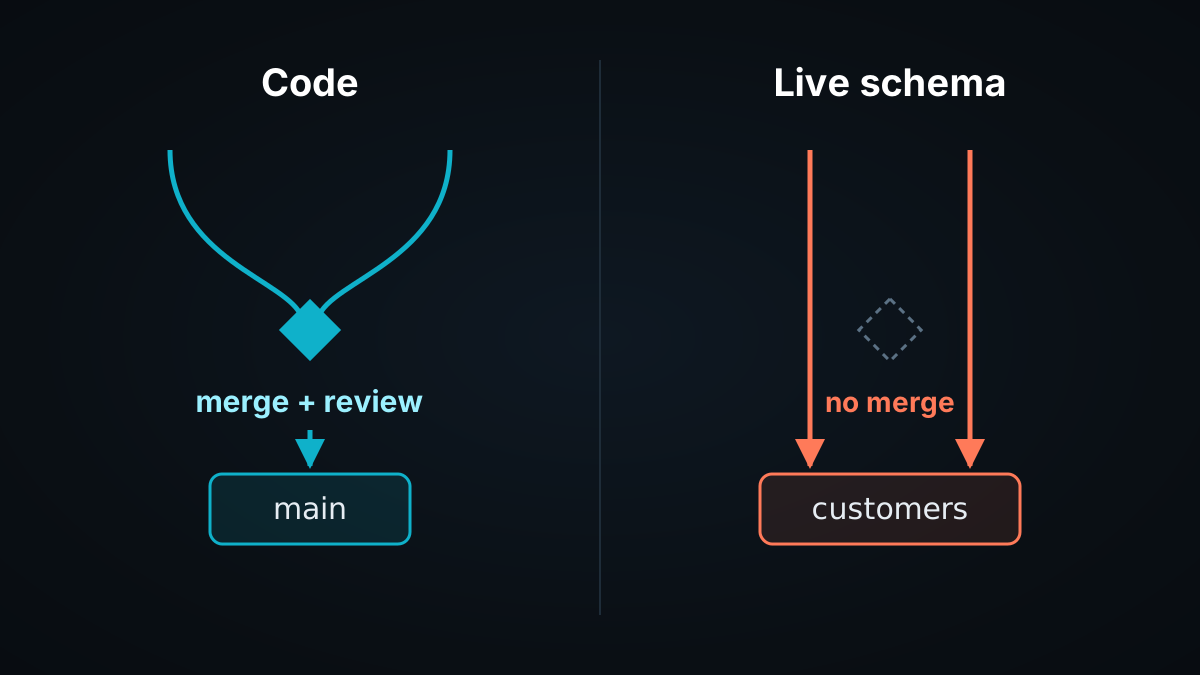
Schema migrations don’t merge because a database applies each DDL statement to one live schema in the order it arrives. There is no three-way merge and no conflict marker. Two agents that each plan against the same schema version can both succeed, leaving a schema neither intended, and every deployed instance that reads it sees the result immediately.
Compare that to code. Two agents editing the same file on separate branches produce a merge conflict, and a human usually reviews the result before it ships. That’s mature tooling built to make concurrent edits safe. A live schema has none of it. It’s unmergeable state: one shared object, changed in place, with no step where two versions are compared.
Code has a step where two versions meet. A live schema doesn’t.
First, Check Whether You Have the Problem
Many teams don’t, and it’s worth saying plainly.
If migrations are files in git, reviewed in pull requests and applied by one pipeline, you’re already serialized. Two agents can write conflicting migrations, but the conflict surfaces at merge or review, and one pipeline applies the result in order. Christopher Meiklejohn describes exactly this kind of collision between coding agents: “One created migration 267. The other, running in a different worktree, also created migration 267. Different schemas, same filename. The second one silently overwrote the first.” That’s a real failure, and it’s also the kind that a merge check and a reviewer are positioned to catch, because it happened in files.
Migration runners serialize execution, not intent. Tools like Liquibase take a lock so two runs don’t overlap; its docs say it “uses the DATABASECHANGELOGLOCK (DBCLL) table to ensure only one instance of Liquibase runs at a time” (Liquibase docs). That prevents two runs from interleaving. It doesn’t notice that the second run’s changes were planned against a schema the first run just changed.
The problem is real when agents change a schema without going through that layer:
Agents with direct DDL access to a shared development, staging or preview database.
App-builder platforms where several people’s agents edit one live app, including its database.
Data-platform agents that create and alter tables and views in a shared warehouse or lakehouse.
Any setup where deployed instances read the schema directly, so a change reaches running code the moment it commits.
A Worked Collision
An illustrative scenario. Both agents start from schema version 42, where customers has a phone column.
text
t = 0:00   Agent A (task: normalize phone numbers) reads schema v42
t = 0:20   Agent B (task: add SMS opt-in) reads schema v42
t = 3:10   Agent A: ADD COLUMN phone_e164; backfill; DROP COLUMN phone
t = 4:45   Agent B: CREATE INDEX ON customers (phone)
           -> ERROR: column "phone" does not exist
t = 5:05   Agent B "fixes" the error: ADD COLUMN phone text; CREATE INDEX succeeds
t = 5:30   Agent B deploys the opt-in service, which writes to customers.phone
Every statement after the error succeeded. The schema now has phone_e164, filled by Agent A’s backfill, and an empty phone, which Agent B’s new service writes to. Agent A’s code reads phone_e164 and never sees numbers collected by the opt-in flow. The error at 4:45 was the only signal, and Agent B treated it as a problem to route around rather than evidence that the schema moved.
Two lessons. Agent A contracted too early, dropping the old column in the same step that added the new one. And Agent B had no way to learn that the schema had changed since it planned, other than an error it could misread.
How DDL Interacts With Running Work
Schema changes also contend with everything else running against the table.
Unless the ALTER TABLE docs note otherwise for a subform, ALTER TABLE takes an ACCESS EXCLUSIVE lock. The locking docs say this mode “guarantees that the holder is the only transaction accessing the table in any way.” The same page adds: “Only an ACCESS EXCLUSIVE lock blocks a SELECT (without FOR UPDATE/SHARE) statement.” It also notes that a transaction seeking a lock “will wait indefinitely for conflicting locks to be released,” as long as no deadlock is detected.
For agents, that means an ALTER TABLE issued while another agent’s long backfill holds the table can wait for as long as the backfill runs, and while the ALTER holds its lock, reads on that table stop. An agent that doesn’t know about the backfill can’t plan around it.
Coordinating Schema Changes Between Agents
One path for DDL. The single most effective fix is that agents don’t run DDL directly. They submit a migration to one service or queue that applies changes in order. That’s the same serialization a pull-request pipeline gives code, applied to the live schema.
Check the version in the same transaction as the DDL. In PostgreSQL, DDL such as a regular CREATE INDEX can run inside a transaction block and roll back with it; the CREATE INDEX docs note that “a regular CREATE INDEX command can be performed within a transaction block, but CREATE INDEX CONCURRENTLY cannot.” That lets a migration bump a schema version and change the schema atomically, failing if the version moved since the agent planned:
sql
BEGIN;
SET LOCAL lock_timeout = '5s';
DO $$
BEGIN
  UPDATE schema_state
  SET    version = 43, applied_by = 'agent-b'
  WHERE  id = 1 AND version = 42;
  IF NOT FOUND THEN
    RAISE EXCEPTION 'schema is no longer at version 42; re-read and re-plan';
  END IF;
END $$;
CREATE INDEX customers_phone_idx ON customers (phone);
COMMIT;
If Agent A’s migration has already moved the version to 43, Agent B’s update matches nothing. If A’s transaction is still open, B’s update waits for it under Read Committed, then the WHERE clause is re-evaluated against the updated row and matches nothing; if A is still open after five seconds, B hits the lock timeout instead. Either way, the exception fires and B’s whole transaction, DDL included, rolls back. B gets a message that says what happened: re-plan against the new schema. One caveat: because CREATE INDEX CONCURRENTLY can’t run inside a transaction block, non-blocking index builds need a separate claim step instead.
Set a lock timeout on every agent’s DDL. PostgreSQL documents lock_timeout as: “Abort any statement that waits longer than the specified amount of time while attempting to acquire a lock on a table, index, row, or other database object.” An agent’s ALTER should fail fast and report contention, not wait behind a backfill while reads on the table stall.
Expand, then contract later. Add the new column, dual-write, migrate readers, and only drop the old column once nothing reads it. Agents should never contract in the same step they expand. That requires knowing which deployed instances read which columns, so keep that registry somewhere every agent can query.
Claim before planning. Have an agent record its intent, such as “changing customers for task 118,” with an expiry, before it plans a migration. A second agent that sees an open claim either waits or coordinates. The claim’s expiry needs the schema version as a fencing check, so an agent whose claim lapsed can’t apply changes planned against an old version.
Take DDL Away From Agent Roles
“One path for DDL” holds only if it’s the only path that works. In PostgreSQL you can enforce that with ownership, because changing a table is the owner’s privilege: “You must own the table to use ALTER TABLE” (ALTER TABLE docs). Let the migration service’s role own the tables, and give agents a role that reads and writes rows but owns nothing and isn’t a member of the owning role, since membership carries the owner’s rights (GRANT docs).
sql
-- tables in schema app are owned by migrator, the migration service's role
CREATE ROLE agent_rw LOGIN;
GRANT USAGE ON SCHEMA app TO agent_rw;
GRANT SELECT, INSERT, UPDATE, DELETE ON ALL TABLES IN SCHEMA app TO agent_rw;
ALTER DEFAULT PRIVILEGES FOR ROLE migrator IN SCHEMA app
  GRANT SELECT, INSERT, UPDATE, DELETE ON TABLES TO agent_rw;
An agent that tries ALTER TABLE as agent_rw gets a permissions error instead of a changed schema, and the only way left to change the schema is to submit a migration. Check schema-level privileges as well. PostgreSQL 15 removed PUBLIC creation permission on the public schema, but only for new clusters and newly created databases; upgrading or restoring a dump “will preserve public’s existing permissions” (PostgreSQL 15 release notes). On those databases, run REVOKE CREATE ON SCHEMA public FROM PUBLIC.
Lint What Agents Generate
Before a migration reaches the queue, check what kind of change it is. Migration linters classify statements by risk. Atlas, for example, reports a dropped column as a destructive change “posing a risk of data loss” (DS103), reports a renamed column as backward-incompatible because it “can cause errors during deployment if applications running the previous version of the schema refer to the old column name” (BC102), and separately flags data-dependent changes, such as a new uniqueness or NOT NULL constraint that existing rows might violate (Atlas analyzers).
In the collision above, a linter would have flagged Agent A’s DROP COLUMN phone, the contract-too-early mistake. It would not have caught Agent B’s real problem: B’s statements fit the schema B planned against and were wrong only because the schema moved after B planned. That’s the version check’s job. Lint catches dangerous changes; the version check catches stale plans. Agents need both.
Where Tacnode Fits
The fixes above depend on coordination records every agent reads and writes: claims, the applied schema version, which deployed instances depend on which columns, and what each agent changed. Those records need transactions, and agents need to read all of them at one moment before planning.
The Tacnode Context Lake™ holds that decision context. Migration claims, the record of applied changes, the dependency registry and agent actions are state Tacnode holds, so claiming and recording changes run as ACID transactions, and serializable isolation is the default. Two agents claiming the same table at the same moment can’t both get the claim; one sees the other’s and re-plans.
The schema being changed often lives in your own database. Tacnode doesn’t enforce anything inside it: an agent that skips the claim step and runs DDL directly against your database isn’t stopped by Tacnode. The version check that guards the DDL itself still runs inside the database being changed, in the same transaction as the DDL, as shown above. The coordination holds for every agent that goes through the claim and version check, which is why that should be the only DDL path agents have. Each agent’s planning step reads current claims, the applied version and the dependency registry in one consistent snapshot, and each change it records becomes context for the next agent’s plan.
If your migrations already go through reviewed pull requests and one pipeline, you don’t need any of this. Git and review are doing the work.
FAQ
AI AgentsSchema MigrationsPostgreSQLConcurrencyDDL