
Table Design
Comprehensive guide to table design best practices in Tacnode. Learn storage modes, primary key design, indexing strategies, and performance optimization for your database tables.
Storage Modes
Tacnode supports three storage modes, each optimized for different workload patterns:
| Storage Mode | Best For | Performance Characteristics | Use Cases | Trade-offs |
|---|---|---|---|---|
| Row Storage (Default) | OLTP workloads | Fast row-level operations, Low latency queries | Transactional systems, frequent updates | Higher storage for analytics |
| Columnar Storage | OLAP workloads | Efficient column scans, excellent compression | Analytics, reporting, data warehousing | Slower for row-level operations |
| Hybrid Storage | HTAP workloads | Balanced read/write performance | Mixed analytical and transactional | Increased complexity and storage |
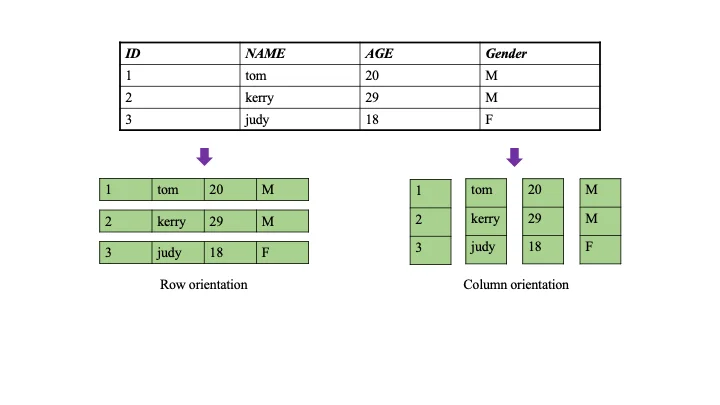
Row Storage
Row storage is the default mode, organizing data by rows. Ideal for transactional workloads:
-- Create row storage table (default behavior)
CREATE TABLE customers (
    customer_id INT PRIMARY KEY,
    first_name VARCHAR(50) NOT NULL,
    last_name VARCHAR(50) NOT NULL,
    email VARCHAR(100) UNIQUE,
    registration_date DATE DEFAULT CURRENT_DATE,
    status VARCHAR(20) DEFAULT 'active'
) USING ROW;
Best for: OLTP applications, frequent INSERT/UPDATE/DELETE operations, queries retrieving complete rows.
Columnar Storage
Columnar storage stores data by columns, enabling efficient analytical operations:
-- Create columnar storage table for analytics
CREATE TABLE sales_analytics (
    sale_id BIGINT,
    product_id INT,
    sale_date DATE,
    quantity INT,
    unit_price NUMERIC(8,2),
    total_revenue NUMERIC(12,2)
) USING COLUMNAR;
Best for: Analytics, reporting, data warehousing, aggregate queries on specific columns.
Hybrid Storage
Hybrid storage combines both approaches for mixed workloads:
-- Create hybrid storage table for HTAP workloads
CREATE TABLE product_performance (
    product_id INTEGER PRIMARY KEY,
    current_inventory INTEGER,        -- Transactional data
    total_sales_ytd BIGINT,          -- Analytical data
    last_updated TIMESTAMP DEFAULT NOW()
) USING HYBRID;
Best for: HTAP scenarios requiring both transactional and analytical capabilities.
Storage Mode Management
You can change storage modes online without downtime:
-- Switch storage modes
ALTER TABLE user_activity SET ACCESS METHOD columnar;
ALTER TABLE user_activity SET ACCESS METHOD row;
ALTER TABLE user_activity SET ACCESS METHOD hybrid;
Primary Key Design
Primary keys ensure data integrity and optimize query performance. Follow these design principles:
Business Keys vs Surrogate Keys
-- Meaningful business key when stable
CREATE TABLE products (
    product_code VARCHAR(20) PRIMARY KEY,  -- SKU-12345-LG
    name VARCHAR(200) NOT NULL,
    price NUMERIC(10,2)
);

-- Surrogate key for frequently changing data
CREATE TABLE customers (
    customer_id SERIAL PRIMARY KEY,        -- Auto-incrementing ID
    customer_code VARCHAR(20) UNIQUE,      -- Business identifier
    company_name VARCHAR(100) NOT NULL
);

-- UUID for distributed systems
CREATE TABLE sessions (
    session_id UUID PRIMARY KEY DEFAULT gen_random_uuid(),
    user_id INT NOT NULL,
    created_at TIMESTAMP DEFAULT NOW()
);
Composite Primary Keys
Design composite keys following the leftmost prefix principle:
-- E-commerce order line items
CREATE TABLE order_line_items (
    order_id INT,
    line_number INT,
    product_id INT NOT NULL,
    quantity INT NOT NULL,
    PRIMARY KEY (order_id, line_number)  -- order_id used most often
);

-- Time-series data
CREATE TABLE time_series_data (
    device_id INT,
    measurement_time TIMESTAMP,
    sensor_type VARCHAR(20),
    value NUMERIC,
    PRIMARY KEY (device_id, measurement_time, sensor_type)
);
Guidelines:
- Queries should include the leftmost column(s) of the composite key
- Place most selective columns first
- Design keys to support your most common query patterns
Index Design
Tacnode offers various index types optimized for different data characteristics:
Secondary Indexes
-- Single column indexes
CREATE INDEX idx_customer_email ON customers (email);
CREATE INDEX idx_order_date ON orders (order_date DESC);

-- Composite indexes
CREATE INDEX idx_order_customer_date ON orders (customer_id, order_date DESC);

-- Partial indexes for specific conditions
CREATE INDEX idx_active_customers ON customers (customer_id)
WHERE status = 'active';
Specialized Index Types
-- Bitmap indexes for low-cardinality data
CREATE INDEX idx_gender_bitmap ON users USING bitmap (gender);

-- GIN indexes for JSON/array data
CREATE INDEX idx_user_preferences ON users USING gin (preferences);
CREATE INDEX idx_product_tags ON products USING gin (tags);

-- Full-text search
CREATE INDEX idx_content_search ON articles USING gin (to_tsvector('english', content));
Index Selection Guidelines:
- Secondary indexes for non-primary key queries and sorting
- Bitmap indexes for low-cardinality filtering (gender, status, category)
- GIN indexes for complex data types (JSONB, arrays, full-text search)
- Vector indexes for similarity search and machine learning applications
Table Creation and Constraints
CREATE TABLE Methods
CREATE TABLE LIKE - Copy table structure:
-- Copy table structure including constraints
CREATE TABLE customers_backup (
    LIKE customers INCLUDING ALL
) USING COLUMNAR;

-- Copy structure with specific inclusions
CREATE TABLE customers_staging (
    LIKE customers
    INCLUDING CONSTRAINTS
    INCLUDING INDEXES
    INCLUDING DEFAULTS
) USING ROW;
CREATE TABLE AS SELECT (CTAS) - Create tables from query results:
-- Create summary table from existing data
CREATE TABLE monthly_sales AS
SELECT
    DATE_TRUNC('month', order_date) AS sales_month,
    COUNT(*) AS order_count,
    SUM(total_amount) AS total_revenue,
    AVG(total_amount) AS avg_order_value
FROM orders
WHERE order_date >= '2024-01-01'
GROUP BY DATE_TRUNC('month', order_date);

-- Create partitioned historical data
CREATE TABLE orders_2023 AS
SELECT * FROM orders
WHERE order_date BETWEEN '2023-01-01' AND '2023-12-31';

-- Create analytics table from joins
CREATE TABLE sales_analytics AS
SELECT
    o.order_id,
    o.order_date,
    c.customer_segment,
    p.category,
    oi.quantity,
    oi.unit_price,
    (oi.quantity * oi.unit_price) AS line_total
FROM orders o
JOIN customers c ON o.customer_id = c.customer_id
JOIN order_items oi ON o.order_id = oi.order_id
JOIN products p ON oi.product_id = p.product_id;

-- Apply columnar storage after creation
ALTER TABLE sales_analytics SET ACCESS METHOD columnar;CREATE TABLE AS SELECT does not copy:
- Primary key constraints
- Foreign key constraints
- Indexes
- Triggers
- Check constraints
Add these manually after table creation if needed.
Auto-increment Columns
-- Different SERIAL types based on expected range
CREATE TABLE lookup_table (
    id SMALLSERIAL PRIMARY KEY,     -- 1 to 32,767
    description TEXT
);

CREATE TABLE entities (
    id SERIAL PRIMARY KEY,          -- 1 to 2,147,483,647 (most common)
    name VARCHAR(100) NOT NULL
);

CREATE TABLE large_entities (
    id BIGSERIAL PRIMARY KEY,       -- 1 to 9,223,372,036,854,775,807
    data JSONB
);
Constraints
-- Foreign key relationships
CREATE TABLE orders (
    order_id SERIAL PRIMARY KEY,
    customer_id INT NOT NULL,
    order_date DATE DEFAULT CURRENT_DATE,
    status VARCHAR(20) DEFAULT 'pending',
    FOREIGN KEY (customer_id) REFERENCES customers(customer_id)
        ON UPDATE CASCADE ON DELETE RESTRICT
);

-- Check constraints for data validation
CREATE TABLE employees (
    employee_id SERIAL PRIMARY KEY,
    email VARCHAR(100) UNIQUE NOT NULL
        CHECK (email ~* '^[A-Za-z0-9._%+-]+@[A-Za-z0-9.-]+\.[A-Za-z]{2,}$'),
    salary NUMERIC(10,2) CHECK (salary > 0),
    department VARCHAR(50) NOT NULL
        CHECK (department IN ('Engineering', 'Sales', 'Marketing', 'HR'))
);

-- Unique constraints
CREATE TABLE user_accounts (
    user_id SERIAL PRIMARY KEY,
    username VARCHAR(50) NOT NULL,
    email VARCHAR(100) NOT NULL,
    phone_number VARCHAR(20),
    UNIQUE (username),
    UNIQUE (email),
    UNIQUE (phone_number) WHERE phone_number IS NOT NULL  -- Conditional unique
);
Performance Optimization
Storage-Specific Optimization
-- Row storage for OLTP with targeted indexes
CREATE TABLE transactions (
    transaction_id UUID PRIMARY KEY DEFAULT gen_random_uuid(),
    account_id INT NOT NULL,
    transaction_time TIMESTAMP DEFAULT NOW(),
    amount NUMERIC(15,2) NOT NULL,
    transaction_type VARCHAR(20) NOT NULL
) USING ROW;

CREATE INDEX idx_transactions_account_time ON transactions (account_id, transaction_time DESC);
CREATE INDEX idx_transactions_type_time ON transactions (transaction_type, transaction_time DESC);

-- Columnar storage for analytics with minimal indexes
CREATE TABLE sales_fact (
    sale_date DATE,
    product_id INT,
    store_id INT,
    quantity INT,
    unit_price NUMERIC(8,2),
    total_amount NUMERIC(12,2),
    PRIMARY KEY (sale_date, product_id, store_id)
) USING COLUMNAR;

-- Hybrid storage for mixed workloads
CREATE TABLE customer_interactions (
    interaction_id UUID PRIMARY KEY DEFAULT gen_random_uuid(),
    customer_id INT NOT NULL,
    interaction_time TIMESTAMP DEFAULT NOW(),
    channel VARCHAR(20) NOT NULL,
    details JSONB
) USING HYBRID;

CREATE INDEX idx_customer_time ON customer_interactions (customer_id, interaction_time DESC);
Partition Tables
Partition tables improve query performance and maintenance operations for large datasets by dividing data across multiple physical partitions. This feature works with all storage modes to provide better scalability and management.
For detailed partitioning strategies, configuration, and best practices, see the Table Partitioning Guide.
Tiered Storage
Tiered storage optimizes costs by automatically moving data between different storage tiers (hot, cold) based on access patterns and data age, ensuring frequently accessed data stays on high-performance storage.
For comprehensive tiered storage configuration and lifecycle management, see the Tiered Storage Guide.
Schema Evolution
Schema evolution allows you to modify table structures without downtime, supporting online DDL operations like adding columns, changing data types, and switching storage modes while maintaining application availability.
For detailed schema change procedures and migration strategies, see the Schema Evolution Guide.
Best Practices
Storage Mode Selection:
- Use Row Storage for OLTP workloads with frequent updates
- Use Columnar Storage for OLAP workloads with analytical queries
- Use Hybrid Storage for HTAP workloads requiring both capabilities
Primary Key Design:
- Choose stable, unique columns that support common query patterns
- Use composite keys strategically, following the leftmost prefix principle
- Consider UUIDs for better distribution in high-throughput systems
Index Strategy:
- Create indexes that align with your query patterns
- Use appropriate index types for different data characteristics
- Monitor index usage and remove unused indexes
Performance Optimization:
- Align table design with intended workload patterns
- Consider constraint overhead versus data integrity benefits
- Design tables to support your most common query patterns
This streamlined approach to table design ensures optimal performance while maintaining data integrity and supporting your application’s scalability requirements.